



Quick Answer
When weighing Spotify vs eSound to decide which is better, the right choice comes down to whether you prioritize studio audio stability or unrestricted free playback:
- Spotify wins on audio fidelity and ecosystem stability: It delivers 100M+ officially licensed studio masters up to 320kbps OGG Vorbis, seamless cross-device syncing, and reliable CarPlay integration. However, its free mobile tier locks you into forced shuffle, audio ads, and a strict six-skip hourly limit.
- eSound wins on free on-demand controls: You get unlimited skips and direct track selection without paying a cent. The catch is that it pulls streams from YouTube rather than a licensed catalog, resulting in variable bitrates, music video talk-intros, and iOS offline playback limits (under its rebranded name, Lyra) that require manual file imports.
- The practical workaround: If you want Spotify’s clean master quality inside a free player without monthly fees, using a dedicated third-party converter to save tracks as local MP3s bridges the gap.
Hitting the six-skip hourly limit on Spotify Free while stuck in forced shuffle mode drives many budget-conscious listeners to look for alternatives. That frustration explains why the Spotify vs eSound: which is better debate keeps popping up across music forums. eSound promises on-demand playback and unlimited skips without a mandatory monthly subscription, making it look like an easy replacement.
However, trading an industry giant for a free streaming wrapper comes with hidden trade-offs. While Spotify streams officially licensed studio masters, eSound pulls its audio largely from YouTube, leading to inconsistent bitrates and unexpected music video intros.
To help you decide which app fits your daily listening habits, this review compares both platforms across catalog sourcing, free-tier usability, iOS rebranding quirks, and offline playback restrictions. We also cover practical ways to handle playlist migration and keep your favorite tracks accessible offline without format limitations.
On this page
- Part 1. Spotify vs eSound Overview: Platform Identity and Trust
- Part 2. Audio Sourcing and Quality: Licensed Masters vs YouTube Streams
- Part 3. Free Tier Limits and Offline Playback Realities
- Part 4. How to Move Playlists from Spotify to eSound
- Part 5. The Best Spotify vs eSound Alternative: AudKit Spotify Music Converter
- Part 6. Feature Comparison: Spotify vs eSound vs Local Conversion
- FAQs About Choosing Between Spotify and eSound
- Conclusion
Part 1. Spotify vs eSound Overview: Platform Identity and Trust
When evaluating Spotify vs eSound: which is better, the core difference starts with platform identity and licensing legitimacy. Spotify operates as the industry-standard streaming giant, hosting over 100 million officially licensed tracks directly from record labels and distributors. Its infrastructure guarantees consistent metadata, stable apps across every major operating system, and transparent subscription management.
eSound takes a completely different route. Developed by the Italian company Spicy Sparks S.R.L. (also known as Early Studio), the app functions primarily as a third-party streaming aggregator rather than a traditional licensed catalog. If you search for it on an iPhone today, you will notice it has been rebranded on the Apple App Store as Lyra: Music Player & eSound under the developer name Nadia Ferrari. Name changes like this are common among apps that navigate strict store compliance policies.
Public perception of eSound is sharply divided depending on where you look:
- App Store Ratings: It holds an impressive 4.5-star rating across more than 630,000 reviews on Google Play (with 10M+ downloads) and 4.1 stars on the Microsoft Store.
- Trustpilot Score: Its reputation drops to a 2.3/5 TrustScore on Trustpilot, where frustrated users report recurring billing disputes and subscription cancellation hurdles.
- Technical Stability: Daily listeners frequently cite Apple CarPlay disconnects, sudden lock-screen playback crashes, and a slow customer support team that replies to only 28% of negative reviews, averaging a two-week wait time.
Spotify wins on corporate reliability, while eSound trades stability for free access.
Part 2. Audio Sourcing and Quality: Licensed Masters vs YouTube Streams
When considering Spotify vs eSound to decide which is better for sound fidelity, the core difference comes down to where each app pulls its audio files. Spotify streams directly from officially licensed studio masters, delivering protected OGG Vorbis audio up to 320kbps—or up to 24-bit/44.1kHz lossless audio on supported tiers—for Premium subscribers, and up to 160kbps for free users. Track metadata, album art, and volume normalization remain consistent across every album.
eSound advertises a catalog of over 150 million songs, but it does not maintain an independent licensed master library. Instead, the app scrapes and plays audio streams straight from YouTube. That backend shortcut ruins playback consistency.
When you search for a popular release on eSound, you rarely get a clean studio file. You will frequently run into:
- Unwanted video audio: Long cinematic music video intros, dialogue breaks, and ambient sound effects baked into the track.
- Fluctuating bitrates: Audio quality that drops noticeably from one song to the next depending on who uploaded the source video.
- Mismatched versions: Amateur acoustic covers, sped-up edits, or live crowd recordings appearing in place of the official release.
- Playback blocks: Sudden YouTube age-restriction prompts that halt your queue until you manually skip the track.
Part 3. Free Tier Limits and Offline Playback Realities
Deciding between Spotify vs eSound often comes down to how much friction you can tolerate on a free account. Spotify Free locks mobile users into forced shuffle mode across most playlists, caps skips at six per hour, and injects unskippable audio ads every few tracks. Removing those playback restrictions and unlocking offline caching requires a $12.99/month Premium subscription, though even then, downloaded tracks remain locked inside the app’s cache.
eSound flips this model entirely. You can open the app without creating an account, pick any song on demand, and skip tracks endlessly. Instead of interrupting your music with audio commercials, eSound relies on visual pop-up ads and full-screen banners, offering a cheap paid tier if you want to hide those ads and unlock equalizers or synced lyrics.
Offline playback, however, is where eSound’s marketing diverges from reality—especially on iPhones. While Android and Windows versions allow basic stream caching, the iOS version (rebranded as Lyra: Music Player & eSound) blocks direct stream downloads to comply with App Store rules. Even if you pay for an eSound subscription on iOS, offline listening is strictly limited to specific direct-link tracks or local MP3 and M4A files that you manually import from your device storage or cloud drive.
Part 4. How to Move Playlists from Spotify to eSound
When comparing Spotify vs eSound to decide which is better for long-term library management, playlist migration is a major sticking point. Because eSound streams directly from YouTube, you must use YouTube as a middleman to move your music over.
Bridge Playlists via TuneMyMusic and YouTube URLs
- Select Spotify as your source: Open TuneMyMusic in your browser, choose Spotify, and paste the share link to your public playlist.
- Export to YouTube: Choose YouTube as the destination platform, sign in with your Google account, and set the newly created playlist’s privacy to Unlisted or Public.
- Copy the YouTube URL: Open the YouTube app, go to your Library tab, open the transferred playlist, and copy its share link.
- Import into eSound: Open eSound (or Lyra on iOS), paste the copied YouTube playlist URL directly into the top search bar, and tap the import icon to save the list to your library.
Why Direct Playlist Transfers Fail on eSound
Direct transfers fail because eSound does not offer a public developer API. Third-party migration services like Soundiiz and TuneMyMusic cannot connect to eSound’s servers directly. Furthermore, bridging tracks through YouTube introduces metadata errors. During the Spotify-to-YouTube sync, algorithms match song titles against public video uploads rather than official ISRC master codes. Studio tracks frequently get replaced by live concert recordings, sped-up edits, or music videos with long spoken intros. If you want exact studio masters on iOS without YouTube mismatches, your only reliable option is importing local MP3 or M4A audio files directly into the Lyra app.
Part 5. The Best Spotify vs eSound Alternative: AudKit Spotify Music Converter
When weighing Spotify vs eSound to decide which is better, both apps force a compromise between monthly subscription fees and inconsistent YouTube audio. AudKit Spotify Music Converter bridges this gap by extracting tracks directly from Spotify’s licensed catalog into standard local files.
Why AudKit Spotify Music Converter Beats Free Streaming Limits
Instead of dealing with eSound’s music video intros or Spotify Free’s six-skip hourly limit, AudKit Spotify Music Converter converts OGG Vorbis streams into unprotected MP3, M4A, FLAC, WAV, or AAC files. It retains 100% lossless quality up to 320kbps and preserves full ID3 tags, including cover art and artist metadata. Furthermore, it directly solves the iOS Lyra offline restriction: you can convert playlists on your desktop and import the clean MP3 or M4A files straight into Lyra or Apple Music for stable CarPlay and lock-screen playback.
- Pros: Works with Spotify Free and Premium accounts; removes audio ads; batch converts at up to 5X speed on Windows; retains studio-grade 320kbps audio and ID3 metadata.
- Cons: Requires a Windows or Mac computer to process conversions before transferring files to mobile devices.
- Best for: Listeners who want Spotify’s official master audio quality for personal offline listening without recurring monthly subscriptions or YouTube scraping glitches.
Main Features of AudKit Spotify Music Converter
- Easily download any Spotify audio content in 320kbps
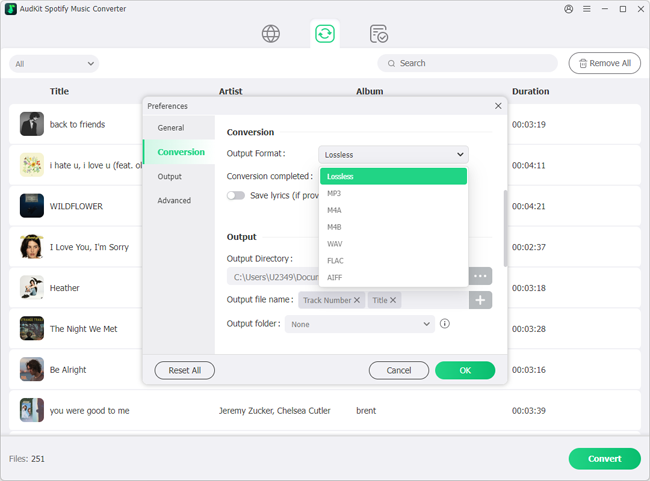
- Convert Spotify music to MP3/AAC/FLAC/WAV/M4A/M4B
- Keep full ID3 tags like artist, year, cover, title, etc.
- Batch download at a fast 5X conversion speed
- Help listen to Spotify music offline anywhere
Step-by-Step Tutorial to Download Spotify Music for Offline Use
Import Spotify Tracks: Launch AudKit Spotify Music Converter, log into the built-in web player, and click the + button or drag songs and playlists into the main interface.
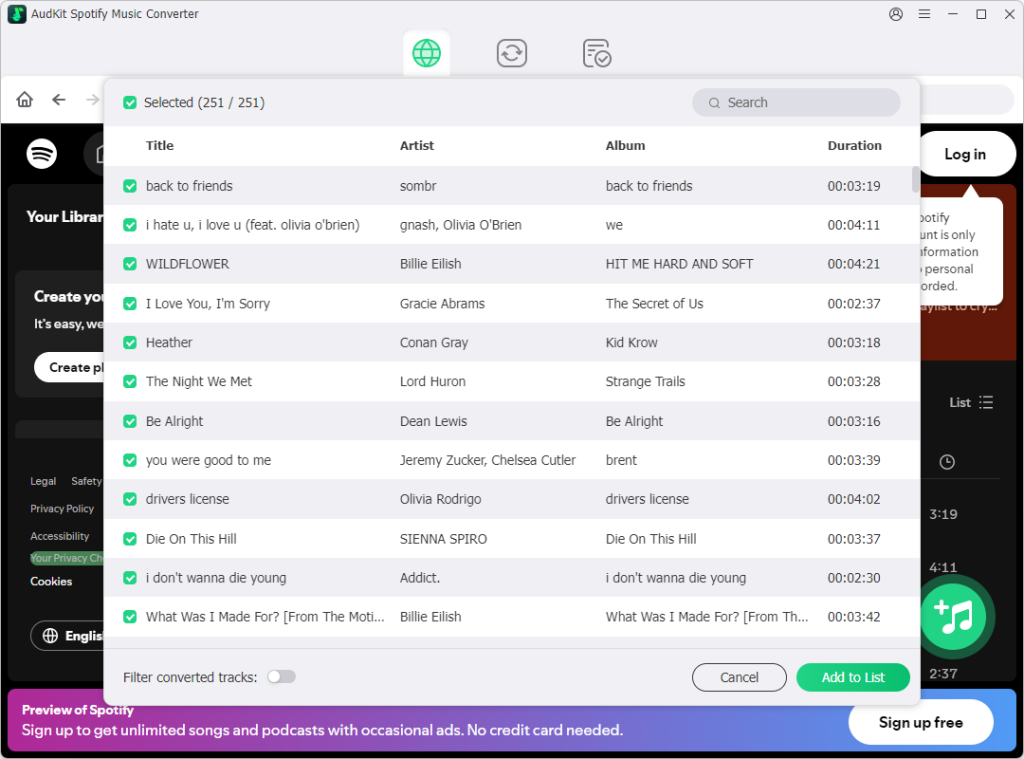
Customize Output Audio: Open Menu > Preferences > Convert to select MP3 or M4A as your target format and set the bitrate to 320kbps.
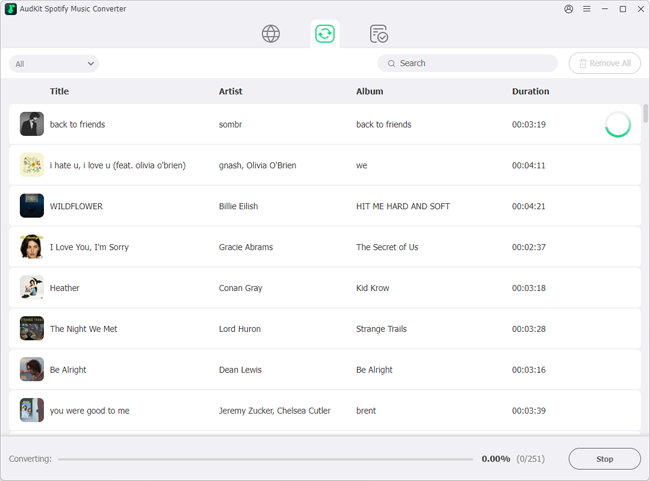
Batch Convert Offline: Click Convert at the bottom-right corner to save the unlocked audio files to your local folder at 5X speed, ready for transfer to any mobile player.
Part 6. Feature Comparison: Spotify vs eSound vs Local Conversion
When deciding between Spotify and eSound—or opting for local audio conversion—the right choice depends on how you balance monthly costs against audio consistency and offline reliability. The table below breaks down how the two streaming apps compare alongside a local file workflow.
| Feature / Dimension | Spotify | eSound (Lyra on iOS) | AudKit Spotify Music Converter |
|---|---|---|---|
| Catalog Source | 100M+ officially licensed studio masters | 150M+ tracks streamed primarily via YouTube | Uses Spotify’s official catalog for local output |
| Audio Quality & Format | Up to 320 kbps OGG Vorbis (Free capped at 160 kbps) | Variable bitrate (often 128 kbps AAC/Opus from video streams) | Up to 320 kbps MP3, M4A, WAV, FLAC, or AAC |
| Free-Tier Skips & Playback | 6 skips/hour on mobile; forced shuffle on most playlists | Unlimited skips and on-demand track selection | Unlimited playback and skips via any local media player |
| iOS Offline Playback | Requires active Premium subscription (~$12.99/month) | Restricted to user-imported local files (MP3/M4A) | Permanent offline playback on all devices without subscriptions |
| Playlist Migration | Supported by all major API tools (Soundiiz, TuneMyMusic) | No public API; requires indirect YouTube playlist linking | Batch-converts entire Spotify playlists into local folders |
| Metadata & ID3 Tags | Full official metadata locked inside the app | Frequent video titles, missing album art, and MV intros | Retains 100% original ID3 tags (title, artist, album, cover) |
If you want seamless cross-device syncing, social features, and algorithmic discovery—and do not mind paying a monthly fee—Spotify remains the superior streaming platform. eSound works well as a free backup for casual Android or desktop listeners who simply want on-demand skips without signing up, provided they can tolerate YouTube audio quirks and pop-up ads. However, for iOS users blocked by Lyra’s offline restrictions or listeners tired of recurring subscription bills, converting playlists into local MP3 or M4A files delivers studio-grade masters that play anywhere permanently.
FAQs About Choosing Between Spotify and eSound
When weighing Spotify vs eSound: which is better for daily listening, these technical details clarify the key differences.
Why is eSound called Lyra on the iOS App Store, and can it download music offline?
Due to App Store compliance updates, eSound rebranded on iOS as “Lyra: Music Player & eSound.” Unlike Android, the iOS version cannot cache streaming catalog tracks offline; it restricts offline playback strictly to local MP3 or M4A files you manually import.
Can I import my Spotify playlists directly into eSound?
No. Because eSound lacks a public API, tools like TuneMyMusic cannot connect to it directly. You must either bridge playlists through YouTube or use AudKit Spotify Music Converter to export your playlists as local MP3s and import them into eSound.
Is eSound safe and legal to use compared to Spotify?
Yes, eSound is legal and safe to install from official app stores. It operates within legal boundaries by acting as a third-party client that streams public YouTube content rather than hosting unlicensed master audio files.
Why do some songs on eSound have long video intros or sound lower quality than Spotify?
Spotify streams licensed studio masters at up to 320 kbps Ogg Vorbis. Conversely, eSound pulls audio from YouTube videos, meaning you often get compressed audio, live covers, or music video dialogue instead of clean album tracks.
Conclusion
Choosing between Spotify and eSound depends on your priorities. Spotify excels in studio-mastered audio quality, accurate metadata, and reliable CarPlay integration. Conversely, eSound suits budget-conscious Android or Windows users seeking free on-demand playback and unlimited skips, provided they tolerate music video intros, variable bitrates, and pop-up ads.
iOS users face tougher limits: the rebranded Lyra app restricts offline playback to imported local files, and no public API means no direct playlist migration. To enjoy Spotify’s licensed catalog without subscriptions or restrictions, AudKit Spotify Music Converter saves playlists as permanent MP3 or M4A files for offline playback anywhere.

Andrew Rowley
 Staff Editor
waitting