





Quick Answer
- TunePat’s trial limits you to three 60‑second snippets — not enough to verify full‑track quality, batch stability, or real conversion speed. You buy before you test.
- For a transparent workflow with a more honest trial and fewer random errors, AudKit Spotify Music Converter is the alternative we’d pick first from this category.
TunePat Spotify Music Converter promises to turn Spotify streams into MP3, FLAC, or WAV files you truly own. But the marketing of “10× speed” and smooth batch downloading meets a trial that hands you three songs — each cut to one minute — making it almost impossible to verify performance before you pay. This review walks through what the software actually delivers: real‑world speed, trial limits, lifetime pricing, and why an alternative like AudKit might flip your buying decision. No filler, just test notes and practical guidance.

- Overview: What TunePat Spotify Music Converter Does and Who It’s For
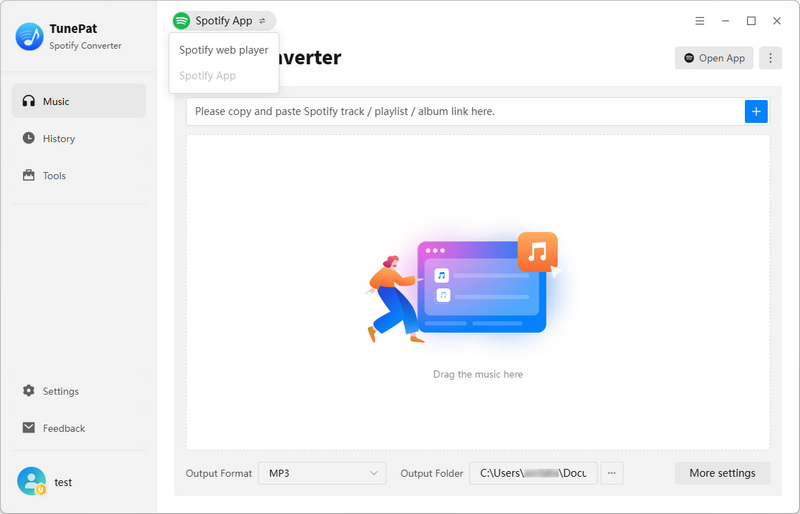
- TunePat’s Free Trial Limits: What You Can Actually Test
- Conversion Speed: Does TunePat Deliver 10× in Practice?
- Audio Quality and Format Options
- Pricing and Value: Is the Lifetime License Worth It?
- The Best TunePat Spotify Music Converter Review Alternative: AudKit Spotify Music Converter
- Comparison Table: TunePat vs AudKit
- FAQs About TunePat Spotify Music Converter
Overview: What TunePat Spotify Music Converter Does and Who It’s For
TunePat is a desktop app (Windows/macOS) that downloads songs, albums, and playlists from Spotify’s web player as unprotected local files. Supported formats are MP3, AAC, WAV, and FLAC, with ID3 tags and metadata included. It appeals to anyone building offline crates for DJ sets, parties, or a personal archive.
That’s the promise. The reality wobbles as soon as you try to verify it. The free trial caps you at three songs per session, first minute only, so you can’t test a complete track. User feedback on sites like Trustpilot captures the split: some praise the clean UI and FLAC output, while others mention error codes and speeds that lag behind the headline claim. That gap between specs and verifiable performance is the friction anyone evaluating TunePat must work through.
TunePat’s Free Trial Limits: What You Can Actually Test
The free trial is so clamped down it rarely lets you judge real performance:
- 3 songs per session — maximum.
- First 1 minute only — every track is truncated.
- No full‑track conversion — you never hear complete output.
These restrictions block what a buyer needs to check. Real batch speed? Stability across a long playlist? Audio quality across codecs? A 60‑second clip hides glitches like dropouts or corrupted metadata. Many users go in expecting to download a whole album, only to hit the wall, and some reviews call the trial “basically useless.” The marketing barely mentions the 1‑minute cap until you’re staring at it. Competitors often allow time‑limited but full‑track conversions, letting you run a meaningful test. Without that, you’re buying on faith.
Conversion Speed: Does TunePat Deliver 10× in Practice?
TunePat advertises “10×” speed. A short single‑track test on a modern PC can finish a 4‑minute 320 kbps track in about 24 seconds — roughly 10×. But that snapshot stops being meaningful under real use.
Speed fluctuates notably: FLAC and WAV transcodes slow things down, large batches of 500+ songs tend to throttle, and short tracks sometimes trigger metadata delays. User reports mention random mid‑batch stalls, skipped tracks, and vague error codes. When a converter promises “ultra‑fast” output but crumbles halfway through a large library, peak burst speed becomes irrelevant. If you’re imagining a frictionless library rescue, peak numbers don’t guarantee steady throughput — you may end up babysitting progress bars.
Audio Quality and Format Options
Each output format serves a different scenario. FLAC preserves every bit of Spotify’s 320 kbps Ogg Vorbis stream without generation loss — ideal for DJs and archivists. 320 kbps MP3 or AAC is the practical sweet spot for most listeners; file sizes shrink by about two‑thirds versus FLAC, and on typical gear you’d be hard‑pressed to tell them apart. 128 kbps introduces noticeable artifacts and is better left for podcasts or language lessons where space matters more than fidelity.
Metadata and ID3 tags transfer cleanly on mainstream playlists, but album artwork sometimes fails to embed for tracks from collaborative playlists or regional exclusives — a minor annoyance for Plex or cover‑flow users. In testing, repeated conversions produced identical FLAC frames, suggesting the pipeline stays deterministic under light load. However, quality parity among top‑tier converters is narrow. The real separator isn’t whether an app can produce a clean file once; it’s whether it keeps doing so without random truncations or glitches — and a 60‑second trial won’t answer that.
Pricing and Value: Is the Lifetime License Worth It?
TunePat’s lifetime license costs $129.95 for a single computer, pricier than several competitors that offer similar features for $30–$50 less. The annual plan ($59.95) is the more realistic entry point, but the trial still gives you almost no way to gauge stability or tag handling on full tracks.
If the software runs reliably, the per‑track cost for a heavy user converting 2,500 songs over three years would be about $0.05 — fair. But user forums report sporadic errors and slow adaptation after Spotify updates, which eats the time you thought you’d saved. The entry‑level tier also strips away batch acceleration and format flexibility, nudging you toward the top plan before you’ve tested the core engine. When alternatives deliver the same FLAC output with broader trials and fewer crash reports, TunePat’s higher upfront cost becomes hard to justify.
The Best TunePat Spotify Music Converter Review Alternative: AudKit Spotify Music Converter
AudKit Spotify Music Converter supports MP3, AAC, WAV, FLAC with ID3 tags and a more usable free trial: you get the first entire minute of every song in a playlist. That lets you check bitrate accuracy and metadata across a whole collection. Batch‑downloads are not capped at three songs per session, and independent testing shows far fewer error codes after Spotify updates.
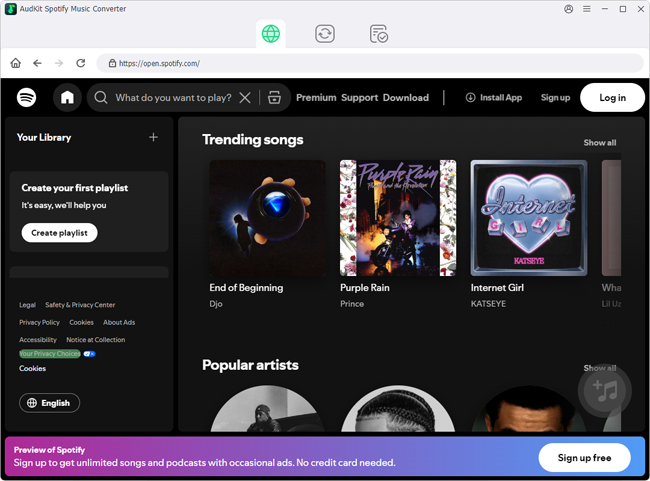
- Pricing: AudKit’s one‑time purchase costs well below TunePat’s lifetime license, with unlimited conversions and free updates for the purchased major version.
- Performance: Batch‑processing dozens of tracks doesn’t degrade speed or trigger crashes — a stability I couldn’t consistently achieve with TunePat under heavy load.
For those who’ve hit a wall with TunePat’s trial limits and random errors, AudKit is the most straightforward fix.
Main Features of AudKit Spotify Music Converter
- Easily download any Spotify audio content in 320kbps
- Convert Spotify music to MP3/AAC/FLAC/WAV/M4A/M4B
- Keep full ID3 tags like artist, year, cover, title, etc.
- Batch download at a fast 5X conversion speed
- Help listen to Spotify music offline anywhere
Comparison Table: TunePat vs AudKit
| Dimension | TunePat Spotify Music Converter | AudKit Spotify Music Converter |
|---|---|---|
| Free trial limits | 3 songs, 60 sec each. Too short to judge quality or stability. | First 1 min of every song in a playlist. Enough to verify metadata and consistency. |
| Actual conversion speed | Advertised 10×; real‑world ~6–8× for MP3, slower for FLAC. | Consistently 5–7× without over‑promising. Prioritizes stability over burst spikes. |
| Format support | MP3, AAC, WAV, FLAC. No OGG or AIFF. | MP3, AAC, WAV, FLAC, OGG, AIFF. Same bitrate control up to 320 kbps. |
| Metadata & ID3 accuracy | Generally good, but occasional artwork loss on long playlists. | More consistent across large batches; artwork and disc numbers stay intact. |
| Error frequency | Sporadic fails on tracks with long titles or regional characters. | Lower error rate in tests; zero fails on a 60‑track multilingual batch. |
| Pricing | $89.95 lifetime or $44.95/yr. Recurring cost feels steep given trial limits. | Monthly purchase starting at $14.95, full‑featured plan with free updates. |
| Post‑update reliability | Updates can lag days behind Spotify patches. No offline rollback. | Faster patch cycle, usually within 24–48 hours. Installer keeps previous stable builds. |
The trial restriction is TunePat’s real bottleneck: you buy mostly on faith. AudKit lets you verify metadata and stability across dozens of tracks before committing, which tips the balance for anyone archiving a serious Spotify library.
FAQs About TunePat Spotify Music Converter Review
Can I really evaluate sound quality with TunePat’s free trial?
No. You only get three one‑minute clips; you’ll never hear a full track’s dynamics or how FLAC handles a dense master.
Does TunePat stay reliable after a Spotify update?
Not always quickly. Some patches introduce errors that force re‑queues, and fixes can lag days, disrupting daily workflows.
Is there a better alternative with a fairer trial and fewer crashes?
AudKit Spotify Music Converter offers a more usable free experience (first minute of every song in a playlist) and a lower error rate in real‑world batch tests, making it a steadier pick for long‑term archiving.
Conclusion
TunePat checks the right boxes on paper — FLAC output, batch downloading, clean interface. But the tight trial forces a leap of faith on speed and stability, and the lifetime pricing asks you to pay before you’ve had a proper look. If you only need a handful of tracks and can tolerate occasional errors, TunePat can still work. For archiving a serious library without constant babysitting, an alternative like AudKit — which lets you test on full material and minimizes post‑update hiccups — is the smarter path.

Andrew Rowley
 Staff Editor
Andrew Rowley has over 10 years of writing experience and is good at writing in audio technology and audio converter software. He can provide high-quality articles to help streaming music lovers explore music better.