





Audible AAX Converter

Download Books without Audible Authorization & iTunes
Concentrated on audiobooks downloaded from Audible.com, AudKit Audible AAX Converter can help audiobook enthusiasts convert AA/AAX books to various files for listening on any device without account authorization.
Different from the traditional Audible converter, no need to install the iTunes app and authorize an Audible account, the AudKit Audible converter is capable of downloading protected Audible files to MP3, AAC, etc. easily.

Convert Audible Up to 14 Output File Types
For unauthorized playback prevention, Audible audiobooks are encoded in “Format 4” (AA) and “Enhanced” (AAX) formats, which can only be playable on selected devices and players.
However, thanks to this professional Audible converter, you have the chance to convert Audible AA / AAX to MP3, AAC, M4A, M4B, FLAC, AC3, WMA, WAV, M4R, MKA, OGG, AIFF, etc. (up to 14 formats) for better compatibility with any device.

Keep 100% Lossless Quality for Audible Books
Equipped with cutting-edge decoding technology, this smartest AAX to MP3 converter offers an option of defining output format as Lossless and customizing output quality settings.
When you choose to keep 100% lossless audio quality via the powerful option, the AA audiobooks will be converted as MP3 files, while AAX books as M4A tracks with all original parameters preserved automatically.
Batch Convert Audible AA/AAX at 100X Fast Speed
There is an important highlight of the AudKit Audible Audiobook converter. It boasts a super faster 100 conversion speed to download and convert unlimited Audible books in batches.
By adopting outstanding decryption technology with such conversion speed, it could be much faster than competitive products that need to launch iTunes for conversion.


Smart ID3 Tag Editor to 100% Reserve or Customize ID3 Tags
Equipped with a built-in powerful ID3 tags editor, AudKit Audible Converter is up to retaining the full audiobook info. Also, it enables you to edit ID3 tags (i.e., title, albums, year, artist, composer, cover, genre, etc.) to your preferences.

Split Audiobook Files into Segments by Chapters or Time Frame
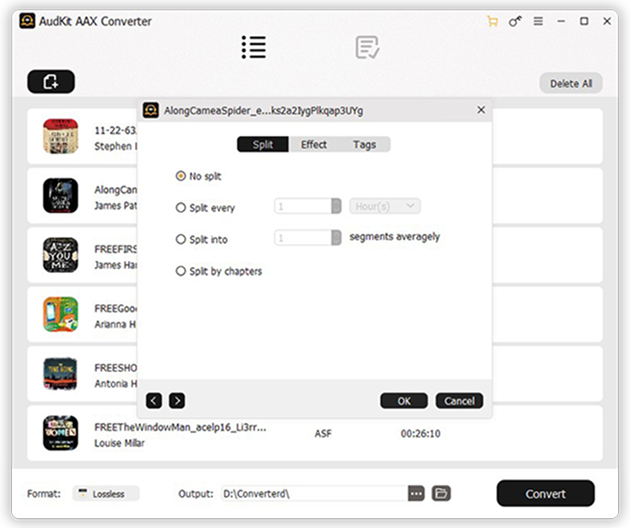
With the ingenious audio splitter, the AudKit AAX Converter supports trimming large Audible books into small clips by chapters/time or splitting them into segments averagely to cater to users’ requirements for convenient playback.

Customize Output Audiobook Settings Freely
AudKit Audible AAX Converter for Mac and Windows also features other customization functions to cater to more personalized tastes. It’s able to especially change the output audio parameters, like bit rate, sample rate, etc.
Besides, there is an ‘Effect‘ feature, which allows users to choose the most suitable playback volume, speed, and pitch.
Play Audible Files on All Devices and Players Offline
After the format conversion of the Audible books using the AudKit Audible Audiobook Converter, you can preview converted Audible books via its built-in audiobook player or directly transfer them to any portable device and player for offline playback without Audible Plus or Premium Plus.

How to Use AudKit Audible AAX Converter
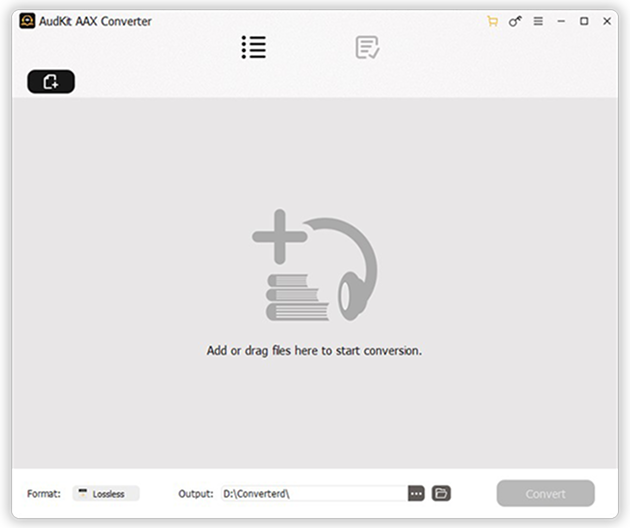
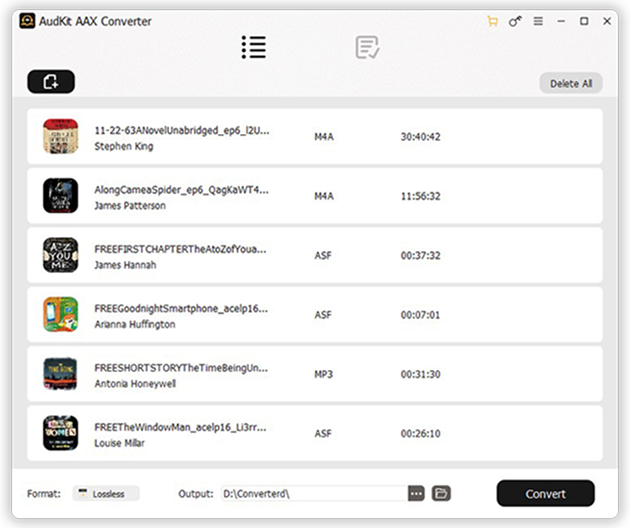
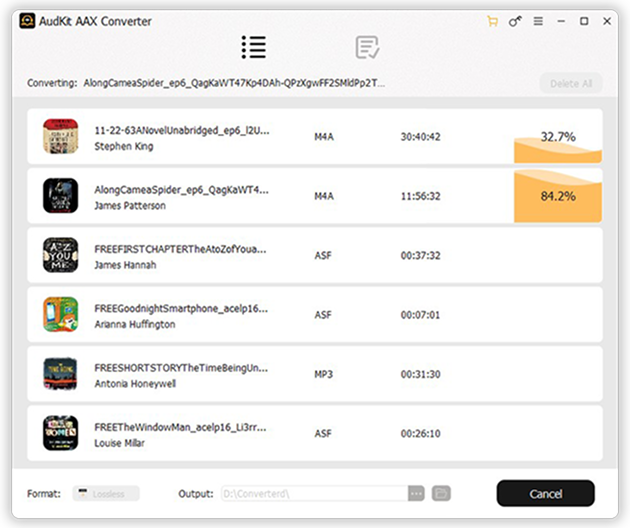
Step 1: Import downloaded Audible books to AudKit.
Open the AudKit AAX Converter after installing it on your Windows PC or Mac. Tap on the upper-left "Add Files" button to locate and select your stored Audible downloads, or directly drag and drop the AA/AAX files into the main interface.
Step 2: Adjust output format and quality settings.
Once the audiobooks are loaded, click on the "Lossless" bar or Format tab at the bottom-left to open the Format Setting panel. Here, you can select your desired output format (such as MP3, M4A, AAC, FLAC, or WAV) and customize the audio parameters.
Step 3: Split audiobooks and edit tags (Optional).
If you want to divide your audiobooks into smaller segments by chapters or duration, hover over an added title and click the "Edit" icon. You can also edit the ID3 tags like title, artist, and cover art before converting.
Step 4: Convert Audible books for offline listening.
Click the "Convert" button at the bottom right to begin the conversion process. The program will batch convert your Audible books at up to 100X speed while preserving lossless quality. Once finished, click the "Converted" icon to find your local files ready for any device.

Easy to Use
Designed with an intuitive interface & easy to use with a few clicks.

Lifetime Update
Lifetime updates for free to support the newest Audible app

24/7 Support
24*7 technical support to fix any possible tech issues
FAQS
Do I need to install iTunes or authorize my Audible account to convert books?
No, neither is required. Unlike many traditional audiobook converters, AudKit Audible AAX Converter works completely independently. It can directly decrypt and convert your Audible AA and AAX files without needing you to install the iTunes app or authorize your Audible account, making the whole process much simpler and faster.
Can I split a large Audible audiobook into smaller parts or chapters?
Yes, absolutely. Since audiobooks can often be dozens of hours long, AudKit features a built-in smart audiobook splitter. You can easily trim large Audible books into smaller clips by specific chapters, fixed time frames, or split them averagely into equal segments. This makes it much more convenient to listen to and manage on portable MP3 players.
How fast can AudKit convert a lengthy Audible audiobook?
AudKit boasts a super-fast 100X conversion speed thanks to its advanced decryption technology. This means a 10-hour audiobook can be downloaded and converted in just a few minutes. Furthermore, it supports batch conversion, allowing you to add and process multiple Audible books simultaneously to save you even more time.
Can I adjust the narrator's reading speed or volume before converting?
Yes! In addition to letting you choose the output format (like MP3, M4A, AAC, or Lossless), AudKit provides an “Effect” feature tailored for audiobook listeners. You can freely customize the playback volume, adjust the reading speed, and even change the audio pitch to cater to your personalized listening preferences before starting the conversion.

Batch convert Audible AA/AAX to MP3, WAV, etc. for offline listening on any device and player.
-
 100% Secure
-
Perfect Compatibility
-
Simple to Operate
-
Free Update
-
Technical Support


