





Quick Answer
Spotyloader is an online download tool that promises free 320kbps MP3s from Spotify links without local software. In practice, our tests revealed three major takeaways:
- Convenient for occasional tracks: It works in any standard web browser on desktop or mobile, making it a quick option if you just want to grab a single file on the fly.
- Mismatched audio pipeline: Spotyloader does not record Spotify streams directly. It scrapes the song metadata, queries public platforms like YouTube, and transcodes a lower-quality web stream into an inflated 320kbps MP3 container. This often leads to live takes, acoustic covers, or music video audio instead of the album version.
- Unstable batch processing: Queuing playlists with more than 30 songs regularly causes server timeouts, damaged ZIP archives, missing metadata, and endless redirect ads. If you need clean, high-fidelity offline files for an entire library, a dedicated desktop converter remains the practical choice.
Web-based music downloaders look like the easiest way to save tracks for offline listening. You paste a link, tap a button, and get an MP3 file without installing desktop apps or paying a monthly subscription. For casual listeners who only need an occasional song on a flash drive, the appeal is obvious.
Real performance tells a different story. Free web scrapers rarely extract audio from original streaming sources. Instead, they rely on automated searches across third-party video platforms, which introduces wrong versions, missing track details, and lower actual bitrates wrapped in bloated file sizes. Aggressive ad networks make the process even more tedious.
This Spotyloader review looks at how the site actually handles audio extraction. We examine spectrogram test results, playlist stability, user safety concerns, and the difference between web rippers and dedicated desktop tools.
- What Is Spotyloader and How It Works
- Audio Quality and Spectrogram Analysis
- Stability, Safety, and Playlist Handling Limitations
- The Best spotyloader review Alternative: AudKit Spotify Music Converter
- Frequently Asked Questions About Spotyloader
What Is Spotyloader and How It Works
Spotyloader is a free browser-based site built to process Spotify track, album, and playlist links. It requires no user registration, no Spotify login, and no local app installation. The interface is minimal: a central search bar, a submit button, and a download prompt once the remote server finishes processing your request.
The backend does not record or capture the encrypted streams directly from Spotify servers. Doing so would require dedicated local decoding pipelines that web-hosted rippers cannot easily maintain. Instead, Spotyloader acts as a metadata scraper tied to a public search script:
- Metadata harvesting: When you paste a Spotify link, the server reads the basic public tags, including track title, artist name, album name, and runtime.
- Third-party query: The backend feeds those tags into automated search scripts (often based on tools like yt-dlp) to find a matching upload on public video sites like YouTube.
- Transcoding to MP3: Once a matching video is selected, the server pulls the available web audio stream (usually 128kbps Opus or AAC) and converts it into an MP3 file container tagged as 320kbps.
- Ad monetization: Because hosting and bandwidth cost money, the site directs users through aggressive redirect loops, pop-under windows, and affiliate ads before unlocking the download button.
This workflow explains why the tool is hit or miss. Spotyloader never handles the native platform files. It automates a search-and-download sequence you could run manually on a video site, which saves time on single tracks but compromises audio fidelity and version accuracy.
Audio Quality and Spectrogram Analysis
Despite Spotyloader’s claim of 320kbps output, acoustic spectrogram tests in Spek reveal a hard frequency cutoff right at 16 kHz. Instead of genuine 320kbps audio—which smoothly reaches ~20 kHz—the tool simply upscales compressed ~128kbps web audio into an inflated file, wasting storage without improving fidelity.
Furthermore, because the tool relies on keyword matching across public video sites rather than direct stream capture, it frequently grabs the wrong audio. During testing, studio recordings were often replaced with live bootlegs, user covers, or music video tracks filled with dialogue, resulting in muffled, inconsistent sound.
Stability, Safety, and Playlist Handling Limitations
Running a single track through Spotyloader takes only a minute or two. The actual user workflow follows four basic steps:
- Copy the link: Open Spotify, find the song or playlist, and copy the share link to your clipboard.
- Submit the URL: Paste the web link into Spotyloader’s search bar and click the download button.
- Handle verifications and ads: Click through Cloudflare checks while closing browser tabs triggered by redirect networks.
- Save the file: Wait for the server to finish processing, then download the individual MP3 or select the batch archive option.
While the process works passably for single songs, it falls apart on larger requests. The remote servers struggle when parsing playlists containing more than 30 or 40 tracks. Queues stall frequently, resulting in 504 Gateway Timeout messages or blank download lists.
When batch downloads do complete, the server often generates corrupted ZIP packages that fail during extraction. That leaves you stuck clicking through individual download buttons and ad popups for every single song.
Safety is another concern. Spotyloader relies on aggressive third-party ad networks. Many of these ads use deceptive “Download Now” or “Update Required” prompts designed to trick users into downloading rogue browser extensions or suspicious setup files. If you use the site, running a strong ad blocker and avoiding external prompts is essential.
Metadata handling is equally inconsistent. Because the platform pulls tags from secondary video uploads rather than the original catalog, downloaded MP3s often lack track numbers, release years, or correct genres. Album artwork is frequently stretched from low-resolution video thumbnails. For listeners who maintain organized music folders, cleaning up these tags takes significant manual effort.
The Best spotyloader review Alternative: AudKit Spotify Music Converter
Spotyloader works as a quick stopgap if you need a single audio file on a mobile phone or shared computer without installing extra software. However, its reliance on public video scrapers makes it unsuited for serious music archiving. For users seeking genuine audio fidelity and reliable playlist exports, AudKit Spotify Music Converter is a far more robust solution.
AudKit runs locally on your PC or Mac, capturing the original stream directly rather than guessing track titles on video sites. This direct approach solves the version-matching problem: you always get the exact studio album track, not a random live recording or user cover. It also produces genuine high-bitrate audio, offering authentic 320kbps MP3s as well as uncompressed formats like FLAC and WAV without the artificial 16 kHz cutoff.
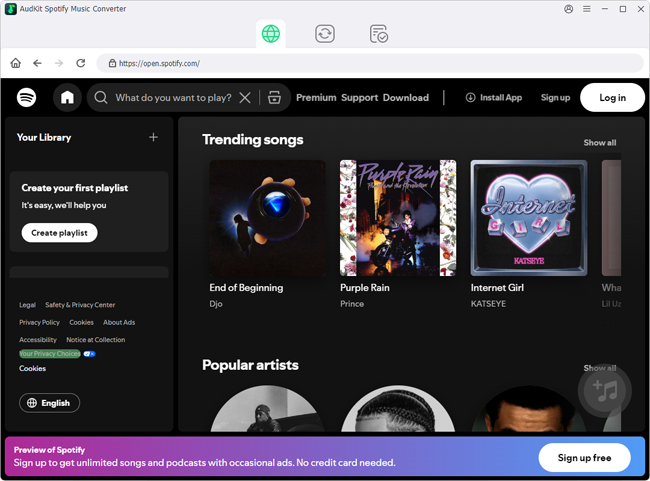
Key benefits of AudKit include:
- Direct stream capture: Decodes tracks, full albums, audiobooks, and playlists directly to MP3, FLAC, WAV, AAC, M4A, or M4B for seamless playback across personal devices.
- Reliable batch conversion: Handles extensive playlists at 5x speed without hitting server gateway timeouts or corrupting archive files.
- Intact ID3 metadata: Automatically keeps track numbers, artist credits, album titles, and original high-resolution cover art organized.
- Clean desktop environment: Operates offline without third-party redirect ads, fake download buttons, or pop-up software installers.
This makes AudKit a practical alternative for collectors, DJs, and anyone building a permanent offline music library on external drives or dedicated media players.
Main Features of AudKit Spotify Music Converter
- Easily download any Spotify audio content in 320kbps
- Convert Spotify music to MP3/AAC/FLAC/WAV/M4A/M4B
- Keep full ID3 tags like artist, year, cover, title, etc.
- Batch download at a fast 5X conversion speed
- Help listen to Spotify music offline anywhere
Spotyloader vs. AudKit Spotify Music Converter
| Feature / Metric | Spotyloader | AudKit Spotify Music Converter |
|---|---|---|
| Audio Sourcing Method | Metadata scraping paired with third-party video search | Direct capture and decoding of original platform streams |
| Actual Output Quality | Transcoded MP3 with a hard 16 kHz shelf (upscaled ~128kbps) | True 320kbps MP3 or lossless FLAC and WAV output |
| Track Matching Accuracy | Vulnerable to live takes, bootleg covers, and video dialogue | Exact 1:1 match to the selected catalog studio track |
| Batch Playlist Handling | Frequent 504 timeouts; struggles with queues over 30 tracks | Smooth multi-track queuing with consistent 5x conversion speeds |
| Metadata & ID3 Tags | Spotty; frequently missing track numbers and clear artwork | Preserves full ID3 tags, artist credits, and high-resolution art |
| Interface & Safety | Adware pop-unders, redirect loops, and CAPTCHA prompts | Clean desktop software with zero advertising redirects |
Comparing both tools highlights the difference between web-based conveniences and dedicated desktop utilities. Spotyloader offers immediate access from any browser, but you trade away audio quality, track accuracy, and stability. You get compressed web rips that take extra time to organize and rename.
AudKit Spotify Music Converter fixes those compromises by managing the conversion directly on your computer. It keeps the original sound profile, preserves complete metadata, and processes large playlists without server-side interruptions.
Frequently Asked Questions About Spotyloader
Is Spotyloader safe to use on desktop and mobile browsers?
Spotyloader itself is a standard web utility, but its ad networks present real risks. Clicking download links often triggers deceptive pop-unders, fake system alerts, or redirects to unwanted extensions. Keep an ad blocker enabled and avoid running any third-party installation prompts.
Does Spotyloader really download music in true 320kbps MP3 quality?
No. Spectrogram tests confirm that Spotyloader’s files have a sharp cutoff at 16 kHz. The platform re-encodes a low-bitrate web stream into a 320kbps container, creating a larger file without improving actual sound resolution.
Why does Spotyloader fail or time out on large Spotify playlists?
The tool relies on shared cloud servers to search and transcode files. When processing large playlists, public API limits and server traffic frequently cause 504 Gateway Timeouts, dropped files, or broken ZIP packages.
What is the most reliable alternative to Spotyloader for lossless Spotify downloads?
AudKit Spotify Music Converter is the most dependable alternative. It extracts audio locally, producing real 320kbps MP3s or lossless FLAC and WAV files while preserving full ID3 tags and maintaining fast batch speeds.
Conclusion
Spotyloader provides quick, zero-cost access for the occasional single track when you are away from your main computer and do not want to install software.
The technical tradeoffs, however, make it frustrating for regular use. Artificial 320kbps upscaling, hard 16 kHz frequency cutoffs, track mismatches, and broken playlist archives stand between the user and clean audio files. Navigating redirect ads only adds to the friction.
For listeners who want genuine studio fidelity, accurate metadata, and reliable playlist exports for personal offline listening, AudKit Spotify Music Converter delivers a much more dependable experience.

Andrew Rowley
 Staff Editor
Andrew Rowley has over 10 years of writing experience and is good at writing in audio technology and audio converter software. He can provide high-quality articles to help streaming music lovers explore music better.