





Quick Answer
- Identify the root cause: When Spotube stops working, playback failures typically stem from expired session cookies, Spotify API revisions, or external streaming servers blocking scrapers with HTTP 403 or 429 rate-limit errors.
- Try open-source streaming alternatives: Community-built frontends provide lightweight playback replacements, though they occasionally face upstream rate throttling and automated track mismatches.
- Switch to a dedicated desktop converter: A dedicated desktop audio encoder ensures permanent offline reliability by downloading playlists directly into local formats like MP3 or FLAC.
If you encounter silent playback loops or an empty queue and find Spotube not working, you are not alone. Many listeners seek smooth, ad-free streaming, only to face invalid session tokens, skipped songs, or sudden 403 and 429 rate-limit errors. When audio does play, automated metadata matching can mistakenly substitute studio cuts with live recordings, acoustic covers, or karaoke tracks.
These interruptions stem from Spotube’s decoupled architecture: it retrieves metadata through Spotify endpoints while streaming audio via external platforms like YouTube or Piped. Whenever these hosting providers alter delivery protocols or throttle scraper IP addresses, playback halts abruptly.
If Spotube is not working, try alternatives here that match your preferred listening setup. This guide reviews reliable open-source frontend players and dedicated desktop tools to restore uninterrupted music playback.
- Part 1. How We Evaluated Spotube Alternatives
- Part 2. Top 5 Spotube Alternatives for Uninterrupted Playback
- Part 3. Comparison of Top Spotube Alternatives
- Also Worth Considering
- FAQs About Spotube Issues and Alternative Players
Part 1. How We Evaluated Spotube Alternatives
When Spotube playback fails, the issue rarely stems from your local network. The software relies on a split framework: pulling track details from Spotify while fetching raw audio from secondary platforms. When these remote services modify their internal web APIs or restrict repetitive scraper requests, users encounter HTTP 403/429 errors and broken session tokens.
To identify dependable replacements, we tested each alternative against four core operational criteria:
- API Resilience and Stream Stability: We prioritized tools with active maintenance cycles or native audio engines that minimize sudden stream disruptions caused by upstream platform updates.
- Audio Bitrate Verification: We verified whether each application delivers genuine high-bitrate audio (such as authentic 320 kbps MP3 or lossless formats) rather than upscaling compressed 128–160 kbps web audio streams.
- Metadata and Studio Track Matching: We evaluated track-matching accuracy to confirm applications retrieve original album cuts while preserving ID3 tags, cover artwork, and track sequence.
- Source Integrity and Security: We selected software featuring transparent source code, verified installation packages, clean repository histories, and freedom from bundled adware.
Part 2. Top 5 Spotube Alternatives for Uninterrupted Playback
When Spotube breaks down due to expired sp_dc cookies or strict rate limits, the fundamental vulnerability is its reliance on web scrapers. To restore dependable listening, you can choose dedicated offline converters that eliminate streaming errors or adopt robust open-source players. Below are five tested alternatives.
1. AudKit Spotify Music Converter — Best Permanent Offline Backup Solution
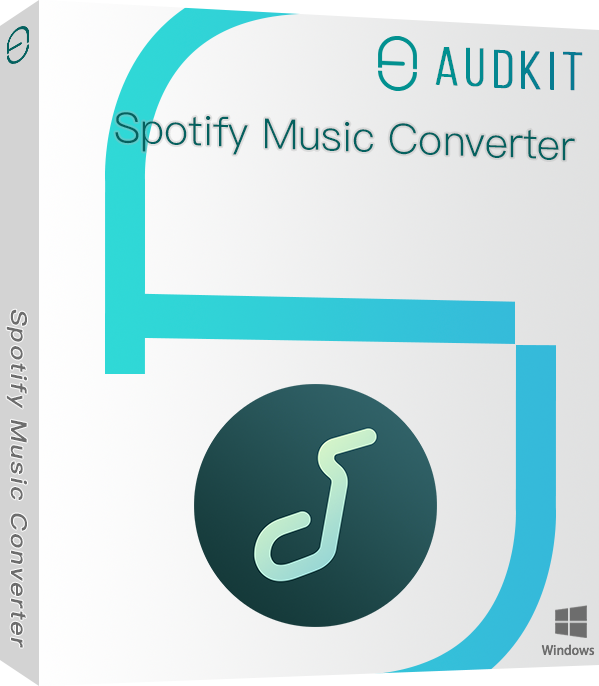
AudKit Spotify Music Converter avoids dynamic scrapers by operating as a dedicated desktop encoder. It accesses playlists, albums, audiobooks, and podcasts directly, converting them into standard audio files on your local drive.
By recording audio directly from native streams, AudKit eliminates the track mismatches common to Spotube, ensuring you receive original studio recordings rather than live bootlegs. The software supports high-quality exports up to 320 kbps MP3 or lossless FLAC, preserving full ID3 tags, artist names, and album artwork. Its 5X batch conversion speed on Windows lets you archive extensive music collections that play anywhere offline without login tokens or network dependencies.
Main Features of AudKit Spotify Music Converter
- Easily download any Spotify audio content in 320kbps
- Convert Spotify music to MP3/AAC/FLAC/WAV/M4A/M4B
- Keep full ID3 tags like artist, year, cover, title, etc.
- Batch download at a fast 5X conversion speed
- Help listen to Spotify music offline anywhere
- Key Parameters:
- Supported Formats: MP3, FLAC, WAV, AAC, M4A, M4B
- Max Audio Bitrate: 320 kbps (sample rates up to 48 kHz)
- Conversion Speed: 5X on Windows (1X stable mode on macOS)
- Platform: Windows, macOS
- Pros:
- Bypasses 403/429 rate limits and external scraping errors.
- Direct audio matching eliminates live and cover substitutions.
- Preserves original ID3 tags and album cover art.
- Cons:
- Desktop application requiring local drive storage space.
- Requires a computer rather than a mobile client.
- Best for: Listeners who want high-bitrate local audio files to permanently prevent streaming interruptions.
2. Spicetify — Best Native Client Customization Framework
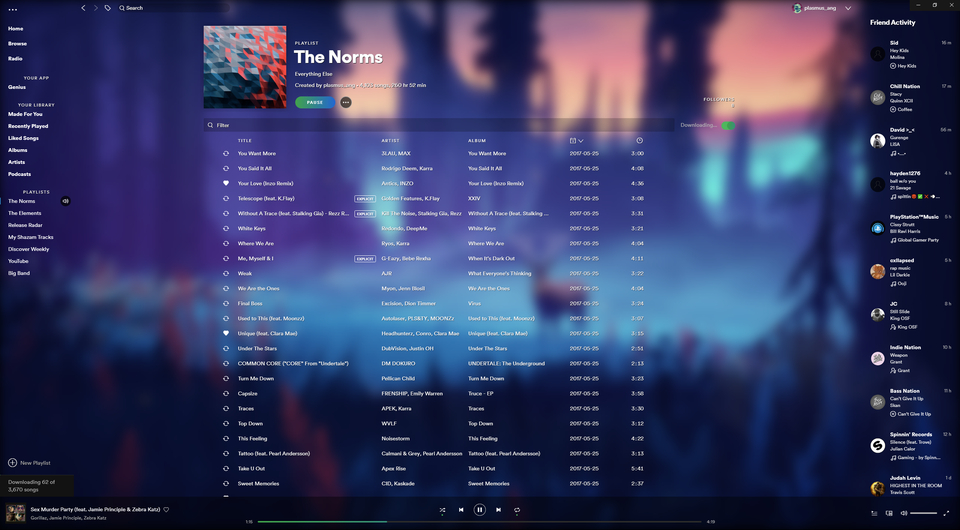
Spicetify is an open-source command-line tool designed to modify the official Spotify desktop client. Rather than fetching audio from third-party websites, it injects custom CSS themes, JavaScript extensions, and interface modifications directly into the native client.
Because it operates on the official playback engine, users retain full catalog access, personalized algorithmic mixes, and authentic stream bitrates. Community extensions provide real-time lyrics, audio visualizers, and customizable user interfaces. However, major official Spotify desktop updates can overwrite injected scripts, requiring users to run a brief terminal command (spicetify upgrade) to reapply customizations.
- Key Parameters:
- Architecture: Command-line injector for official Spotify desktop app
- Audio Source: Native Spotify CDN (up to 320 kbps on Premium)
- Platform: Windows, macOS, Linux
- Pros:
- Utilizes the official audio engine with zero track mismatches.
- Maintains access to daily mixes, podcasts, and personal libraries.
- Extensive community library of themes and functional add-ons.
- Cons:
- Requires basic command-line knowledge to install and configure.
- Updates to the desktop client temporarily disable injected modifications.
- Best for: Desktop users seeking a personalized interface powered by the official Spotify audio engine.
3. Nuclear Music Player — Best Multi-Source Desktop Streaming Client
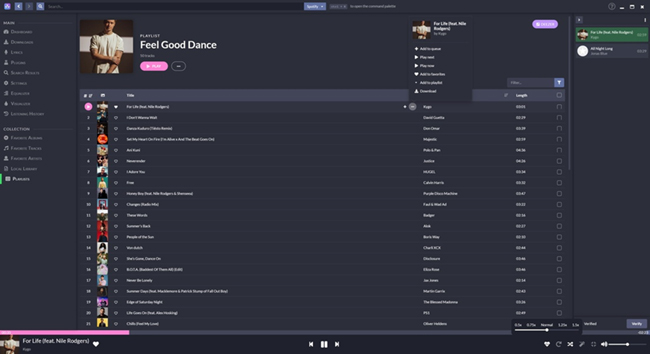
Nuclear Music Player is an open-source multi-source streaming client for desktop systems. Instead of binding audio playback to one service, it aggregates content from several open platforms—including Bandcamp, YouTube, SoundCloud, and Invidious—into a unified interface.
Nuclear avoids the authentication headaches of Spotube because it does not require browser session cookies or personal account credentials. It features Last.fm scrobbling, integrated lyrics, and customizable playback queues. Because it pulls from public video and audio hosts, bitrate quality varies between 128 kbps and 160 kbps Opus/AAC, and songs with generic titles can occasionally match non-album cuts.
- Key Parameters:
- Audio Sources: Bandcamp, YouTube, SoundCloud, Invidious
- Audio Bitrate: Variable web quality (128–160 kbps)
- Platform: Windows, macOS, Linux
- Pros:
- Operates without account logins or manual session tokens.
- Integrates independent releases from Bandcamp alongside mainstream music.
- Built-in lyrics display and queue management tools.
- Cons:
- Audio quality depends on host platforms.
- Occasional track mismatches for common song names.
- Best for: Privacy-oriented users who want unified streaming without linking personal accounts.
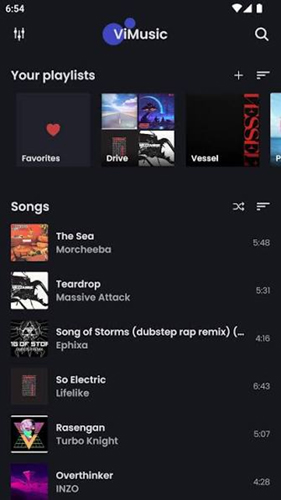
4. ViMusic — Best Lightweight Open-Source Android Frontend
ViMusic is a streamlined open-source Android music client written in Kotlin. It communicates directly with YouTube Music endpoints, bypassing the fragile metadata-matching layers that often cause playback failures in Spotube.
The app supports background playback with the screen locked, automated caching, Android Auto, and synchronized lyrics. While it does not provide Spotify-exclusive podcasts or proprietary playlist curation, ViMusic delivers fast, stable mobile playback without requiring user accounts or third-party login cookies.
- Key Parameters:
- Audio Source: YouTube Music API
- Audio Bitrate: 128–160 kbps Opus
- Platform: Android (GitHub / F-Droid)
- Pros:
- Fast playback response with low battery and memory usage.
- Supports background playback and screen-off listening without subscriptions.
- Direct audio streaming avoids cross-service metadata errors.
- Cons:
- Limited to Android; lacks a desktop client.
- Maximum audio quality matches standard web stream bitrates.
- Best for: Android users looking for an ad-free, lightweight mobile player that functions without account credentials.
5. MooSync — Best Local Library and Cloud Aggregator
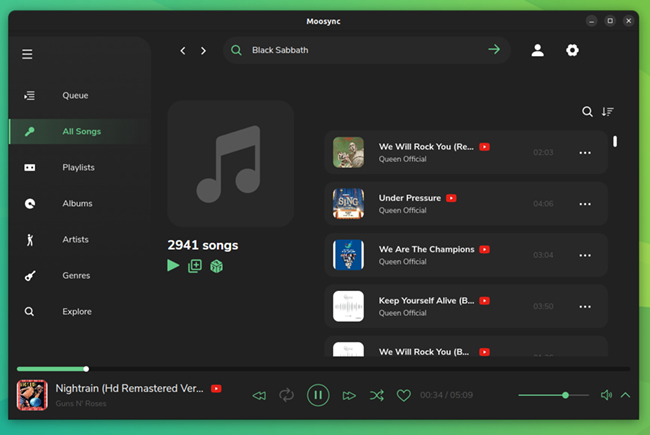
MooSync combines local audio file management with online cloud streaming within a modern desktop interface. Built using Electron, it indexes local audio stored on your drive while supporting external feeds from YouTube, Invidious, and Spotify metadata.
The application includes advanced playback features such as a 10-band equalizer, ReplayGain volume normalization, and lyrics retrieval. While cloud streams may occasionally run into host restrictions, having your local music collection directly integrated guarantees continuous playback whenever remote scrapers encounter errors.
- Key Parameters:
- Audio Sources: Local hard drive, YouTube, Invidious
- Features: 10-band equalizer, ReplayGain normalization, plugin support
- Platform: Windows, macOS, Linux
- Pros:
- Bridges local music files and online streams in a single library.
- Comprehensive audio controls including equalizers and volume leveling.
- Active development community providing extensions and themes.
- Cons:
- Cloud-based feeds can face 403 errors during host API changes.
- Heavier memory usage than lightweight native clients.
- Best for: Listeners who maintain a local audio library alongside online music streams.
Part 3. Comparison of Top Spotube Alternatives
When Spotube encounters expired sp_dc cookies, HTTP 403 rate limits, or stream extraction errors, your ideal replacement depends on whether you prefer online streaming frontends or local audio storage. Frontends that scrape media sites carry risks of rate limits and live-cover substitutions, whereas local audio converters deliver permanent offline access.
The comparison table below outlines key alternatives across primary sources, audio quality, formats, and supported platforms:
| Tool | Primary Audio Source | Max Output Quality | Output Format | Platform Compatibility |
|---|---|---|---|---|
| Dedicated Music Converters | Direct Web Player / Audio Stream | Up to 320kbps | MP3, FLAC, WAV, M4A | Windows, macOS |
| Spicetify CLI | Official Desktop Client | 320kbps (Account dependent) | Cache-based streaming only | Windows, macOS, Linux |
| MooSync | YouTube, Invidious, Local drive | ~160kbps (Opus/AAC) | Real-time streaming | Windows, macOS, Linux |
| Nuclear | YouTube, Bandcamp, SoundCloud | Source-dependent (128–160kbps) | Real-time streaming | Windows, macOS, Linux |
| RiMusic | YouTube Music API | ~256kbps (Opus) | Cached audio / M4A export | Android |
Open-source streaming frontends like Nuclear and ViMusic provide practical, account-free listening. However, for a reliable music library immune to scraping bans and network interruptions, converting tracks to local files using dedicated desktop software offers the most dependable long-term solution.
Also Worth Considering
Beyond graphical desktop players, alternative technical workflows can bypass metadata scraping issues entirely. Depending on your computing environment and command-line familiarity, these options provide effective backups when Spotube stops playing.
1. Web-Based Frontends: Piped and Invidious
When desktop players crash or return 403 Forbidden messages, privacy-focused web proxies like Piped and Invidious offer immediate playback inside any web browser without installation.
How They Function
These open-source web proxies route media requests through decentralized instances. By bypassing client-side scrapers, they deliver media streams without user tracking, commercial advertisements, or heavy client software overhead.
Practical Use Cases
- Restricted Environments: Useful on work or educational computers where administrative policies prevent installing desktop software.
- Low-Power Hardware: Runs efficiently inside lightweight web browsers on legacy machines without high CPU or RAM consumption.
Trade-Offs and Limitations
- Manual Playlist Search: Lacks automated synchronization with Spotify libraries, requiring users to search for music manually.
- Instance Availability: Relies on public community servers that can experience periodic downtime or IP throttling.
2. Command-Line Media Extraction: yt-dlp (and spotdl)
For power users and system administrators, command-line utilities eliminate graphical application overhead and provide precise control over audio fetching and file metadata.
How It Works
yt-dlp acts as a multi-platform media downloader, while spotdl reads Spotify playlist data and automates audio retrieval from matched web streams.
spotdl https://open.spotify.com/playlist/YOUR_PLAYLIST_ID --output "{artist} - {title}.{output-ext}" --format opusTo fetch a specific high-quality track directly:
yt-dlp -x --audio-format mp3 --audio-quality 0 --embed-metadata "https://music.youtube.com/watch?v=TRACK_ID"Practical Use Cases
- Automated Archiving: Automates scheduled playlist backups directly to external hard drives or network-attached storage.
- Granular Stream Selection: Explicitly targeting individual URLs avoids automated track mismatches and unwanted live cuts.
Trade-Offs and Limitations
- Lacks Player GUI: Built for terminal-based batch downloads rather than instant point-and-click listening.
- Maintenance Requirements: Demands regular terminal updates (
yt-dlp -U) to adapt to upstream site changes.
3. Dedicated Local Audio Converters (e.g., AudKit)
Dynamic streaming frontends remain vulnerable to API shifts, cookie expiration, and server rate limits. Dedicated desktop converters solve this problem by converting streaming audio directly into permanent local files.
Why Dedicated Converters Sit Outside the Main Top List
Standard frontends focus on daily queue management and interactive playback. In contrast, desktop converters function as preservation utilities, downloading complete playlists into standard offline formats like MP3 or FLAC stored securely on your drive.
Where Offline Converters Fit Best
- Guaranteed Playback: Saved files play indefinitely without active internet connections, session cookies, or scraper availability.
- Hardware Portability: Converted tracks transfer seamlessly to standalone MP3 players, SD cards, and in-car entertainment systems.
- Full ID3 Tag Preservation: Complete metadata, including artist names, track numbers, and high-resolution cover artwork, remains embedded in each file.
FAQs About Spotube Issues and Alternative Players
When Spotube stops working, try alternatives here or review these answers to understand why open-source scrapers break.
Why does Spotube frequently play covers or live versions instead of original tracks?
Spotube searches external hosts like YouTube using Spotify track metadata. When automated search queries match similar titles, algorithms frequently prioritize popular live recordings, karaoke renditions, or cover songs over original studio albums.
Why do Spotube authentication cookies stop working every few weeks?
Spotify periodically updates user session credentials for account security. When your sp_dc cookie expires or triggers automated scraper detection, Spotube loses API authorization, requiring you to retrieve and enter a new browser cookie.
Does Spotube download true 320kbps audio directly from Spotify?
No. Spotube retrieves metadata from Spotify but streams audio through third-party platforms like YouTube. These external web hosts deliver audio at standard 128–160 kbps Opus/AAC formats, regardless of your Spotify subscription tier.
Spotube not working? Try alternatives here to save playlists locally
Dedicated software like AudKit Spotify Music Converter downloads your playlists into permanent MP3 or FLAC files on your computer. This provides uninterrupted offline listening while bypassing fragile session cookies, API rate limits, and third-party scraping errors.
Conclusion
When Spotube stops working, playback disruptions usually stem from its decoupled architecture, where expired session tokens, API rate throttling, and mismatched audio streams interrupt listening. Choosing a dependable replacement depends on whether you prefer an open-source frontend or guaranteed daily playback.
Community-developed frontends offer convenient, free listening but remain vulnerable to upstream platform restrictions. For permanent reliability without missing songs or sudden connection drops, downloading your library locally with AudKit Spotify Music Converter ensures your music remains accessible across any device without third-party streaming dependencies.

Andrew Rowley
 Staff Editor
Andrew Rowley has over 10 years of writing experience and is good at writing in audio technology and audio converter software. He can provide high-quality articles to help streaming music lovers explore music better.