




For music lovers, Spotify is the ultimate destination for streaming millions of tracks, podcasts, and playlists. However, Spotify’s offline listening feature is locked behind its Premium subscription. This limitation has given rise to numerous third-party downloading tools, with Spotifymate emerging as one of the most popular options.
If you are looking for a reliable way to save your favorite tracks locally, you have likely come across this tool. But does it actually work as advertised? In this comprehensive Spotifymate review, we will dive deep into its features, audio quality, safety concerns, and overall user experience to help you decide if it is the right Spotify downloader for your needs, and explore the best alternatives available.
What is Spotifymate?
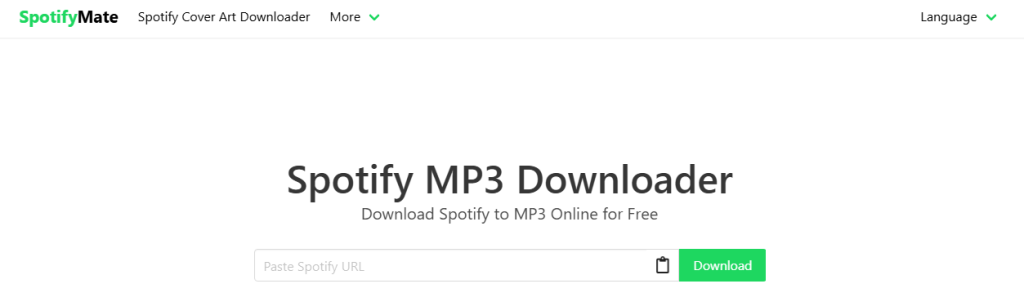
Spotifymate is a free, web-based Spotify downloader that allows users to convert and download Spotify songs, albums, and playlists into MP3 format. Unlike dedicated desktop software that requires installation, Spotifymate operates entirely within your web browser.
By simply copying a link from the Spotify app or web player and pasting it into the Spotifymate search bar, users can bypass the streaming restrictions and save audio files directly to their computers, smartphones, or tablets. Its primary appeal lies in its accessibility—it is completely free and requires no user registration.
Key Features of Spotifymate
To understand why this tool has gained traction, we need to look at its core offerings. Here are the standout features of Spotifymate:
1. No Software Installation Required
Because it is a cloud-based web application, Spotifymate works seamlessly across various operating systems, including Windows, macOS, Android, and iOS. You do not need to clutter your hard drive with additional software.
2. Completely Free to Use
There are no hidden subscription fees, premium tiers, or credit card requirements. The service is entirely free, supported primarily by on-site advertisements.
3. Retention of ID3 Tags
One of the biggest frustrations with free audio converters is the loss of metadata. Spotifymate attempts to retain essential ID3 tags, meaning your downloaded MP3 files will often keep the original album artwork, artist name, and track title, making it easier to organize your local music library.
4. PWA (Progressive Web App) Support
For mobile users, Spotifymate offers a PWA feature. This allows you to add a shortcut to your smartphone’s home screen, making it look and function almost like a native mobile app for quicker access.
Hands-On Spotifymate Review: Performance and Audio Quality
Features on paper are great, but real-world performance is what truly matters. We tested the tool extensively for this Spotifymate review to evaluate its speed and audio output.
Download Speed and Reliability
During our testing, Spotifymate performed reasonably well for single-track downloads. Once the Spotify URL is pasted, the server takes a few seconds to parse the link and generate a download button. However, when attempting to download massive playlists, the tool can occasionally lag or fail to fetch certain tracks. It is highly recommended to download songs individually or in small batches for the best experience.
Audio Quality
Many free online downloaders claim to offer “lossless” or 320kbps audio quality. In reality, Spotifymate generally outputs MP3 files at a standard bitrate, typically hovering around 128kbps to 256kbps.
While this quality is perfectly acceptable for casual listening on standard earphones or car speakers, audiophiles using high-end studio monitors or premium headphones will notice a lack of depth and clarity compared to Spotify Premium’s native “Very High” streaming quality.
Is Spotifymate Safe and Legal?
When using any free online downloading tool, safety and legality are the two most critical factors to consider.
The Safety Aspect: Beware of Ads
Is Spotifymate safe? The core website itself does not host malware. However, because the service is free, it relies heavily on advertising networks to keep the servers running.
Users will encounter display ads and, more importantly, pop-up or pop-under advertisements when clicking the download buttons. Some of these pop-ups may redirect you to suspicious third-party websites or prompt you to download unnecessary browser extensions. To ensure a safe experience, we highly recommend using a reliable ad-blocker (such as uBlock Origin) when visiting Spotifymate, and never click on “update” or “download” prompts that appear in pop-up windows.
The Legal Aspect: Copyright Concerns
It is crucial to understand the legal implications of using a Spotify downloader. Spotifymate circumvents Spotify’s protection. Downloading copyrighted music without permission is a direct violation of Spotify’s Terms of Service and infringes upon copyright laws in most countries.
Disclaimer: This article is for educational and informational purposes only. We do not endorse or encourage the piracy of copyrighted material. Always respect the rights of artists and creators.
Pros and Cons of Using Spotifymate
To summarize our findings, here is a quick breakdown of the advantages and disadvantages of this tool:
Pros:
- 100% free with no registration required.
- Web-based; works on PC, Mac, Android, and iOS.
- Preserves basic ID3 tags and album artwork.
- Very user-friendly interface.
Cons:
- Audio quality is not true 320kbps lossless.
- Intrusive pop-up ads can pose a security risk.
- Struggles with parsing very large playlists.
- Violates Spotify’s Terms of Service.
How to Use Spotifymate to Download Spotify Songs
If you have decided to use the tool for non-copyrighted audio or personal archiving, the process is incredibly straightforward. Follow these steps:
Step 1: Copy the Spotify Link
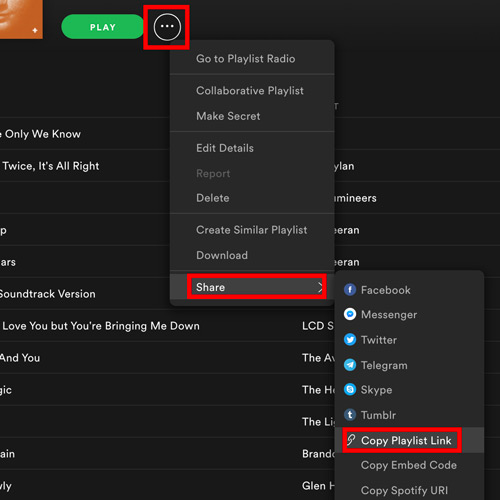
Open the Spotify app or web player. Find the song or playlist you want to download. Click the three dots (…) next to the track, select Share, and click Copy Song Link.
Step 2: Paste the Link into Spotifymate
Open your web browser and navigate to the Spotifymate website. Paste the copied URL into the prominent search box in the center of the screen.
Step 3: Generate the Download
Click the Download button next to the search box. The site will take a moment to process the link and fetch the audio data.
Step 4: Save the MP3 File
Once processed, a new download button will appear along with the track’s album art. Click this button to save the MP3 file directly to your device. (Note: If a pop-up ad opens during this step, simply close the new tab and return to the main page).
Top Spotifymate Alternative for Offline Listening
If you are frustrated by Spotifymate’s pop-up ads, its inability to handle large playlists, or its compressed audio quality, you will need a more robust solution. Here are the best alternatives available today:
If you want to completely avoid the safety risks of web-based downloaders and demand true high-fidelity audio, AudKit Spotify Music Converter is the undisputed best alternative to Spotifymate.
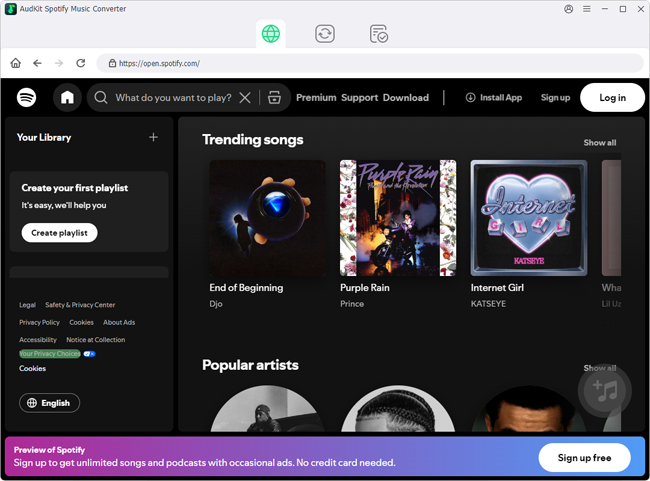
Unlike Spotifymate, AudKit is a dedicated desktop software (available for Windows and Mac) designed specifically for lossless audio extraction. It solves all the pain points associated with free online tools:
- True Lossless Quality: It downloads Spotify songs at a genuine 320kbps bitrate, preserving 100% of the original audio quality.
- Ad-Free and Secure: Because it is a standalone application, you will never encounter malicious pop-ups, redirects, or hidden malware.
- Batch Downloading at 5X Speed: Spotifymate struggles with playlists, but AudKit can download massive playlists consisting of hundreds of songs simultaneously at 5X faster speeds.
- Multiple Formats: While Spotifymate limits you to MP3, AudKit allows you to convert tracks into MP3, AAC, FLAC, WAV, M4A, and M4B.
While AudKit is a premium software, it offers a free trial so users can test its superior stability and audio quality before committing. For users serious about building a pristine, offline local music library, it is a highly worthwhile investment.
Final Verdict
Spotifymate is a fast, free web tool perfect for converting single Spotify tracks into MP3s without any software installation. While highly convenient for occasional use, it comes with notable drawbacks. Users must navigate intrusive pop-up ads, and the tool struggles with large playlists while failing to provide true 320kbps audio.
If you prioritize digital security, effortless playlist downloads, and premium sound fidelity, upgrading to a professional desktop application like AudKit Spotify Music Converter is highly recommended. Ultimately, users must choose between the quick convenience of a free online converter and the reliable safety, stability, and superior audio quality of dedicated software.

Andrew Rowley
 Staff Editor
Andrew Rowley has over 10 years of writing experience and is good at writing in audio technology and audio converter software. He can provide high-quality articles to help streaming music lovers explore music better.