





Quick Answer / Key Takeaways:
- No Native Option: TikTok does not have a built-in feature to download audio directly; you must rely on third-party tools or workarounds.
- Web Downloaders (Fastest): Use free web tools by copying the TikTok video link and pasting it into a TikTok-to-MP3 converter site for immediate downloads.
- Desktop Software (Highest Quality): For the best sound fidelity (up to 320kbps), batch conversion, and ID3 tag preservation, dedicated desktop audio extractors are highly recommended.
- Mobile Workaround: You can save a TikTok video directly to your phone’s camera roll and use a free video-to-audio app to extract the MP3 track locally.
We have all been there. You are scrolling through your “For You” page late at night, and suddenly, you hear it—the absolute perfect remix, an unreleased acoustic cover, or a hilariously catchy mashup. You want to add it to your Spotify playlist, listen to it offline on your commute, or even make it your morning alarm.
But then you hit a wall. You tap the “Share” icon, scan the options, and realize TikTok only lets you save the heavy, storage-hogging video. There is no simple “Save Audio” button.
As someone who spends an unhealthy amount of time tinkering with streaming audio technology, I completely understand the frustration of losing track of a brilliant song just because the creator took the video down or the algorithm buried it. The good news? Extracting crisp, high-quality audio from a TikTok video is incredibly simple once you know the right methods.
Here is your complete guide to downloading TikTok songs, preserving their audio quality, and building your ultimate offline library.
Why Saving TikTok Audio Isn’t Built-In
Before we dive into the solutions, it helps to understand the landscape. TikTok is designed as a visual-first platform. By forcing users to keep audio tied to the video, the platform keeps you inside its ecosystem. Furthermore, licensing complexities make offering a native “download MP3” button legally tricky for the app developers.
Because of this, we have to look at external solutions. The goal here isn’t just to get the audio—it is to get it safely, without bloated files, and in a format that actually sounds good on your headphones.
Method 1: Web-Based TikTok to MP3 Downloaders (The Quickest Route)
If you just stumbled upon a trending audio and want it on your device in the next 30 seconds, web-based extractors are your best friend. These tools operate entirely in your browser, meaning no software installation is required.
How it Works
Websites like SSSTik, TTSave, or MusicallyDown act as bridge servers. They parse the TikTok video URL, isolate the audio stream from the video stream, and repackage it into a downloadable MP4 or MP3 file.
Step-by-Step Guide:
Step 1. Open the TikTok app, find the video with the audio you want, tap the Share arrow, and select Copy Link.
Step 2. Open your mobile or desktop browser and navigate to a reputable TikTok audio downloader (e.g., SSSTik.io).
Step 3. Paste your copied URL into the search bar and hit Download.
Step 4. The site will process the link and offer several download options. Ignore the video options and click Download MP3.
This method is incredibly fast and perfect for one-off downloads. However, these sites are often cluttered with pop-up ads, and the audio bitrate is sometimes capped at 128kbps—which is fine for a phone speaker, but might sound slightly muddy on high-end audio gear.
Method 2: Ultimate Quality Hack—Downloading TikTok Songs from Spotify
Here is a brilliant workaround that most casual users overlook: almost every viral TikTok audio eventually gets a high-quality, official release on Spotify. Whether it is a trending phonk beat, a sped-up remix, or an acoustic cover, curators are constantly updating “TikTok Viral Hits” playlists on Spotify.
Instead of ripping a compressed, user-uploaded audio file directly from a TikTok video (which often suffers from background noise or volume capping), you can source the pristine, studio-grade track directly from Spotify. To do this, you need a specialized tool that can translate streaming formats into local files, and AudKit Spotify Music Converter is arguably the best in class for this job.
Main Features of AudKit Spotify Music Converter
- Easily download any Spotify audio content in 320kbps
- Convert Spotify music to MP3/AAC/FLAC/WAV/M4A/M4B
- Keep full ID3 tags like artist, year, cover, title, etc.
- Batch download at a fast 5X conversion speed
- Help listen to Spotify music offline anywhere
Why Choose AudKit Spotify Music Converter
AudKit is a dedicated desktop application designed to bypass the closed streaming ecosystem. It allows you to download entire Spotify playlists as local, unrestricted audio files. As an audio purist, I love this tool because it offers:
- True Lossless Extraction: Unlike standard web rippers, AudKit captures the audio stream without quality loss, allowing you to save tracks at a flawless 320kbps and a 48,000Hz sample rate.
- High-Speed Batch Conversion: You can drag and drop a massive playlist of 100+ TikTok trending songs and let the software process them simultaneously at up to 5X speed.
- Perfect ID3 Tag Preservation: It automatically fetches and embeds the metadata—including the album artwork, track title, artist, and track number—so your offline library looks immaculate.
Step-by-Step: Extracting TikTok Hits via AudKit
Step 1: Download and Launch
Install AudKit Spotify Music Converter on your Mac or Windows PC. When you launch the software, the Spotify desktop app will open automatically in the background to sync your library.
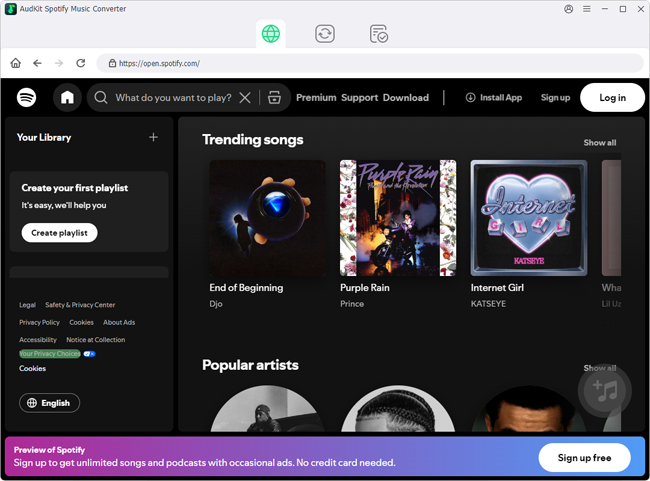
Step 2: Import Your TikTok Playlist
Go to Spotify and search for playlists like “TikTok Viral 2024” or find the specific trending track. Simply drag the song or playlist directly from the Spotify interface and drop it into the main conversion window of AudKit. (Alternatively, right-click the playlist, copy the link, paste it into AudKit’s search bar, and hit the “+” icon).
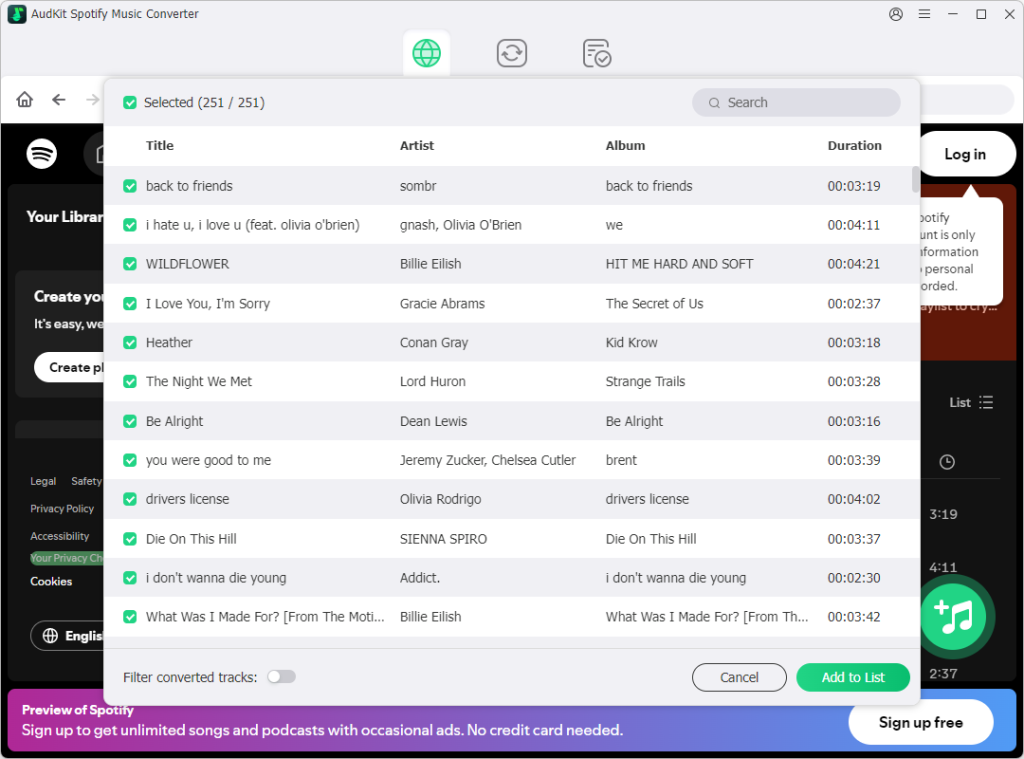
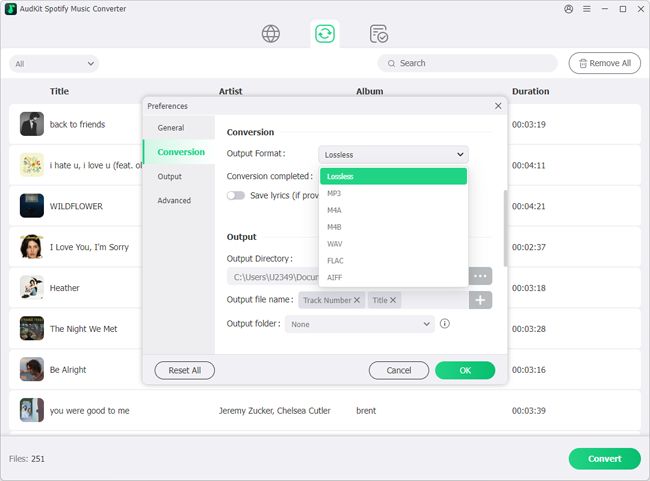
Step 3: Customize Output Parameters Click the menu icon (usually a gear or hamburger menu) and open the Preferences. Under the “Convert” tab, set your output format. For universal compatibility and high fidelity, select MP3, set the Bit Rate to 320 kbps, and the Sample Rate to 48000 Hz.
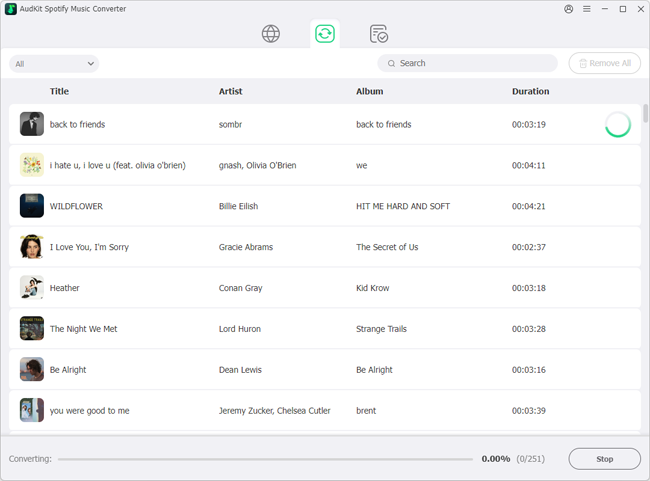
Step 4: Convert and Enjoy Offline Click the Convert button in the bottom right corner. AudKit will efficiently process the queue, saving the high-quality TikTok songs directly to your local hard drive. From there, you can transfer them to your phone, use them in your own video edits, or add them to your DJ software without any streaming restrictions.
Pro Audio Tips: Preserving Sound Quality and Metadata
As an audio enthusiast, I have to give you a quick crash course on why formats matter when you are downloading music from social media.
TikTok compresses audio to make the app load faster. When you download a song, you want to make sure you aren’t compressing it again.
- MP3 vs. M4A: While MP3 is universally recognized, M4A (which uses the AAC codec) often provides better sound quality at the same file size. If your downloader gives you the choice and you mostly listen on Apple devices, choose M4A.
- Bitrate Matters: Bitrate is the amount of data processed per second. 128kbps is standard radio quality, 256kbps is great, and 320kbps is the gold standard for MP3s. Always set your tools to output at the highest bitrate available to preserve the punchy bass and clear vocals of your favorite tracks.
- Organize with ID3 Tags: “download_12345.mp3” is a terrible file name. Use a free metadata editor (like Mp3tag on Windows or your native music app) to edit the ID3 tags. Tagging the track with the correct Artist, Title, and Genre ensures your downloaded TikTok songs integrate seamlessly into your Spotify Local Files or Apple Music library.
FAQs About How to Download TikTok Songs
1. Is the audio quality of a downloaded TikTok song as good as Spotify or Apple Music?
Generally, no. Streaming platforms like Spotify offer official studio-grade masters. TikTok audio is often uploaded by users and compressed by the platform. However, using a high-quality extractor ensures you are getting the absolute best version of whatever was uploaded to TikTok, without adding further degradation.
2. How can I turn a downloaded TikTok song into my phone’s ringtone?
Once you have the MP3 or M4A file, the process is simple. On Android, go to Settings > Sound & Vibration > Ringtone and tap the “+” to add your downloaded file. On iPhone, you will need to use the free GarageBand app to import the audio file, loop it, and export it as a custom Ringtone directly to your system settings.
3. What if a TikTok video has downloads disabled by the creator?
If a creator has turned off the native “Save Video” feature, you won’t be able to save it directly to your camera roll. However, web-based downloaders and desktop converters like AudKit Spotify Music Converter only need the public URL to extract the audio stream, bypassing the app’s local download restriction entirely.
Conclusion
The music discovery engine on TikTok is undeniably powerful. From sped-up remixes that breathe new life into 80s classics to completely original indie tracks, there is a wealth of audio gold waiting to be saved.
By utilizing web extractors for quick grabs, desktop converters for building a pristine, high-fidelity library, and local mobile apps for on-the-go extraction, you will never have to worry about losing a catchy tune again. Just remember to manage your metadata, aim for high bitrates, and enjoy your newly expanded offline music collection!

Andrew Rowley
 Staff Editor
Andrew Rowley has over 10 years of writing experience and is good at writing in audio technology and audio converter software. He can provide high-quality articles to help streaming music lovers explore music better.