




Key Takeaways
- The core problem: Streaming platforms save offline music as encrypted cache files, meaning you cannot play World Cup playlists on generic MP3 players, DJ software, or USB drives.
- The best solution: Using a specialized tool like the AudKit Spotify Music Converter allows you to securely extract audio and save it in universal formats like MP3, FLAC, or WAV.
- No quality drop: AudKit’s advanced decoding ensures you get 320kbps lossless quality while perfectly preserving all ID3 tags (album art, artist, track number).
- Universal playback: Once converted, your FIFA World Cup 2026 anthems can be played offline anywhere, completely free from restrictive app ecosystems.
The FIFA World Cup 2026 across North America is finally here, and if there is one thing that rivals the thrill of a last-minute goal, it is the music. From stadium-shaking anthems to rhythmic global beats, the official soundtrack defines the vibe of the entire tournament.
Whether you are hosting a massive backyard watch party, curating a hype playlist for your morning run, or preparing a DJ set for a post-match celebration, you need these tracks ready to go. But there is a catch: relying on streaming apps can be incredibly frustrating when you need true offline freedom.
If you have ever tried to export your favorite soccer anthems from a streaming app, you already know the roadblock. Today, as a music tech geek, I am going to walk you through exactly how to bypass streaming restrictions and download your FIFA World Cup 2026 songs and playlists directly to MP3 using the most reliable tool on the market.
Why Standard Streaming Downloads Fall Short
I hear the same complaint all the time: “I downloaded the playlist on Spotify Premium, why can’t I put it on my USB drive to play in my car?”
It is a fair question. When you click that “Download” toggle on your favorite streaming app, you are not actually downloading an MP3 file. Instead, the app downloads an encrypted cache file (often in OGG Vorbis format) that is permanently locked to that specific application.
Here is why that is a massive headache for soccer fans:
- Device Limitations: You cannot transfer those downloaded tracks to your smartwatch, an older iPod, a dedicated MP3 player, or a flash drive.
- Subscription Traps: The moment your Premium subscription lapses, your entire offline library vanishes.
- Mixing Restrictions: If you are a DJ wanting to mix the new 2026 World Cup anthem with Shakira’s classic “Waka Waka,” DJ software like Serato or Rekordbox cannot read encrypted streaming files.
To truly own your music and play it on your terms, you need a way to convert these streams into a universal, restriction-free format.
The Ultimate Solution: AudKit Spotify Music Converter
To get the job done efficiently without sacrificing audio fidelity, my top recommendation is the AudKit Spotify Music Converter.
Instead of recording audio through your computer’s soundcard (which ruins the sound quality and takes forever), AudKit acts as a high-speed bridge between your streaming library and your local hard drive. It reads the raw audio data and seamlessly transcodes it, making it the ultimate tool for liberating your playlists.
Main Features of AudKit Spotify Music Converter
- Easily download any Spotify audio content in 320kbps
- Convert Spotify music to MP3/AAC/FLAC/WAV/M4A/M4B
- Keep full ID3 tags like artist, year, cover, title, etc.
- Batch download at a fast 5X conversion speed
- Help listen to Spotify music offline anywhere
Here is why AudKit stands out as the best software for the job:
- Original Audio Quality: Under the hood, AudKit utilizes advanced encoding technology to output files at a pristine 320kbps. Every drumbeat, crowd chant, and bassline sounds exactly as the studio intended.
- Lightning-Fast Batch Conversion: Got a massive 50-song “History of the World Cup” playlist? You can drop the entire playlist into AudKit, and it will process it at up to 5X speed (on Windows), saving you hours of waiting.
- Smart ID3 Tag Retention: There is nothing worse than a folder full of files generically named “Track01.mp3.” AudKit automatically grabs the metadata, embedding the original album art, artist name, track title, and release year right into the new MP3 file.
Step-by-Step Guide: Using AudKit to Download World Cup Playlists
Ready to build your ultimate offline soccer soundtrack? The process is surprisingly simple. Here is how to use the AudKit Spotify Music Converter to get permanent MP3s.
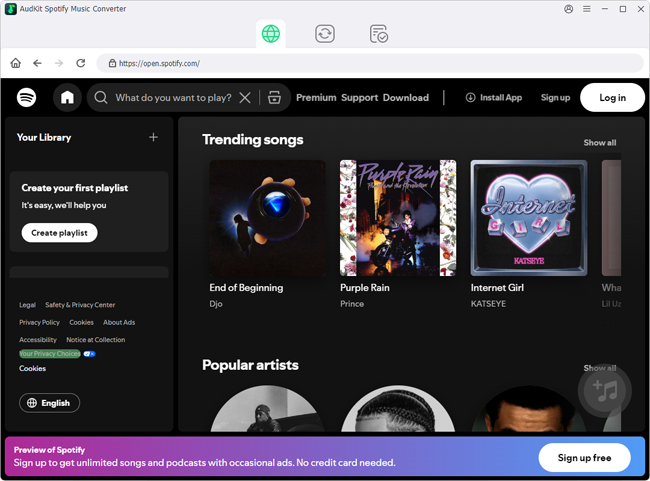
Step 1: Install AudKit and Launch the Software
Download and install the AudKit Spotify Music Converter on your Mac or Windows PC. When you launch the program, the Spotify desktop app will automatically open alongside it. Keep both windows open.
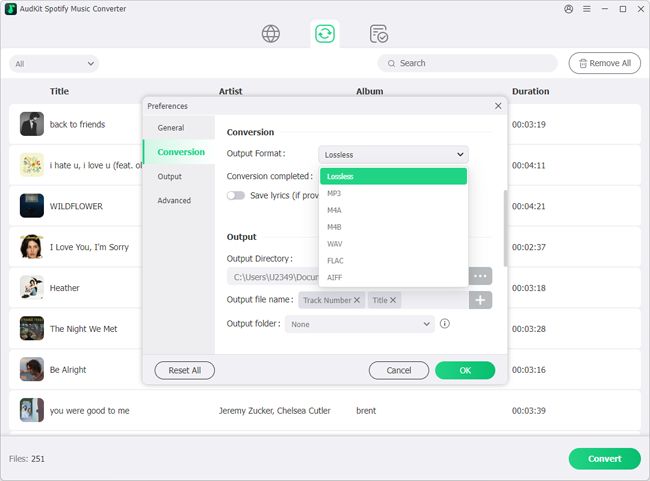
Step 2: Customize Your Output Settings
Before importing our World Cup tracks, we need to make sure the audio quality is dialed in. Click on the Menu icon (three horizontal lines) in the top right corner and select Preferences, then navigate to the Convert tab.
- Format: Select MP3 from the dropdown menu (or FLAC if you are an audiophile).
- Bit Rate: Set this to 320 kbps for the absolute best sound quality.
- Sample Rate: Set to 48000 Hz.
- Archive: You can choose to organize your output files by Artist or Album to keep your tournament tracks tidy.
Step 3: Add Your World Cup Playlist
Now, head over to the Spotify app. Search for the official “FIFA World Cup 2026” songs or your favorite curated soccer playlist. You have two easy ways to import them into AudKit:
- Drag and Drop: Simply click and drag the playlist cover from Spotify directly into AudKit’s main interface.
- Copy URL: Right-click the playlist, select Share > Copy link to playlist, paste that link into AudKit’s top search bar, and hit the “+” button.
AudKit will instantly read the link and populate a list of all the tracks. You can uncheck any specific songs you do not want to download.
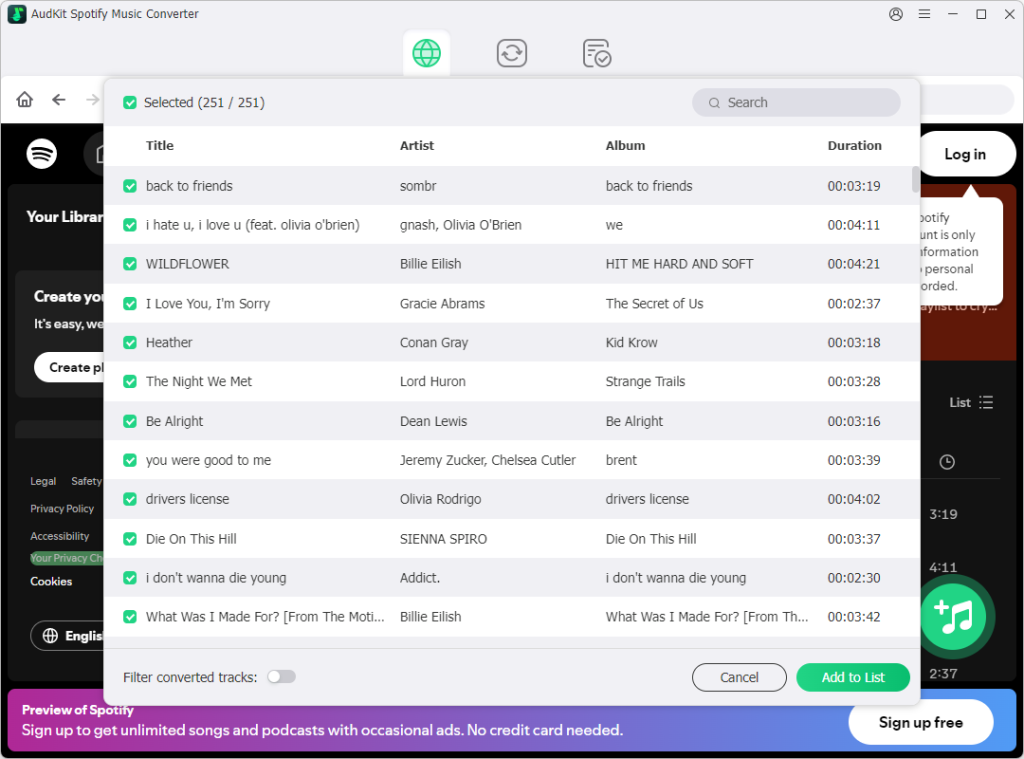
Step 4: Start the Batch Conversion
Once your songs are loaded, simply click the “Convert” button in the bottom right corner. AudKit will rapidly process the tracks at 5X speed, converting them into restriction-free MP3 files while seamlessly attaching all the beautiful cover art and metadata.
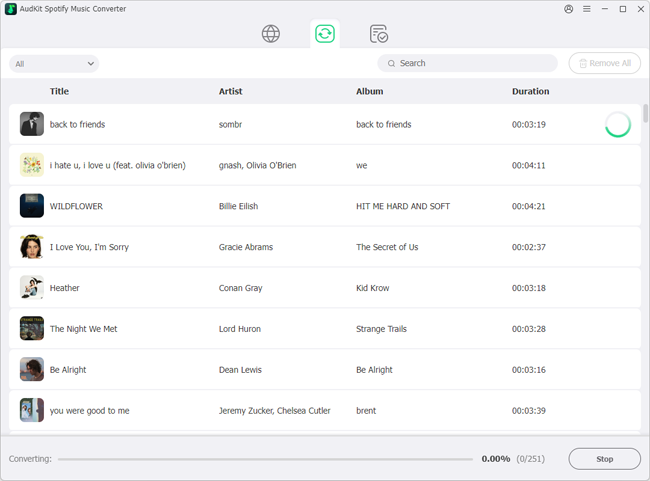
Step 5: Transfer and Enjoy
Once the conversion is complete, click the “Converted” icon (it looks like a folder with a musical note) to locate your new MP3 files on your computer. You are now completely free to drag and drop these tracks onto a USB thumb drive, sync them to your phone, or load them into your DJ deck. Let the games begin!
Bonus: Must-Have Tracks for Your World Cup Playlist
While we are enjoying the fresh anthems dropping for the 2026 tournament, no World Cup playlist is complete without the legendary tracks that defined past matches. When you are testing out your new AudKit batch conversion skills, make sure to add these undisputed bangers to your queue:
“Waka Waka (This Time for Africa)” – Shakira (2010): Arguably the greatest World Cup anthem of all time. The energy is unmatched.
“The Cup of Life (La Copa de la Vida)” – Ricky Martin (1998): The ultimate brass-heavy, stadium-shaking classic that brought global pop to the football world.
“Wavin’ Flag” – K’NAAN (2010): The unofficial anthem of 2010 that captured the pure emotion and unity of the beautiful game.
“We Are One (Ole Ola)” – Pitbull ft. Jennifer Lopez & Claudia Leitte (2014): Fast-paced, rhythmic, and perfect for getting a watch party jumping.
Frequently Asked Questions (FAQ)
Can I use AudKit to download World Cup songs for free without a Premium account?
Yes, you absolutely can! One of the biggest advantages of using AudKit Spotify Music Converter is that it works perfectly fine with free streaming accounts. The software extracts the audio directly, bypassing the app’s internal download limitations and automatically filtering out annoying audio ads in the process.
Will my downloaded MP3s keep the original album art and song details?
Yes. AudKit utilizes intelligent ID3 tag identification. This means your resulting MP3 files will retain all vital metadata—including the vibrant World Cup album artwork, artist names, album titles, and track numbers. Your local media player or car stereo will display them beautifully.
Is there a loss of audio quality when converting streaming music to MP3?
When using a high-end tool like AudKit, the quality drop is practically non-existent. Streaming platforms broadcast at a maximum of 320kbps. By setting your AudKit output preferences to a 320kbps bitrate, you are effectively performing a lossless extraction of the available stream, preserving crystal-clear audio.
Conclusion
Celebrating the FIFA World Cup 2026 should be about enjoying the beautiful game with friends, not fighting with your music apps over offline playback limits. By utilizing the AudKit Spotify Music Converter, you can effortlessly bypass format restrictions, download the official anthems in stunning 320kbps audio, and keep your playlists forever. Whether you are burning a mix for a road trip across the host cities or just setting the mood for a watch party, converting your tracks to universal MP3s gives you the ultimate freedom to enjoy the soundtrack of the tournament anywhere. Grab AudKit, queue up those playlists, and get ready for kickoff.

Andrew Rowley
 Staff Editor
Andrew Rowley has over 10 years of writing experience and is good at writing in audio technology and audio converter software. He can provide high-quality articles to help streaming music lovers explore music better.