





Quick Answer
- Why transfers usually fail: Standard web-based sync services rely solely on metadata matching (ISRC codes, song titles, and artist tags). When a track is region-locked, exclusive to Spotify, or labeled slightly differently in Tidal’s database, the sync fails—often resulting in 10% to 30% lost tracks.
- The reliable alternative: Using a dedicated desktop Spotify converter downloads your playlists into universal offline formats (such as MP3 or lossless FLAC) with intact ID3 tags, ensuring no tracks are left behind.
- How to get tracks into Tidal: Once downloaded, you can import your tracks into local media managers or sync your complete collection directly into your Tidal ecosystem using local file linking or cloud library tools.
Switching streaming platforms is often an exciting upgrade, especially if you are transitioning from Spotify to Tidal to experience HiFi audio, Master Quality Authenticated (MQA) tracks, or superior artist payout rates. However, moving years of curated playlists can quickly turn frustrating.
Many users find that standard online sync tools fail to match every song. Obscure remixes, live acoustic sessions, Spotify-exclusive podcasts, and region-restricted releases frequently drop off during the transfer process. If you want to move your entire library without leaving your favorite tracks behind, this guide covers both the root causes of transfer errors and the most reliable offline method to achieve a complete, lossless migration.
- Solved: Transfer Spotify to Tidal via Offline Tools
- Detailed Steps: Convert Spotify Playlists to Tidal
- Learn More: Why Can’t Completely Import Playlist from Spotify to Tidal
- Frequently Asked Questions
- Conclusion
Part 1. Transfer Spotify Playlists to Tidal via Offline Tools
Since all online music sync tool can’t transfer 100% Spotify playlists to Tidal, have you ever tried an offline tool? Please notice that not all offline programs are capable of transferring Spotify to Tidal with a 100% success rate. To be qualified for this difficult job, AudKit Spotify Music Downloader and Converter is the first choice.
Specially designed for Spotify music, this smart program is compatible with all types of Spotify audios, including songs, playlists, albums, podcasts, and even radios. Being proficient in processing Spotify music, AudKit is able to convert and download Spotify playlists to MP3, AAC, WAV, M4A, FLAC, and other commonly used audio file formats. The converted Spotify songs are truly local files so that you can import 100% songs from Spotify playlists to Tidal.
Main Features of AudKit Spotify Music Converter
- Download Spotify playlists locally for offline listening
- Convert Spotify tracks to other formats at 5X speed
- Stay 100% sound quality and metadata in the output Spotify files
- Available to transfer Spotify music to Tidal and any app
In addition, AudKit Spotify Music Converter and Downloader offers some hidden features. Spotify Free users are eligible to enjoy some premium features like ads-free songs, offline listening, unlimited skips, etc. Now let me explain it to you in detail.
For example, AudKit removes the inserted Spotify ads during the conversion. Thus, all converted Spotify audio files are totally ads free. Besides, the downloaded Spotify songs are saved on the local computer. Listeners are available for offline listening and unlimited skips in any music player.
Part 2. How to Transfer Spotify to Tidal Playlists: 4 Steps
As mentioned above, AudKit Spotify Music Converter and Downloader plays 2 roles for Spotify music lovers: a Spotify to Tidal playlist converter and a Spotify Premium provider. One tool serves for two purposes. That is a good deal, isn’t it?
Now let’s take a browse at how to transfer Spotify playlist to Tidal by using this smart tool.
Step 1 Import Spotify playlists to AudKit
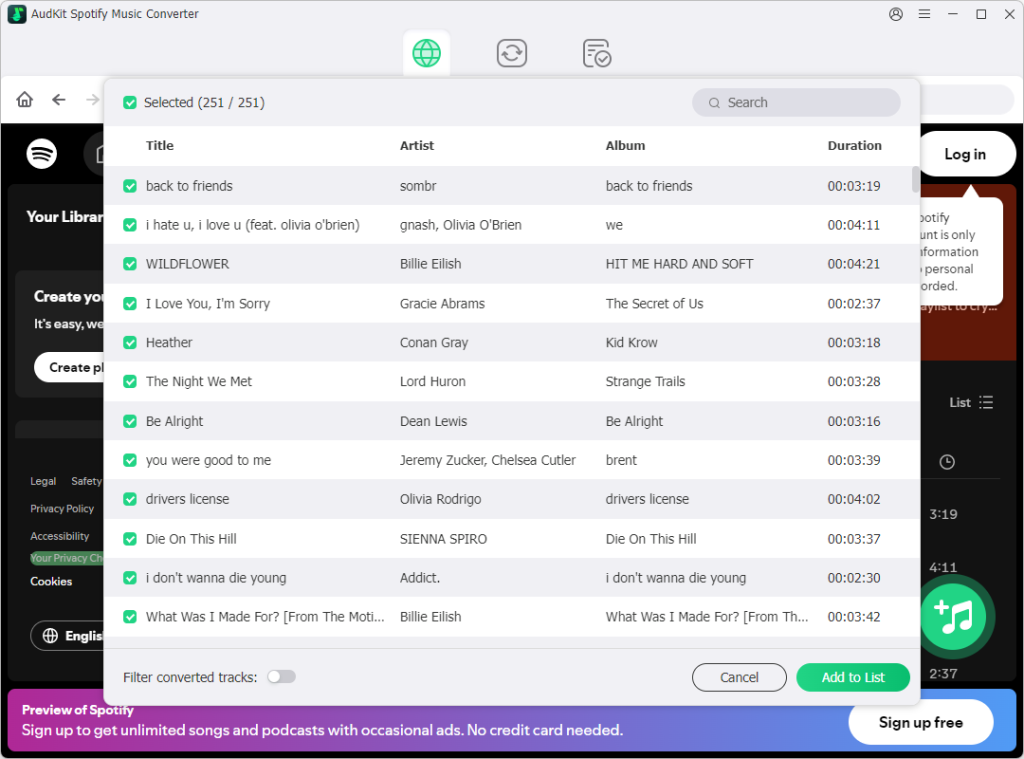
Download and launch AudKit Music Converter for Spotify on the computer. The Spotify Music app will automatically open. Directly drag & drop the playlist from Spotify to the interface of AudKit.
Step 2 Reset the output settings for Spotify songs
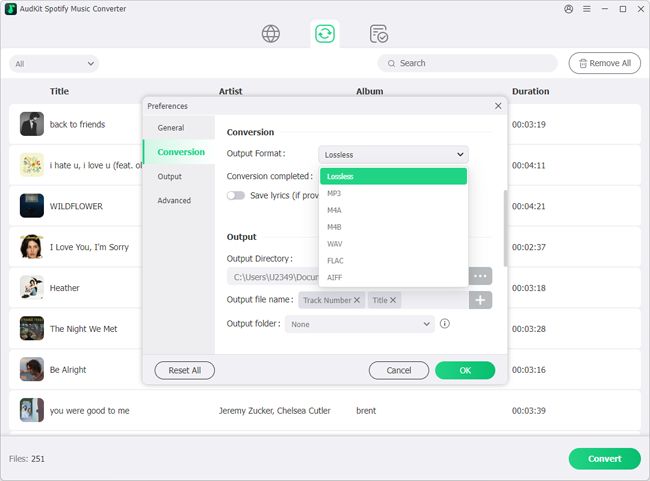
Open the menu button > ‘Preferences’ > ‘Convert’ to reset the output settings. To keep the best sound quality, you can choose MP3, 320 Kbps, 48000 Hz for Spotify songs. Then reselect the way to archive songs by Artist, Artist/Album, or None.
Step 3 Begin to download Spotify songs
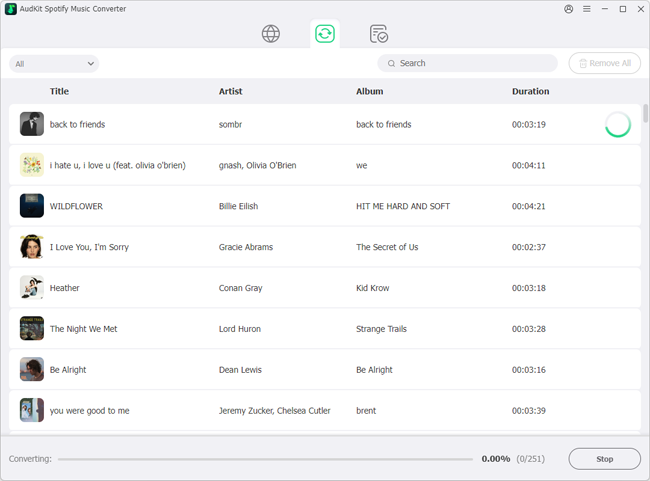
Tap on the ‘Convert’ tab to start conversion. When the conversion finishes, you can hit the “folder” icon to locate the output folder and double-check the output files.
Step 4 Import Spotify playlist to Tidal
Now, you can open the output folder locally. Then manually import the converted Spotify playlists to iTunes. After that, open Soundiiz to sync the converted Spotify playlists to Tidal from iTunes.
If you are still wondering whether you should register for AudKit software, why not have a try first? The free trial version of AudKit provides 1 minute’s conversion for each Spotify song. To unlock the time limitation, you need to buy the full version.
Learn More: Why Can’t Completely Import Playlist from Spotify to Tidal?
If you have previously tried web-only transfer utilities like Soundiiz, FreeYourMusic, or TuneMyMusic and ended up with missing tracks, the issue usually boils down to two structural limitations.
1. Catalog Discrepancies and Exclusive Releases
No two streaming services share an identical catalog. Even though both platforms advertise tens of millions of songs, licensing agreements vary significantly:
- Spotify Exclusives: Certain singles, live sessions, podcasts, and indie artist releases are licensed exclusively to Spotify and do not exist on Tidal’s servers.
- Metadata Mismatches: If a song on Spotify is listed as “Track Name (Remastered 2021)” while Tidal lists it as “Track Name (Deluxe Edition)”, an automated API matching script may fail to detect the match, marking the song as “Not Found.”
- Regional Licensing Restrictions: A song accessible in your region on Spotify might not be licensed for playback on Tidal in the same geographic territory.
2. Unstable Network Sessions and API Rate Limits
Web-based converters operate through third-party servers connecting to both Spotify and Tidal APIs simultaneously. Large playlists containing hundreds of tracks place high demand on these endpoints:
- Streaming platforms enforce strict API rate limits to prevent server abuse. If an automated script exceeds those thresholds, the session halts or skips remaining songs.
- Cloud-based matching easily drops connections during peak server hours, forcing users to restart the transfer without knowing which songs successfully synced.
An offline solution completely circumvents API limitations because the files are saved locally to your hardware rather than depending on a remote server handshake.
Frequently Asked Questions
Can I transfer Spotify playlists to Tidal on mobile devices directly?
Yes, online web tools like Soundiiz or TuneMyMusic offer mobile browser interfaces that sync playlists between cloud accounts. However, these tools still run into the metadata-matching limitations described above. For an exact, lossless transfer that includes tracks missing from Tidal’s catalog, you will need a computer to convert and manage the local audio files.
Does transferring playlists transfer my Spotify algorithmic recommendations to Tidal?
No. Migrating your playlists moves track titles, albums, and artists, but Tidal’s recommendation algorithm (My Daily Discovery, artist mixes, and personalized track radios) will take several days of active listening and “favoriting” to adapt to your taste profile.
Will converting Spotify tracks with AudKit Spotify Music Converter degrade the sound quality?
No. AudKit Spotify Music Converter captures audio at the maximum bit rate offered by Spotify (up to 320 Kbps Ogg Vorbis converted to 320 Kbps MP3 or lossless FLAC). The output audio retains its original dynamic range, clarity, and tag metadata.
Conclusion
Migrating your music collection from Spotify to Tidal does not have to mean sacrificing hard-to-find remixes, regional tracks, or custom playlists. While online web tools provide a fast starting point for standard pop and rock albums, they regularly miss tracks due to catalog differences and licensing boundaries.
Using an offline solution like AudKit Spotify Music Converter ensures that every single track in your playlist is preserved locally in high resolution. Once downloaded, you have complete ownership of your library, making it simple to organize, play, and integrate your entire collection across Tidal and any other playback system you choose.

Elle Johnson
 Staff Editor
Elle Johnson has been working in the technology and music software field for over 5 years. She is dedicated to providing easy-to-use guides and effective tips to play music anywhere.