





Quick Answer
- Tidal’s native downloads are cached files, restricting playback to the official app.
- AIFF is an uncompressed, lossless audio format perfect for audiophiles and DJs.
- To truly own your files, use AudKit Tidal Music Converter to download Tidal music to AIFF.
- This unlocks full access for personal offline listening across any device or software.
Tidal is a goldmine for audiophiles. Its high-fidelity tracks offer incredible depth and clarity. But there is a catch. When you save tracks for offline listening on the mobile app, you do not actually own the audio files.
Due to strict format limitations, those cached files are locked inside the Tidal ecosystem. You cannot transfer them to an MP3 player, burn them to a CD, or load them into DJ software like Serato.
If you want uncompressed, studio-quality sound, AIFF is the perfect format. The challenge is figuring out how to download Tidal music to AIFF safely and efficiently.
In this guide, I will show you exactly how to bypass these playback restrictions. We will use a dedicated tool to convert your favorite playlists for true offline freedom. Let’s dive in.
Part 1. Why Download Tidal Music to AIFF Format?
Before we tackle how to download Tidal music to AIFF, let’s talk about why this format matters. AIFF stands for Audio Interchange File Format. Apple developed it as an uncompressed, lossless audio standard.
Unlike MP3s, which discard audio data to save space, AIFF preserves every single detail. You get the exact studio-quality sound the artist intended. This makes it a top choice for audiophiles and professional DJs.
Another huge advantage of AIFF over WAV is metadata support. AIFF files easily store ID3 tags. This means your album art, artist names, and track titles remain perfectly intact.
When you download Tidal music to AIFF, you get the best of both worlds. You enjoy flawless, uncompressed audio quality while keeping your digital music library perfectly organized.
Part 2. The Best Tool to Download Tidal Music to AIFF
To overcome Tidal’s playback restrictions, you need specialized software. You cannot just drag and drop files from the Tidal app. This is where AudKit Tidal Music Converter comes into play.
I have tested dozens of audio tools, and AudKit stands out for its reliability. It is designed specifically to help users convert for personal offline listening. It handles high-fidelity streams without dropping the audio quality.
Main Features of AudKit Tidizer Music Converter
- Retain lossless audio quality and ID3 tags
- Download FLAC from Tidal losslessly
- Download songs from Tidal for offline use
- Offer 5X conversion speed and batch conversion
Key Features of AudKit Tidal Music Converter
- Lossless Quality: AudKit preserves the original HiFi and Master quality of your Tidal tracks. When exporting to AIFF, you get pure, uncompressed sound.
- Lightning Fast Speed: It boasts a 5X conversion speed on Windows and Mac. This batch conversion feature saves you hours when downloading massive playlists.
- Smart ID3 Tag Preservation: Nobody wants a library full of “Track 01” files. AudKit Tidal Music Converter automatically retains all metadata, including album covers and track numbers.
- Multiple Output Formats: While our focus is on how to download Tidal music to AIFF, AudKit also supports FLAC, WAV, MP3, and AAC.
Part 3. Step-by-Step: How to Download Tidal Music to AIFF
Ready to unlock full access to your favorite tracks? Here is a detailed tutorial on how to download Tidal music to AIFF using AudKit Tidal Music Converter.
Step 1: Install AudKit and Log In
First, download and install AudKit Tidal Music Converter on your Mac or Windows computer. Launch the software. You will immediately notice the built-in Tidal web player interface.
Click the “Log In” button and enter your Tidal account credentials. You do not need the official Tidal desktop app installed, which keeps your system lightweight.

Step 2: Configure the Output Format to AIFF
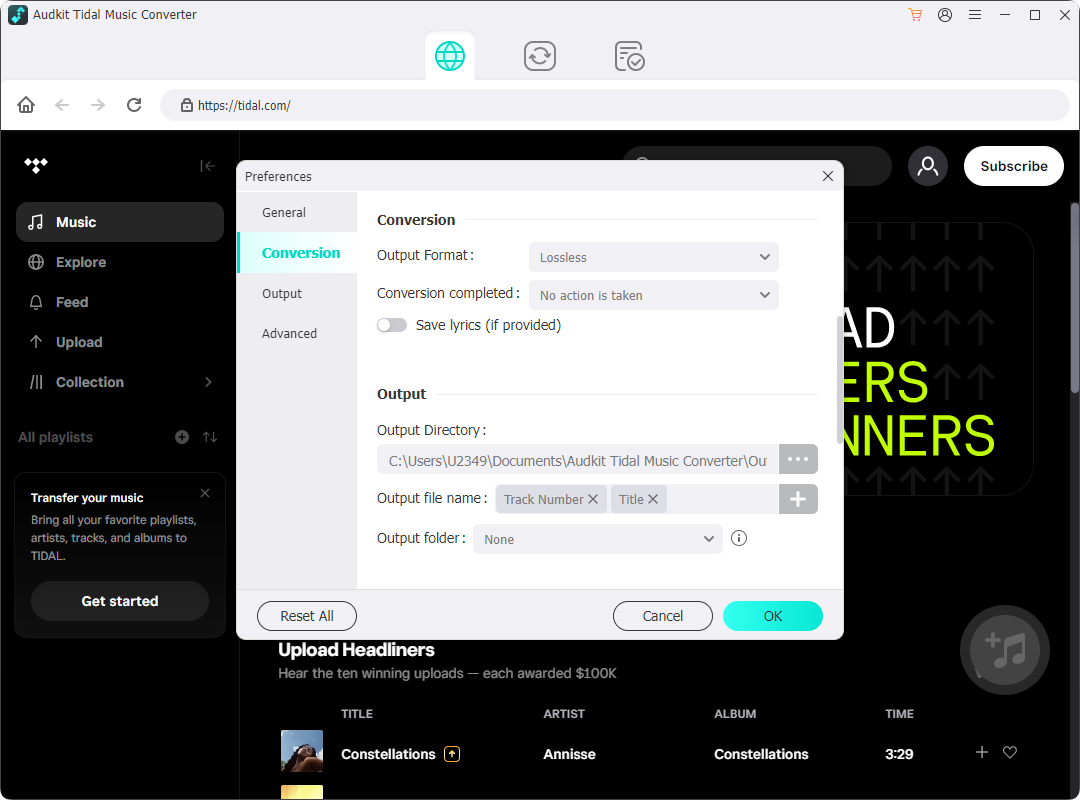
Next, we need to set our target audio format. Click the menu icon (usually three horizontal lines) in the top right corner. Select “Preferences” and navigate to the “Advanced” tab.
Under the format options, choose “AIFF”. To maximize audio fidelity, set the sample rate to 192kHz and the bit depth to 24-bit. Click “OK” to save your settings.
Step 3: Add Tidal Playlists to the Converter
Now, browse the built-in Tidal web player. Find the playlist, album, or track you want to convert for personal offline listening.
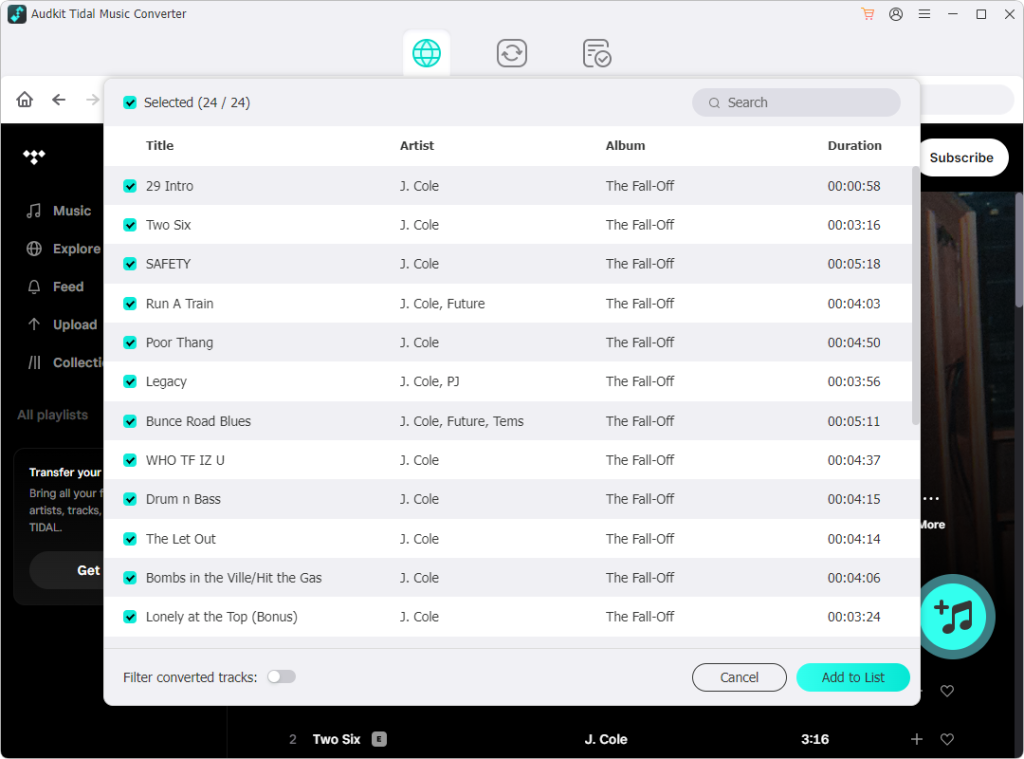
Open the playlist and look for the floating blue “+” button in the bottom right corner. Click it. AudKit Tidal Music Converter will instantly parse the playlist and show you a list of selectable tracks.
Step 4: Download Tidal Music to AIFF
Review the selected tracks and uncheck any you do not want to save. Once you are ready, click the “Convert” button at the bottom of the screen.
AudKit will now download Tidal music to AIFF at 5X speed. Once finished, click the “Converted” icon (a checklist symbol) to locate your uncompressed, high-fidelity AIFF files on your local drive.
Part 4. Tips for Managing Your Downloaded Tidal AIFF Files
Now that you know how to download Tidal music to AIFF, you will quickly build a massive local library. AIFF files are large. A single uncompressed track can easily exceed 50MB.
Storage Solutions
Because these files take up significant space, I highly recommend investing in an external SSD. Brands like Samsung or SanDisk offer fast, portable drives perfect for storing high-res audio.
DJ Software Integration
One of the biggest reasons to download Tidal music to AIFF is for DJing. Since you used AudKit Tidal Music Converter, your files are free from format limitations.
You can drag and drop these AIFF files directly into Rekordbox, Serato DJ, or Traktor. The preserved ID3 tags ensure your BPM and track keys are easily readable by the software.
High-Res Audio Players
To truly appreciate the lossless quality, play your new AIFF files through dedicated hardware. Transfer them to a high-res digital audio player (DAP) like an Astell&Kern or a Sony Walkman.
FAQs About How to Download Tidal Music to AIFF
Can I play AIFF files on my iPhone?
Yes. Apple devices natively support the AIFF format. You can easily sync the AIFF files you downloaded via AudKit Tidal Music Converter to your iPhone using Apple Music or Finder.
Does converting Tidal to AIFF improve the audio quality?
No conversion tool can add quality that was not there originally. However, downloading Tidal music to AIFF ensures zero quality loss. You retain the exact fidelity of the original Tidal stream.
Is AudKit Tidal Music Converter safe to use?
Yes, AudKit is designed strictly for personal use. It allows you to convert for personal offline listening safely. Distributing or selling the downloaded files violates copyright laws and Tidal’s terms of service.
Conclusion
Tidal’s high-fidelity library is incredible, but its playback restrictions can be frustrating. By learning how to download Tidal music to AIFF, you take full control of your listening experience.
AIFF provides the perfect balance of uncompressed, studio-quality sound and robust metadata support. It is the ultimate format for audiophiles and DJs alike.
With AudKit Tidal Music Converter, bypassing these format limitations is incredibly easy. It preserves the original audio quality and ID3 tags while offering lightning-fast batch conversion.

Elle Johnson
 Staff Editor
Elle Johnson has been working in the technology and music software field for over 5 years. She is dedicated to providing easy-to-use guides and effective tips to play music anywhere.