




Quick Answer
Finding the best running audio platform depends on your training goals and hardware preferences:
- Dynamic cadence pacing: Dedicated stride-matching apps shift song tempo dynamically to match steps per minute, locking in turnover without audio distortion.
- Native ecosystem streaming: Mainstream services optimize battery life on smartwatches by caching playlists locally over Wi-Fi.
- Universal watch playback: Standalone desktop converters transfer existing playlists to Garmin, Coros, or Polar watches for reliable, phone-free runs.
Ever since Spotify retired its cadence detection, endurance runners have struggled to maintain a steady stride using standard playlists. Finding an effective alternative is no longer just about browsing workout tracks; it requires precision tempo matching, battery conservation, and hardware freedom.
Carrying a smartphone disrupts arm swing and adds unwanted weight, while cellular streaming rapidly depletes smartwatch battery reserves. Phone-free running should be simple, not an exercise in troubleshooting sync failures at the trailhead.
Whether you need tempo shifting that adapts to your steps per minute or reliable local playback on a dedicated GPS watch, better options exist. We evaluated the leading running audio platforms across cadence alignment, wearable support, and offline endurance.

- Introduction
- Part 1. How We Picked the Best Running Music Services
- Part 2. Top 10 Spotify Running Alternatives
- Part 3. Running Music Platforms Feature Comparison
- Also Worth Considering
- Frequently Asked Questions About Running Music Platforms
- Conclusion
Part 1. How We Picked the Best Running Music Services
Choosing practical running music solutions requires balancing biomechanical pacing against hardware constraints. We evaluated candidates across four benchmarks:
First, we assessed tempo management, distinguishing dynamic cadence matching from static BPM curation. Dynamic tools read device accelerometer data to shift playback tempo in real time to match steps per minute (SPM). Static curation relies on pre-sorted 160–180 BPM playlists where runners deliberately match turnover to a fixed beat.
Second, we prioritized wearable compatibility across Garmin, Apple Watch, Wear OS, and Coros devices. Practical alternatives must operate phone-free through native watch apps or clean offline file transfers.
Third, battery efficiency directly affects workout reliability. Cellular streaming drains smartwatch batteries rapidly. Platforms supporting locally cached audio preserve essential battery life for double-digit training blocks and marathons.
Finally, we balanced catalog variety against specialized workout tools, prioritizing platforms that deliver reliable, stride-focused audio without recurring technical friction.
Part 2. Top 10 Spotify Running Alternatives
Selecting the right running music platform requires balancing stride synchronization, wearable hardware support, and battery efficiency. These ten options address key endurance needs.
AudKit Spotify Music Converter — Best Offline Utility for Non-Streaming Sports Watches
AudKit Spotify Music Converter resolves hardware playback limitations for athletes using performance watches like Garmin Forerunner, Coros Pace, or Polar Vantage. Rather than streaming over cellular connections, this desktop tool exports Spotify playlists into standard MP3, AAC, FLAC, or WAV files at 5X speed. It preserves 320 kbps lossless audio quality and ID3 metadata for direct USB transfer to onboard watch storage.
Main Features of AudKit Spotify Music Converter
- Easily download any Spotify audio content in 320kbps
- Convert Spotify music to MP3/AAC/FLAC/WAV/M4A/M4B
- Keep full ID3 tags like artist, year, cover, title, etc.
- Batch download at a fast 5X conversion speed
- Help listen to Spotify music offline anywhere
- How to transfer Spotify tracks to a running watch:
- Open AudKit Spotify Music Converter and load your running playlist.
- Set output format to MP3 at 320 kbps under Preferences.
- Click Convert, then connect your sports watch via USB to copy the MP3 files.
- Pros: Converts Spotify to open MP3/FLAC; enables phone-free playback on Garmin and Coros; retains 320 kbps fidelity.
- Cons: Requires a computer for initial transfer; no dynamic real-time tempo shifting.
- Best for: Distance runners wanting personal Spotify playlists on GPS watches phone-free.
- Key Specs: Output: MP3, AAC, FLAC, WAV | Quality: Up to 320 kbps | Wearables: Garmin, Coros, Polar | Platform: Windows/macOS.
RockMyRun — Best for Real-Time Cadence and Stride Matching
RockMyRun uses its proprietary myBeat algorithm to adjust track tempo between 120 and 180+ BPM dynamically, matching your steps per minute without pitch distortion. Continuous DJ mixes eliminate awkward silences between songs, helping you maintain momentum. Its standalone Apple Watch app tracks heart rate and manages playback phone-free.
- Pros: Dynamic real-time tempo shifts; gapless DJ mixes; standalone Apple Watch app.
- Cons: Mix catalog lacks individual on-demand hits; monthly subscription required.
- Best for: Runners seeking automated stride-cadence synchronization to reinforce consistent turnover.
- Key Specs: Offline: Yes | Wearables: Apple Watch, Wear OS | Cadence: Dynamic (myBeat) | Price: $7.99/mo.
Apple Music — Best Seamless Native Integration for Apple Watch Runners
Apple Music offers the lowest-friction audio experience for runners in the watchOS ecosystem. Operating as a native system service, it consumes less battery power than third-party apps while logging GPS routes and heart rate. You can cache curated workout playlists directly onto watch storage over Wi-Fi, using Siri for hands-free mid-stride controls.

- Pros: Native watchOS integration optimizes battery life; hands-free Siri controls; 100M+ lossless tracks.
- Cons: Lacks dynamic cadence matching; incompatible with Garmin or Coros devices.
- Best for: Apple Watch runners wanting phone-free local playback alongside full commercial music variety.
- Key Specs: Offline: Yes | Wearables: Apple Watch | Cadence: Static BPM playlists | Price: $10.99/mo.
Fit Radio — Best for Coach-Guided Interval and High-Cadence Running
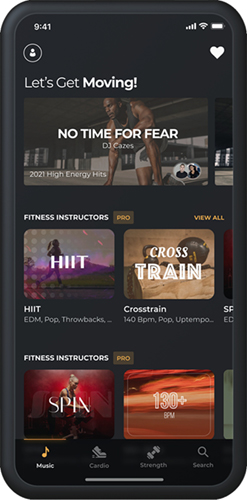
Fit Radio formats running sessions like studio fitness classes. It combines upbeat mixes locked to strict BPM targets (such as 170 or 180 SPM) with motivational voice coaching. The app includes dedicated modes for road runs, track sprints, and treadmill intervals, featuring reliable offline caching for low-reception routes.
- Pros: Mixes categorized by strict BPM targets; motivational audio coaching; dependable offline downloads.
- Cons: No standalone GPS sports watch app; voice overlays may distract some runners.
- Best for: Treadmill and interval runners building cadence discipline.
- Key Specs: Offline: Yes | Wearables: Phone companion app | Cadence: Fixed BPM mixes | Price: $9.99/mo.
PaceDJ — Best for Pacing Local Tracks to Foot Strikes
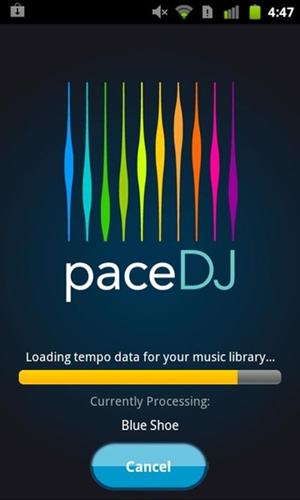
PaceDJ analyzes the audio tracks stored on your smartphone, indexing your personal music library by steps per minute. After you designate a target running cadence, the app automatically sequences matching songs. If a track deviates slightly from your goal, PaceDJ adjusts playback tempo up or down without vocal distortion.
- Pros: Uses your existing local music library; adjusts track tempo to cadence; minimal battery drain.
- Cons: Cannot access encrypted streaming services; dated interface.
- Best for: Runners with owned MP3 libraries seeking cadence-targeted playback.
- Key Specs: Offline: Yes | Wearables: Phone-based | Cadence: Target BPM adjustment | Price: Free basic / $2.99 one-time.
Amazon Music — Best Offline Sync Reliability for Garmin GPS Watches
Amazon Music provides a stable native streaming client within the Garmin Connect IQ ecosystem. Unlike apps prone to Bluetooth sync failures, it caches playlists reliably over Wi-Fi directly to compatible Garmin Forerunner and fēnix watches. Prime members access workout stations at no extra cost, while Unlimited subscribers unlock 100 million tracks.

- Pros: Reliable Wi-Fi syncing via Garmin Connect IQ; Prime music access included; massive catalog.
- Cons: Watch must remain connected to charger during large syncs; lacks dynamic tempo matching.
- Best for: Garmin watch owners wanting stable direct-to-wrist music syncing without a phone.
- Key Specs: Offline: Yes | Wearables: Garmin Connect IQ, Apple Watch, Wear OS | Quality: Compressed on watch | Price: Prime included / $9.99/mo Unlimited.
YouTube Music — Best Algorithmic Recommendations for Running Discovery
YouTube Music excels at generating high-energy workout radios based on your listening habits. It pulls from commercial studio tracks, DJ sets, and user-uploaded remixes to keep long training runs engaging. Standalone watch apps for Wear OS and Apple Watch feature smart downloads that cache top workout tracks overnight over Wi-Fi.

- Pros: Surfaces energetic remixes and live cuts; automated smart downloads on Wear OS; background video playback via YouTube Premium.
- Cons: Lacks dedicated Garmin or Coros watch apps; no BPM cadence tags.
- Best for: Wear OS smartwatch runners seeking automated music discovery.
- Key Specs: Offline: Yes | Wearables: Wear OS, Apple Watch | Cadence: Algorithmic radio curation | Price: $10.99/mo.
Spring Running Music — Best Simplified Metronome-Based Pacing App
Spring Running Music indexes workout audio strictly by steps per minute between 130 and 200 SPM. Designed by sports scientists, it matches songs to your target cadence to reinforce consistent turnover. An optional rhythmic metronome clicks over the track to maintain pacing discipline, while integrated GPS tracks route distance and pace.
- Pros: Filters music by exact SPM values; integrated metronome trains stride turnover; built-in GPS tracking.
- Cons: Niche catalog with fewer mainstream hits; lacks standalone sports watch support.
- Best for: Athletes working to eliminate overstriding with metronome discipline.
- Key Specs: Offline: Yes | Wearables: Phone-carried | Cadence: SPM-indexed tracks + metronome | Price: $7.99/mo.
Deezer — Best Alternative High-Fidelity Audio Curation for Sports Watches
Deezer delivers CD-quality audio streaming combined with broad wearable support across Garmin Connect IQ, Apple Watch, and Wear OS. While typical compressed streams top out at 320 kbps, Deezer HiFi provides 16-bit/44.1 kHz FLAC streaming at 1411 kbps for high-end sport earbuds. Its Flow feature generates endless upbeat playlists automatically.

- Pros: High-fidelity 16-bit FLAC audio; native Garmin and Wear OS apps; Flow feature automates upbeat playlists.
- Cons: Lossless files occupy substantial watch storage; lacks adaptive stride matching.
- Best for: Audiophile runners who prioritize sound separation on multisport watches.
- Key Specs: Offline: Yes | Wearables: Garmin Connect IQ, Apple Watch, Wear OS | Quality: 16-bit/44.1 kHz FLAC | Price: $11.99/mo.
Weav Run — Best Adaptive Music Technology for Sprint Intervals
Weav Run features an adaptive audio engine that shifts song tempo between 100 and 240 SPM in real time using your phone’s motion sensors. When you accelerate into an interval sprint, the tempo speeds up instantly without altering vocal pitch. As you slow for recovery, the music dials back seamlessly.
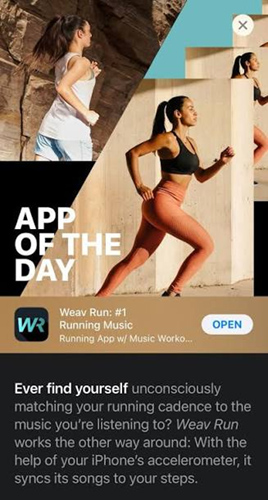
- Pros: Adjusts tempo across 100–240 SPM with zero pitch distortion; adapts instantly to interval surges; reduces joint braking stress.
- Cons: Limited to proprietary mastered tracks; iOS only and requires carrying the phone.
- Best for: Interval runners and 5K racers wanting audio that mirrors real-time pace surges.
- Key Specs: Offline: Yes | Wearables: iOS with Apple Watch companion | Cadence: Dynamic tempo shifting (100–240 SPM) | Price: $4.99/mo.
Part 3. Running Music Platforms Feature Comparison
Selecting an effective running platform requires balancing cadence flexibility, hardware constraints, and wearable battery conservation.
| Evaluation Dimension | Dynamic Cadence Apps (e.g., RockMyRun) | Native Streaming Services (e.g., Apple Music) | Dedicated Local Storage (Garmin / MP3) |
|---|---|---|---|
| Dynamic BPM Matching | Yes; shifts song tempo in real time to match steps per minute (SPM). | No; runners rely on static, pre-curated 160–180 BPM playlists. | No; playback relies on fixed-tempo audio files organized manually. |
| Wearable Integration | Standalone watchOS and Wear OS apps; syncs with cadence sensors. | Deep native integration with Apple Watch and Wear OS background playback. | Native onboard flash storage on Garmin, Coros, Polar, and Amazfit watches. |
| Battery Consumption | Moderate to high; continuous sensor processing increases watch drain. | High when streaming over LTE; moderate when cached locally over Wi-Fi. | Lowest power draw; wireless radios remain switched off during GPS tracking. |
| Catalog & Bitrate | Continuous DJ sets and fitness mixes; 128–192 kbps lossy audio. | 100M+ commercial songs; 256 kbps AAC or lossless ALAC options. | Any imported audio track; user-selected bitrates up to 320 kbps MP3 or FLAC. |
| Pricing Model | $7.99–$12.99/month fitness subscription. | $10.99/month streaming subscription. | Zero ongoing subscription fees for locally owned audio files. |
Hardware battery limits dictate workout success. Cellular streaming drains smartwatches rapidly during endurance runs. Playing local audio files directly from onboard storage eliminates wireless radio consumption, preserving battery life for GPS tracking. Dynamic cadence apps excel during form retraining, while local storage offers unmatched reliability for distance running.
Also Worth Considering
While dedicated streaming services and cadence tools suit standard workouts, specific endurance scenarios require alternative hardware or format solutions.
Onboard-Storage Bone-Conduction Headphones (Shokz OpenRun Pro / Swim)
For runners who prefer leaving both smartphone and sports watch behind, open-ear MP3 headphones like the Shokz OpenSwim provide an independent hardware solution. Bone-conduction transducers transmit audio vibrations through your cheekbones, leaving ear canals open for traffic awareness. With onboard flash memory, these headsets play locally stored MP3 files without Bluetooth connection drain, delivering up to eight hours of continuous playback.
Pure Cadence Metronomes and Metric-First Drill Apps
When biomechanical efficiency takes priority over musical entertainment, dedicated metronome tools eliminate acoustic distractions like irregular intros:
- Pro Metronome & RunCadence: Lightweight apps generating crisp percussive clicks at your exact SPM target to shorten ground contact time.
- Audio-Blended Drill Tools: Utilities that overlay a steady metronomic tick across podcasts or background tracks.
- Built-in Garmin Cadence Alerts: Native audible or vibrating cadence warnings configured directly in Garmin running profiles without extra software.
Utility Bridge for Wearables: AudKit Spotify Music Converter
Endurance athletes frequently hit a barrier where streaming over smartwatch connections causes sync failures or rapid battery depletion. Spotify discontinued its built-in cadence detection, and cellular streaming exhausts watch batteries before marathon completion.
AudKit Spotify Music Converter bridges this gap by letting runners export Spotify workout playlists into standard MP3, AAC, or FLAC files. By preserving 320 kbps fidelity and ID3 metadata, it allows athletes to load high-tempo playlists directly onto sports watches like Coros, Garmin, or Polar via USB. Storing files locally on your watch conserves battery power for GPS logging and heart-rate monitoring, providing phone-free reliability without ongoing subscription overhead.
Frequently Asked Questions About Running Music Platforms
Why was Spotify Running removed, and how can runners match BPM today?
Spotify retired its cadence feature to simplify app maintenance. Runners now match tempo using dynamic apps like RockMyRun or by following pre-curated 160–180 BPM playlists.
Which running app automatically adjusts music tempo to match running cadence?
RockMyRun and Weav Run dynamically shift playback tempo in real time using device motion sensors, matching your physical steps per minute without pitch distortion.
How can runners play Spotify playlists on a Garmin watch without sync errors?
Converting playlists into standard MP3 files using a desktop utility allows direct USB transfer to Garmin or Coros watches, bypassing Wi-Fi sync timeouts and platform errors.
Is it better to stream music on a smartwatch or store songs offline while running?
Local offline storage is far superior. Cellular streaming rapidly exhausts smartwatch batteries and drops out in poor reception areas, while local playback preserves battery life for GPS tracking.
What cadence range is optimal for injury prevention during distance runs?
A rhythm between 160 and 180 steps per minute is widely recommended. Running to tracks within this window shortens stride length, softens footfalls, and reduces joint impact stress.
Conclusion
Finding the best Spotify running alternatives involves matching your training priorities with the right hardware setup. If you need dynamic tempo shifts to lock in a 170 SPM cadence, specialized fitness music apps provide the real-time adjustments mainstream platforms discontinued. For everyday easy runs, native watchOS and Wear OS clients offer convenient, low-friction wrist controls.
For marathon training and long trail efforts, locally stored audio remains the gold standard. Playing files directly from onboard watch memory eliminates streaming battery drain and ensures uninterrupted music anywhere. If you want to keep your favorite playlists on a dedicated GPS watch without playback limits, AudKit Spotify Music Converter provides an effective bridge for phone-free endurance runs. Choose the setup that fits your routine, lace up, and run untethered.
This tool is intended for personal backup of content you have the right to access. Users must comply with local copyright laws.

Andrew Rowley
 Staff Editor
Andrew Rowley has over 10 years of writing experience and is good at writing in audio technology and audio converter software. He can provide high-quality articles to help streaming music lovers explore music better.