




Quick Answer
In this SpotiSaver review, here is the bottom line on how the browser-based downloader actually performs:
- Audio Sourcing: It does not extract streams from Spotify servers. Instead, it parses playlist metadata and matches tracks against YouTube, capping real audio quality well below true 320kbps MP3.
- Limits & Trust Score: The free tier stops at 100 tracks per playlist and appends a “Spotisaver” watermark to every filename, while security scanners like ScamAdviser score its shifting domains at 1/100.
- Best Use Case: Fine for quick, casual MP3 grabs. For lossless FLAC output, exact studio versions, and huge playlists, use a dedicated desktop Spotify converter instead.
Web-based Spotify downloaders come and go, constantly hopping across domains like .net, .online, and /en1 subdirectories to stay online. If you landed on this SpotiSaver review, you probably want a quick way to grab playlists for a car USB drive or local MP3 player without installing clunky software. Convenience is the main appeal.
Yet browser tools carry hidden trade-offs. Users frequently run into “Resource not found” playlist errors, intrusive ad redirects, and mandatory filename watermarks appended to every song. Worse, files advertised as 320kbps often turn out to be re-encoded YouTube audio—complete with music video intro chatter and missing ID3 metadata tags.
To see if this tool is worth your time or money, we tested its output using Spek acoustic spectrum analysis and Mp3tag. Below, we break down SpotiSaver’s real audio quality, €2 to €5 pricing gates, exact fixes for loading errors, and when to switch to a dedicated desktop converter for true lossless archiving.
SpotiSaver Overview: How the Web Downloader Works
SpotiSaver is a browser-based utility built for casual listeners who want quick offline files without installing desktop software or logging into their accounts. In any technical SpotiSaver review, the most critical mechanism to understand is how the tool acquires audio. It does not capture streams directly from Spotify servers. Instead, the web app reads the public link you paste, extracts the basic ID3 metadata (track title, artist, and duration), and queries external video platforms like YouTube to find a matching audio stream.
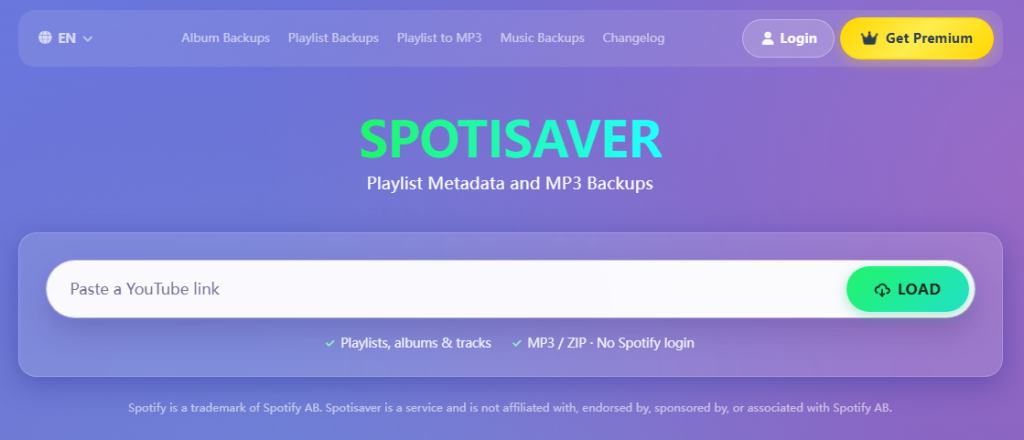
Once matched, the platform converts those external streams into MP3 files. It is an MP3-only service—you cannot select lossless FLAC, WAV, or M4A formats. However, unlike single-track web rippers that force you to click every song individually, SpotiSaver sets itself apart in the browser downloader market by offering ZIP bulk archive downloads and TXT tracklist exports across both its free and paid tiers.
To fund its server costs, the platform divides its features between a restricted free version and short-term paid passes:
- Free Tier Limits: Processes up to 100 tracks per playlist, restricts you to 1 concurrent download queue, and appends a mandatory “Spotisaver” watermark suffix to every output filename.
- One-Time Premium Passes: Costs €2 for 30 days or €5 for 3 months as a one-time payment without auto-renewal. Upgrading raises the batch cap to 1,000 tracks per playlist, removes the filename watermark, unlocks YouTube Music link support, and adds email delivery for finished ZIP archives.
This setup makes the tool convenient for grabbing a quick road-trip mix on a Chromebook or mobile browser, though the reliance on third-party video matching creates clear trade-offs for serious audio archiving.
Audio Quality and Security Risks Revealed
A thorough SpotiSaver Review must look beyond download speed to examine true file fidelity. While the site advertises 320kbps output, Spek acoustic spectrum analysis reveals a hard frequency cutoff at 15.5 kHz to 16 kHz. The MP3 header reads 320kbps, yet the underlying audio is simply an up-converted 128kbps AAC or Opus stream pulled from YouTube—bloating file size without restoring lost detail. Furthermore, relying on text-based search queries rather than direct audio extraction causes constant version mismatches. You might queue a studio album only to end up with music video dialogue intros, live crowd noise, or user covers.
Metadata formatting and web safety pose additional hurdles. Inspecting files in Mp3tag reveals missing track numbers, mismatched album art, and a mandatory “Spotisaver” watermark appended to every free-tier filename. Meanwhile, security scanners like ScamAdviser and Gridinsoft assign the platform a 1/100 trust score, driven by its frequent domain hopping (.net, .online, /en1) and aggressive pop-up ad redirects triggered during downloads.
Pros:
- Requires zero software installation and runs in any desktop or mobile browser.
- Bundles converted playlists into a single ZIP archive for one-click saving.
- Exports plain-text (TXT) tracklists on both Free and Premium tiers for playlist backups.
- Offers low, non-recurring Premium passes (€2 for 30 days or €5 for 3 months) without auto-renewal traps.
Cons:
- Capped at fake 320kbps MP3s transcoded from lower-bitrate video sources, with zero FLAC or WAV support.
- Pulls incorrect audio versions, including music video skits and user covers.
- Appends “Spotisaver” watermarks to all free filenames and caps free queues at 100 tracks.
- Flags 1/100 domain trust scores due to rotating URLs and intrusive ad scripts.
How to Fix Common SpotiSaver Errors and Payment Issues
During our SpotiSaver review tests, we encountered frequent API timeouts, stuck progress bars, and payment delivery delays. Because the web tool relies on public metadata scraping and external server queues, minor configuration oversights will halt your downloads immediately. Here is how to fix the most common failures.
Fix “Private Playlist” and Loading Errors
SpotiSaver cannot read user-authenticated links or private collections. If the parser throws a loading error, you must change your playlist visibility and allow Spotify’s API cache to update before trying again.
- Open the Spotify app or web player and navigate to the playlist you want to export.
- Click the three-dot menu icon below the playlist title and select Make public (or Add to profile).
- Wait at least 60 full seconds for Spotify’s external API cache to refresh; pasting the link immediately will still trigger a “Private Playlist” error.
- Copy the fresh share URL, paste it into the SpotiSaver search bar, and click Load.
Resolve “Resource Not Found” and Endless Hang Ups
When the progress bar freezes at 99% or returns a “Resource Not Found” alert, the external matching engine is usually timing out on unindexed audio or hitting tier bottlenecks. Run through this checklist to clear the queue:
- Trim playlist size: Keep collections under 100 tracks on the Free tier (or 1,000 on Premium) and run only 1 concurrent playlist download at a time.
- Remove non-music files: Delete podcasts, audiobooks, and local files from the playlist, as the YouTube metadata matcher cannot process them.
- Avoid peak server hours: Run large ZIP batch exports during off-peak morning hours when external conversion servers face less congestion.
Recover Missing Premium Activation Codes
Upgrading to the €2 (30-day) or €5 (3-month) Premium tier requires an activation code that often goes missing after checkout. Follow these steps to locate your key and unlock your 1,000-track limit.
- Identify the exact email address tied to your PayPal account, even if you typed a different contact email on the checkout page.
- Log into that email inbox and open the Spam, Junk, or Promotions folder.
- Search for automated receipts from the payment processor containing your alphanumeric activation key.
- Copy the code, return to the SpotiSaver homepage, and paste it into the Premium activation prompt to remove the “Spotisaver” filename watermark.
The Best SpotiSaver Alternative: AudKit Spotify Music Converter
If this SpotiSaver review shows that web-based metadata matching falls short for your audio library, switching to a dedicated desktop tool solves the root problem. SpotiSaver still works fine when you just need to grab a few casual MP3s on a Chromebook or mobile browser without installing software. However, audiophiles, DJs, and collectors building permanent local archives need AudKit Spotify Music Converter.
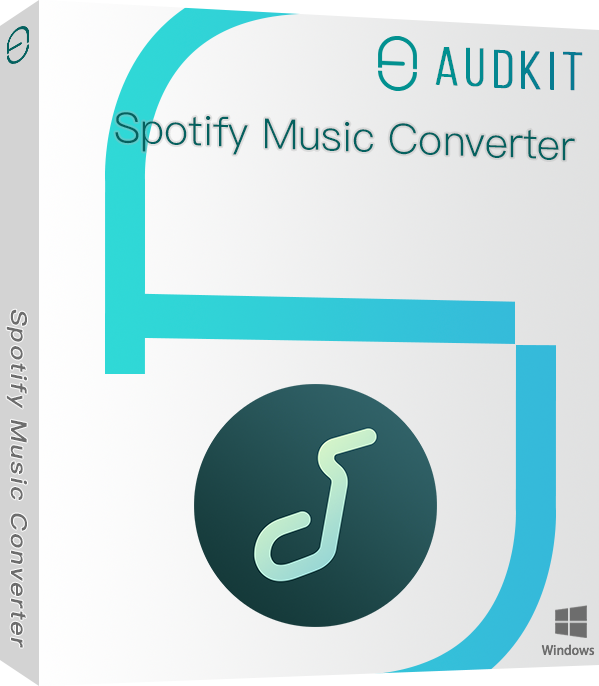
Main Features of AudKit Spotify Music Converter
- Easily download any Spotify audio content in 320kbps
- Convert Spotify music to MP3/AAC/FLAC/WAV/M4A/M4B
- Keep full ID3 tags like artist, year, cover, title, etc.
- Batch download at a fast 5X conversion speed
- Help listen to Spotify music offline anywhere
Instead of scraping third-party video platforms and risking live covers or music video intros, AudKit processes audio directly within the Spotify ecosystem via its built-in web player. It unlocks playback restrictions on both Spotify Free and Premium accounts, allowing you to save exact studio originals for personal offline listening.
- True Lossless & Multi-Format Output: Convert encrypted OGG Vorbis streams directly to uncompressed FLAC, WAV, AAC, M4A, M4B, or true 320kbps MP3 with customizable sample rates.
- 5X Batch Conversion Speed: Download entire playlists, albums, podcasts, and audiobooks at up to 5X speed on Windows (1X default on Mac) with zero “Spotisaver” filename watermarks or 100-track free limits.
- 100% Original ID3 Tagging: Automatically retain full metadata—including embedded cover art, track numbers, artist, and album titles—while stripping out audio ads for uninterrupted car USB or Hi-Fi playback.
To see exactly how browser-based matching stacks up against direct desktop conversion, check the side-by-side breakdown below.
SpotiSaver vs. AudKit Spotify Music Converter
| Feature / Dimension | SpotiSaver (Web Tool) | AudKit Spotify Music Converter |
|---|---|---|
| Audio Source Mechanism | External metadata matching (YouTube) | Direct Spotify ecosystem conversion |
| Output Formats | MP3 only | MP3, FLAC, WAV, AAC, M4A, M4B |
| True Audio Quality (Spek Verified) | Transcoded ~128–160kbps (16kHz cutoff) | True 320kbps & Lossless (20kHz+ full spectrum) |
| Batch Download Limits | 100 tracks (Free) / 1,000 tracks (Paid) | Unlimited playlists and full libraries |
| ID3 Tags & Filenames | Basic tags; adds “Spotisaver” suffix on free tier | 100% original metadata; customizable clean filenames |
| Safety & Stability | Low trust score; frequent domain changes & ad redirects | Ad-free, local desktop installation |
| Pricing | Free / €2 (30 days) / €5 (3 months) | Free trial / Paid desktop license |
When comparing both tools side by side in this SpotiSaver review, the right choice depends entirely on how you listen. SpotiSaver works well as a quick, browser-based utility if you want to grab a small playlist for casual listening or export a TXT tracklist on a Chromebook. Paying €2 for a month of SpotiSaver Premium removes the annoying filename watermark and expands your batch queue to 1,000 songs, though it still relies on external YouTube matching.
If you are archiving a permanent local collection for Hi-Fi gear, DJ software, or a car USB drive, web-based matching falls short. AudKit Spotify Music Converter eliminates version mismatches and high-frequency cutoffs by pulling directly from the original stream, making it the better investment for strict audio accuracy and clean metadata.
FAQs About SpotiSaver
Before wrapping up this SpotiSaver review, here are quick answers to common troubleshooting and quality questions.
Is SpotiSaver safe to use?
Scanners like ScamAdviser and Gridinsoft score its domain trust as low as 1/100 due to frequent URL hopping and ad redirects. Always run an ad blocker and convert tracks strictly for personal offline listening.
Why does SpotiSaver say “Resource not found” on my playlist?
Your playlist is likely Private. Switch it to Public via Spotify’s three-dot menu, then wait one full minute for the server cache to refresh before clicking Load.
Does SpotiSaver output true 320kbps MP3s?
No. It matches Spotify metadata against external sources like YouTube rather than pulling direct studio streams. Spek spectrum analysis reveals re-encoded audio caps alongside occasional live or music video version mismatches.
How can I remove the “Spotisaver” filename tag without paying?
Skipping the €2 (30-day) or €5 (3-month) pass leaves a watermark suffix on every file. Extract your downloaded ZIP archive and clear the text locally using macOS Finder’s batch Rename tool or Bulk Rename Utility on Windows.
What does this SpotiSaver review recommend for lossless playlists?
If the 100-track free cap or MP3-only limit holds you back, AudKit Spotify Music Converter handles batch conversion into lossless FLAC, WAV, or 320kbps MP3 while keeping original ID3 tags intact.
Conclusion
As this SpotiSaver review shows, the browser tool works fine if you only need a few casual MP3s and can tolerate external YouTube audio matching and ad redirects. It handles quick TXT tracklist exports and basic ZIP downloads without requiring any software installation.
Paying €2 for a 30-day pass or €5 for 3 months removes the “Spotisaver” filename watermark and raises your playlist limit from 100 to 1,000 tracks. However, a paid code cannot fix the underlying transcode loss, missing FLAC support, or occasional music video audio mismatches. Those limits are built into how the web tool sources its files.
If you want to archive large playlists, podcasts, or albums without quality drops, switch to AudKit Spotify Music Converter for secure, lossless batch downloads and accurate ID3 tags on your desktop.

Andrew Rowley
 Staff Editor
Andrew Rowley has over 10 years of writing experience and is good at writing in audio technology and audio converter software. He can provide high-quality articles to help streaming music lovers explore music better.