




Quick Answer
- What it is: As this TidaLuna review highlights, TidaLuna is the active successor to the discontinued
uwu/neptuneframework. It injects a custom plugin loader and a Luna Settings panel into the official TIDAL desktop client. - Safety and stability: The open-source core (
Inrixia/TidaLuna) is transparent to audit on GitHub. However, installing unverified community plugins carries standard client-modding and Terms of Service caveats. - Desktop limits: TidaLuna unlocks custom themes, Discord Rich Presence, and Exclusive Mode tweaks, but it cannot enable offline desktop playback. You will need a dedicated third-party audio converter to save local lossless files.
Introduction
While TIDAL delivers pristine 24-bit/192kHz Hi-Res FLAC streams, its official desktop client feels remarkably rigid. Audiophiles get studio-grade sound, yet basic quality-of-life perks—custom themes, Discord Rich Presence, and granular output toggles—remain completely absent. This in-depth TidaLuna review examines whether the leading open-source client modification framework successfully bridges that gap.
Following the abandonment of the popular Neptune (uwu/neptune) project, TidaLuna emerged as the community’s primary runtime injector. Running custom scripts inside a proprietary desktop client raises valid questions about account safety, update durability, and performance overhead. Below, we break down TidaLuna’s core architecture, address frequent Windows installation snags, and clarify its functional boundaries—including why UI mods cannot unlock true desktop offline listening.
On this page
- Introduction
- Part 1. TidaLuna Overview: Architecture and Key Features
- Part 2. How to Set Up TidaLuna and Fix Common Installation Errors
- Part 3. Is TidaLuna Safe to Use? Security, Stability, and ToS Audit
- Part 4. The Best TidaLuna Alternative for Offline Playback: AudKit Tidal Music Converter
- Part 5. Comparison: TidaLuna vs. Neptune vs. CLI Scripts vs. AudKit
- FAQs About TidaLuna Review and Setup
- Conclusion
Part 1. TidaLuna Overview: Architecture and Key Features
TidaLuna is an open-source modification framework for the official TIDAL desktop app. Maintained on GitHub by Inrixia, it serves as the direct successor to the discontinued uwu/neptune project. Instead of acting as a standalone wrapper, TidaLuna hooks directly into the official app’s Electron front-end. It injects a dedicated “Luna Settings” tab into the main sidebar while leaving the underlying audio playback pipeline completely untouched.
For users migrating from older modding tools, the cross-platform installer automatically detects and removes leftover Neptune files before deploying its lightweight loader. Once installed, you can manage themes and extensions through a built-in repository without manually editing configuration files.
Key capabilities enabled by the framework include:
- Built-In Plugin and Theme Store: Browse, install, and toggle custom CSS skins, alternative layouts, and track progress bar styles directly inside the settings view.
- Discord Rich Presence (RPC): Broadcasts real-time listening status, album art, elapsed track duration, and active playback controls to your Discord profile.
- Visual and UI Adjustments: Unlock rounded album art, customize playback banners, hide promotional home carousels, and tweak interface spacing.
- Audio Output Controls: Streamline Exclusive Mode toggles and audio device switching, resolving interface lag when cycling through high-resolution external DAC profiles.
It is equally important to establish what the mod cannot do. TidaLuna is purely an interface enhancement layer, not a music downloader or a tool to bypass account tiers. It still requires a valid, active TIDAL subscription to stream, respects TIDAL’s content catalog restrictions, and cannot enable offline desktop downloads. TIDAL officially restricts offline caching to Android and iOS mobile devices, and running this runtime mod will not unlock local track storage on your PC. It makes the desktop client significantly more versatile, but your audio files remain tethered to the streaming platform.
Part 2. How to Set Up TidaLuna and Fix Common Installation Errors
Setting up this client modification requires specific file system permissions that determine whether the injection succeeds. During testing for this TidaLuna review, nearly all setup failures traced back to locked directories or residual background tasks blocking the installer.
Replace the Microsoft Store (UWP) App with Standalone TIDAL
The Microsoft Store version of TIDAL runs inside a strict Windows UWP sandbox, which locks the core application directory and blocks external runtime injection. Before installing TidaLuna on Windows, you must switch to the standard desktop build so the injector can modify the client files.
- Open Windows Settings, navigate to Apps > Installed apps, and uninstall the Microsoft Store version of TIDAL.
- Visit TIDAL’s official download page and download the standalone
.exeinstaller directly. - Run the downloaded installer and sign in to initialize the local
AppDatafolder structure. - Close the application window once your library finishes syncing.
Terminate Background Processes Before Injecting TidaLuna
Closing the main TIDAL window only minimizes the client to the system tray, leaving Electron helper processes active in memory. If these background tasks hold a read/write lock on the app archive, the jxnxsdev/TidaLuna-Installer utility will fail with a file-access error.
- Press Ctrl + Shift + Esc on Windows (or open Activity Monitor on macOS) to inspect active tasks.
- Locate every running instance of
TIDAL.exeand select End task to release all file locks. - Download the latest executable from the official
jxnxsdev/TidaLuna-InstallerGitHub repository and launch it. - Click Install (which also automatically detects and overwrites legacy
uwu/neptunehooks), then reopen TIDAL to verify the Luna Settings tab appears.
[Image: TidaLuna Installer GUI showing detected standalone TIDAL path and Install button]
How to Fix TidaLuna After Official TIDAL Desktop Updates
The official desktop client downloads and applies silent updates in the background, which routinely replaces the modified runtime files with clean stock versions. When the Luna Settings menu disappears after a client restart, follow this recovery checklist to restore your setup without losing local plugin configurations:
- Fully exit the updated client: Quit TIDAL from the system tray and verify no background processes remain active in Task Manager.
- Re-run the TidaLuna installer: Launch
TidaLuna-Installerand click Install or Repair to re-inject the framework into the newly created app version folder. - Check plugin compatibility: Open Luna Settings > Plugins and toggle off any community extensions throwing console errors if TIDAL changed its internal UI components.
- Clear the render cache if blank screens occur: Press Ctrl + Shift + R inside the desktop app to force a clean UI reload while keeping your saved CSS themes intact.
Part 3. Is TidaLuna Safe to Use? Security, Stability, and ToS Audit
Any comprehensive TidaLuna review must address the security of injecting code into an official desktop application. Because the core framework and installer (Inrixia/TidaLuna and jxnxsdev/TidaLuna-Installer) are fully open-source on GitHub, anyone can inspect the codebase for malicious scripts. The base injector is safe. However, third-party community plugins do not always undergo strict code audits. Installing unverified extensions carries user-assumed risk and can trigger client crashes or memory leaks during long listening sessions.
Modifying the desktop client also technically violates TIDAL’s standard Terms of Service. Account bans for purely cosmetic mods or Discord Rich Presence remain practically unheard of, since TidaLuna does not touch playback restrictions or unlock paid tiers. You still need an active subscription to stream.
On Windows, macOS, and Linux, the base framework adds almost zero CPU or RAM overhead when running lightweight CSS themes. Still, stability depends on TIDAL’s update cycle. Whenever the official desktop app pushes a silent background update, it overwrites the modified files, forcing you to re-run the installer to restore your plugins.
Part 4. The Best TidaLuna Alternative for Offline Playback: AudKit Tidal Music Converter
Any thorough TidaLuna review must clarify a fundamental distinction: styling the TIDAL desktop interface is not the same as managing local audio files. While TidaLuna excels at runtime CSS theming, lyric styling, and Discord Rich Presence, it cannot bypass the playback restrictions that prevent desktop users from saving offline music. Official downloads remain locked to mobile operating systems. Meanwhile, open-source command-line alternatives like tidal-dl suffer from recurring API breakage and complex terminal authentication whenever TIDAL patches its backend endpoints.
Why AudKit Tidal Music Converter Complements Desktop Setups
AudKit Tidal Music Converter fills the operational gap that client injectors and command-line scripts leave behind:
- Native Desktop Offline Storage: It bypasses desktop streaming limitations by converting streaming catalogs directly into permanent offline audio files on Windows and macOS.
- High-Resolution Sound Preservation: The converter preserves 100% of the original audio stream, decoding up to 24-bit/192kHz Hi-Res FLAC tracks as well as uncompressed WAV, AAC, and universal 320kbps MP3 files.
- Integrated Web Player Architecture: You do not need to juggle separate terminal dependencies or fragile client hooks; you browse, queue, and convert tracks directly within the software.
- Intact Metadata Retention: Batch conversion keeps full ID3 tags, including song titles, artists, track sequencing, and high-resolution album artwork, ensuring clean integration with local media servers like Plex or portable DAPs.
How to Download TIDAL Tracks for Local Offline Listening
Setting up a local archive requires only a few direct actions:
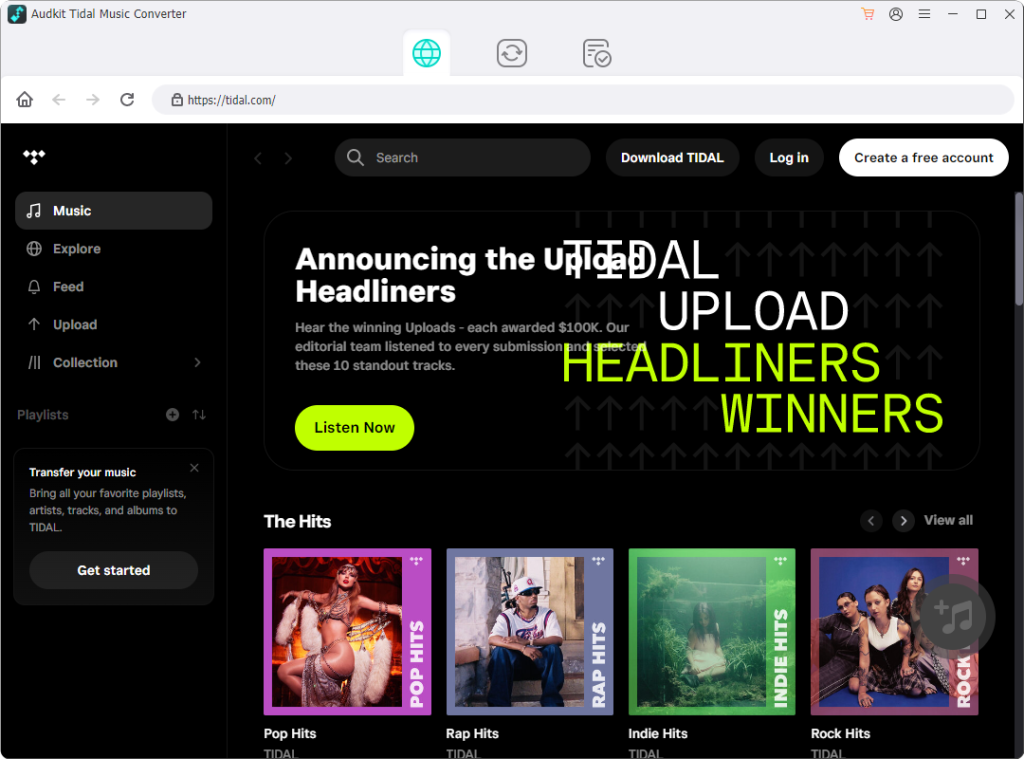
- Open the Built-in Player: Launch AudKit Tidal Music Converter on your PC or Mac, then log in to your TIDAL account inside the built-in web browser window.
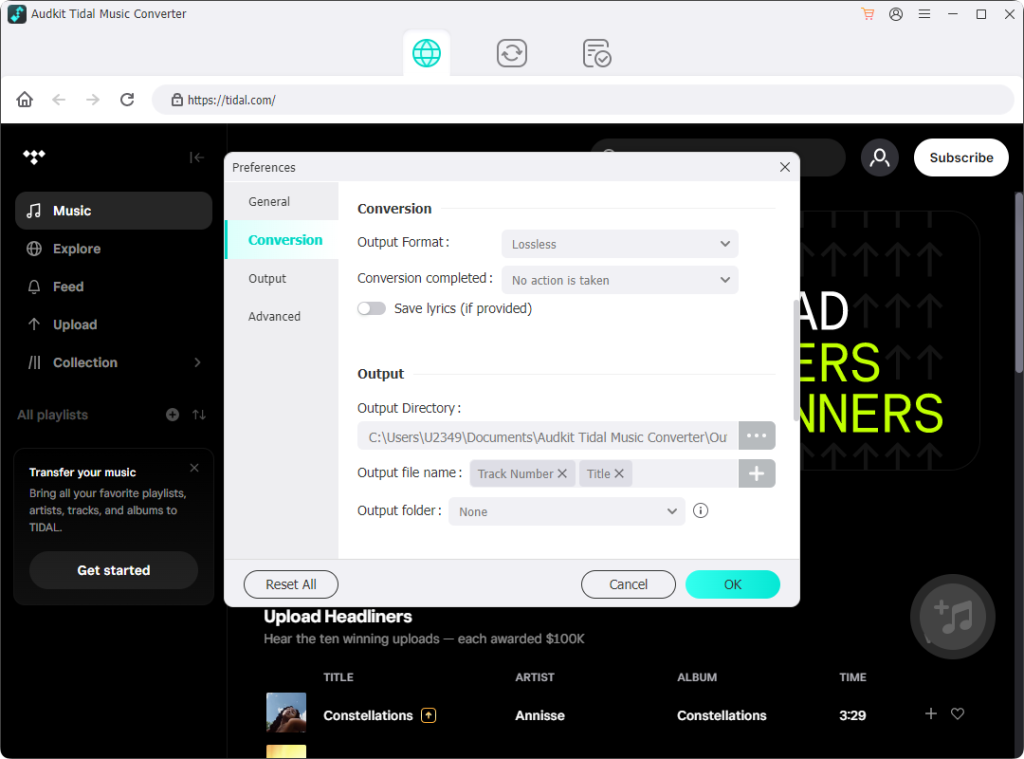
- Configure Output Parameters: Navigate to the menu in the top-right corner, select Preferences, and switch to the Convert tab. Select your format (such as lossless FLAC or MP3) and adjust your desired bit depth, sample rate, and folder archiving preferences.
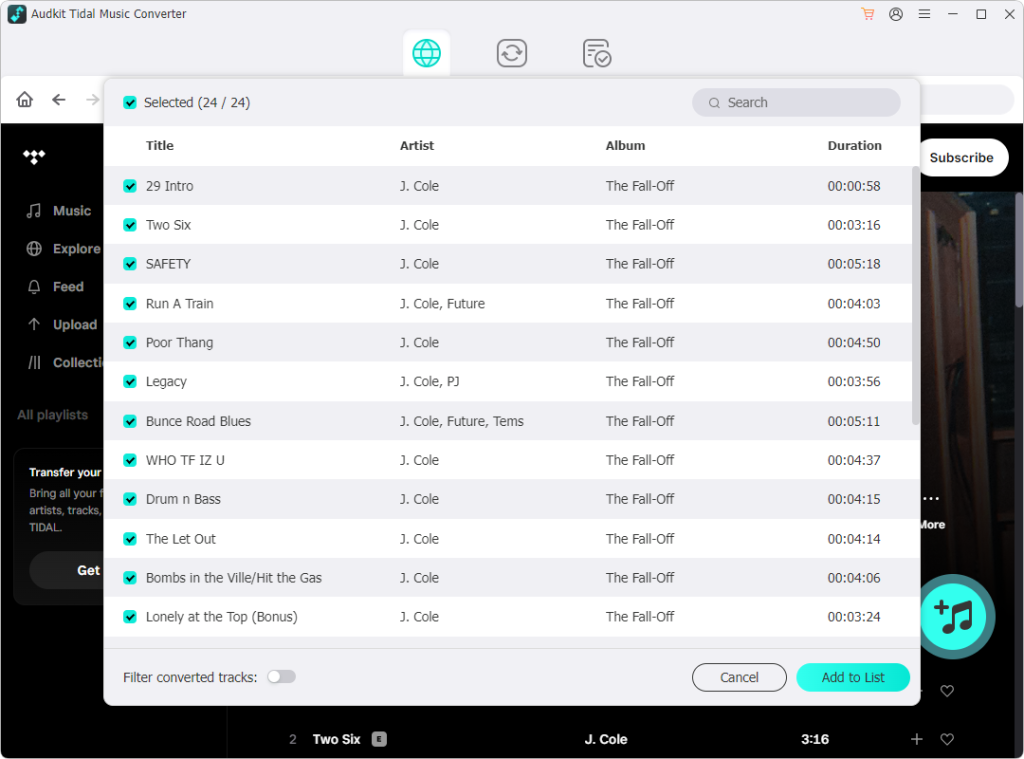
- Queue Albums or Playlists: Navigate to any album, track list, or custom playlist in your library, then click the orange + button in the lower corner to load the songs into the conversion queue.
- Execute Batch Conversion: Click Convert to process the list at up to 5X speed on Windows. Once the process completes, click the folder icon next to any track to inspect your standalone local files.
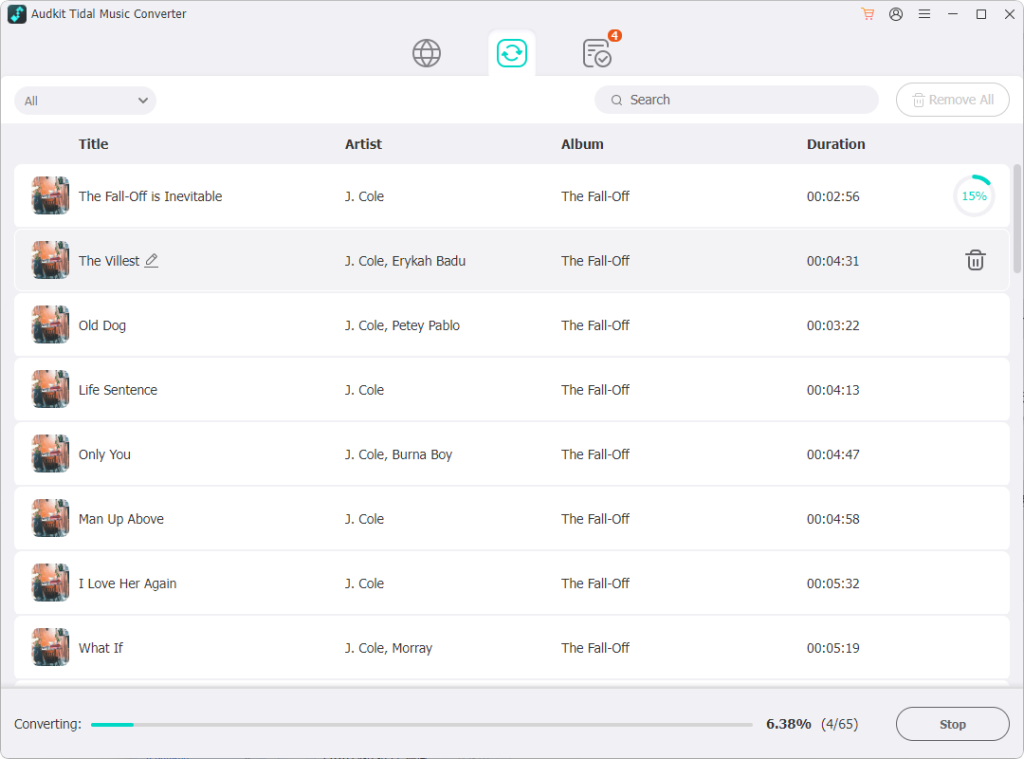
Understanding where this converter fits alongside UI frameworks and terminal tools requires looking at how each utility approaches TIDAL’s desktop ecosystem.
Part 5. Comparison: TidaLuna vs. Neptune vs. CLI Scripts vs. AudKit
Evaluating a tool through a technical TidaLuna review requires separating visual client modification from actual audio extraction. While community projects often get lumped together under the umbrella of TIDAL tweaks, their underlying architectures serve fundamentally different goals.
The table below breaks down how TidaLuna stacks up against its discontinued predecessor, open-source command-line downloaders, and AudKit Tidal Music Converter across core technical dimensions:
| Feature / Dimension | TidaLuna | Legacy Neptune (uwu/neptune) |
GitHub CLI Scripts (tidal-dl) |
AudKit Tidal Music Converter |
|---|---|---|---|---|
| Primary Purpose | Desktop client UI modding & plugin loader | Legacy client modding (predecessor) | Audio extraction via reverse-engineered API | Local audio conversion & offline backup |
| Development Status | Active (community-maintained fork) | Abandoned / Deprecated | Variable (frequent breakage from API shifts) | Actively maintained commercial build |
| Offline File Output | None (streaming interface only) | None (streaming interface only) | Raw FLAC/AAC (depends on token validity) | Unrestricted FLAC, WAV, MP3, AAC, M4A |
| Setup Complexity | Low to Moderate (installer injection) | Manual build / injection required | High (Python, CLI tokens, config files) | Low (GUI installer with built-in web workflow) |
| Stability Risk | Overwritten by official TIDAL client updates | Broken by modern TIDAL desktop updates | Account flags, sudden API token revocation | High reliability independent of desktop app builds |
| Audio Quality Support | Bit-perfect stream handling (Exclusive Mode) | Basic stream passthrough | Up to HiRes FLAC (when API routes allow) | Lossless HiRes FLAC up to 24-bit/192kHz |
Choosing between these tools comes down to whether your bottleneck is client usability or file mobility. TidaLuna is the definitive replacement for Neptune if your goal is an enriched interface, custom CSS themes, and Discord Rich Presence directly inside the native TIDAL environment. However, it will never solve the missing desktop offline mode.
If your objective shifts from styling the desktop UI to saving portable, unencrypted audio for external DACs, car stereos, or offline media servers, command-line scripts offer a fragile route prone to sudden authentication failure. For reliable offline conversion without command-line maintenance or update breakage, AudKit Tidal Music Converter fills the gap that runtime client modifications deliberately leave open.
FAQs About TidaLuna Review and Setup
Is TidaLuna a TIDAL music downloader or a free streaming tool? No. As noted earlier in this TidaLuna review, the software is strictly a runtime UI and plugin modification framework. You still need an active, paid TIDAL subscription to stream audio, and it does not unlock free account tiers.
Why is the TidaLuna installer failing to detect my TIDAL app on Windows? You are likely running the Microsoft Store (UWP) edition of TIDAL, which locks its application directory inside a protected Windows sandbox. Uninstall the Store version, download the standalone .exe installer directly from TIDAL’s website, and close all background TIDAL processes in Task Manager before running the injector.
What happens to TidaLuna when the official TIDAL desktop app updates? Official client updates overwrite the modified app.asar files and revert your player to its stock interface. However, your installed plugins and theme configurations remain safe in your local user folder. Simply run the TidaLuna installer again to restore your setup.
Can I use TidaLuna to save TIDAL songs as local FLAC or MP3 files on my computer? No, TidaLuna cannot overcome desktop playback restrictions or enable local audio caching. To convert playlists into unprotected FLAC, WAV, or MP3 files for personal offline listening, you will need a dedicated tool like AudKit Tidal Music Converter.
Conclusion
TidaLuna is the most capable open-source replacement for former Neptune users. It injects custom CSS themes, Discord Rich Presence, and Exclusive Mode tweaks directly into the official TIDAL desktop client without noticeable memory overhead.
A successful setup requires using the standalone desktop installer rather than the Microsoft Store version. Expect occasional client updates to overwrite your injection, and always vet third-party plugins to keep playback stable.
Because TidaLuna only modifies the front-end UI, it cannot change TIDAL’s streaming architecture. Pair TidaLuna with AudKit Tidal Music Converter to customize your daily interface while saving 24-bit/192kHz FLAC files for permanent offline desktop playback.

Andrew Rowley
 Staff Editor
Andrew Rowley has over 10 years of writing experience and is good at writing in audio technology and audio converter software. He can provide high-quality articles to help streaming music lovers explore music better.