





Tidal Music Converter



Download Any Tidal Audio Content to Computer for Offline Playback
For any Tidal members, AudKit Tidal Music Downloader for Windows & Mac allows you to download Tidal tracks, playlists, albums, artists, and podcasts to a computer for local storage easily.
After getting the Tidal CD-quality, HiFi, and MQA music download, you can listen to Tidal offline on any device or player without limits, even if your Tidal membership free trial account expires.
Losslessly Convert Tidal Music to MP3, FLAC, WAV, etc. with Ease
AudKit Tidal Music Converter is also designed as an all-around Tidal converter to download and convert Tidal Free, HiFi, and MQA audio to MP3, FLAC, WAV, AAC, M4A, and M4B for easier playback anywhere.
With cutting-edge converting technology, this awesome Tidal music converter keeps Tidal CD-quality, HiFi, and Master quality without loss, giving the best audio experience to you.


Smart ID3 Tags Editor
With the help of a built-in ID3 tag editor, the AudKit Tidizer Music Converter for Windows and Mac can identify, capture, and keep 100% full ID3 tags from original Tidal music automatically.

Batch Download at 5X
Thanks to a high-speed processor for conversion, the AudKit Tidal Music Converter for Windows can batch convert a 10-hour Tidal playlist in only 2 hours or even shorter at 5X. The Mac version is still 1X speed.
Freely Customize Tidal Music Output Quality at Up to 32-bit/192kHz
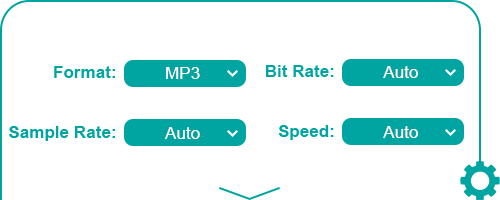
AudKit Tidal Converter for Mac and Windows empowers you to change the output format and quality parameters to enhance quality at up to 32-bit/192kHz, which is higher than Tidal Master.
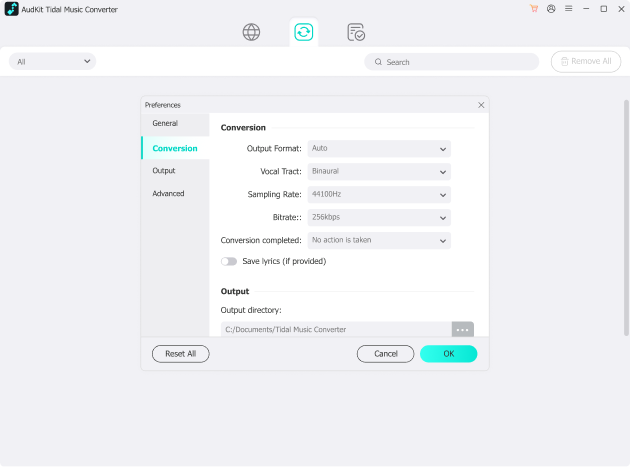
Specifically, it supports you to customize the audio format, bitrate, sample rate, conversion speed, audio channel, and archive ways before downloading a song from Tidal.
Listen to Tidal on Multiple Devices & Players Offline
Tidal music downloads are immovable and unplayable in any MP3 player, smartphone, smart TV, smart speaker, game console, movie editor, DJ software, and so on.
However, the powerful AudKit Tidal Music Converter can help you import and play Tidal on Google Home, Bose Soundtouch, Apple Watch, PS5, Xbox One, Rekordbox, Serato, and any other device offline without the Tidal app and subscription.

How to Use AudKit Tidal Music Converter
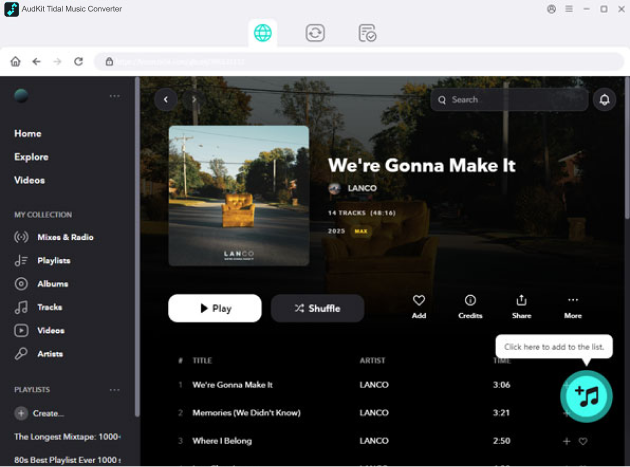
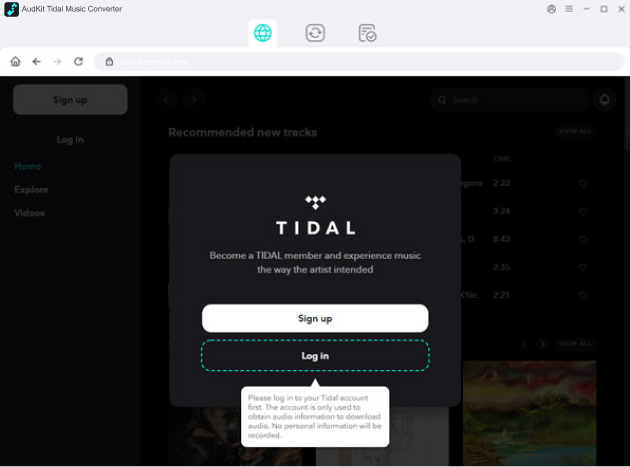

Step 1: Download and install AudKit Tidal Music Converter.
Download and install AudKit Tidal Music Converter on your computer first. Then, log into your Tidal account in the built-in web player.
Step 2: Import Tidal music to the program.
Here, you can add Tidal songs to the convert list if you want to download them. Just find the song in the player and click on the "+" button.
Step 3. Set output format.
You can set the output format by clicking the menu button at the top-right tool bar. Navigate to the Conversion area and set the output format.
Step 4: Convert Tidal music for offline listening.
Click Convert to get your Tidal music downloaded.

High Compatibility
Work perfectly with the latest Tidal Web Player and app on Windows & macOS.

User-friendly Interface
Simple to use for newbies with a clear interface and intuitive icon effortlessly.

Free Support & Updates
Provide lifetime free technical support and free software updates during use.
FAQS
Is it legal to use AudKit Spotify Music Converter?
Yes, it is legal as long as it is strictly for personal and educational use. You can use AudKit Spotify Music Converter to download and back up your favorite Spotify songs for offline playback on your own devices. However, using the software to distribute, share, or monetize the downloaded copyrighted music for commercial purposes is strictly prohibited.
Do I need a Premium account to download music with AudKit?
No, a Spotify Premium subscription is not required. One of the best features of AudKit Spotify Music Converter is that it allows both Spotify Free and Premium users to download songs, albums, playlists, and podcasts to their local computers. Furthermore, it automatically removes ads, allowing Free users to enjoy an ad-free offline listening experience.
What output audio formats are supported by this converter?
The songs you download using AudKit Tidal Music Converter are saved as local files on your Windows or Mac computer. Because they are converted into standard audio formats, they are stored permanently on your drive. You can continue to listen to them offline forever, even if you cancel your Tidal subscription or your free trial account expires.
Will I lose the album art and track information after conversion?
No, your music library will remain perfectly organized. The software features a smart built-in ID3 tag editor that automatically identifies, captures, and preserves 100% of the original metadata from Tidal. This means your downloaded files will still display the correct track title, artist, album name, album cover art, and track numbers on any media player.

5X to download any audio content from Tidal to MP3, WAV, FLAC, etc. losslessly.
-
 100% Secure
-
Perfect Compatibility
-
Simple to Operate
-
Free Update
-
Technical Support


