





Quick Answer: How to Convert Spotify to WAV
Spotify streams in OGG Vorbis, which isn’t compatible with many CD burners, DJ software, or older media players. To get true lossless WAV files, you need a dedicated converter that preserves the original audio data. Our top recommendation is AudKit SpotiLab Music Converter — it exports directly to WAV at up to 320kbps, keeps all ID3 tags, and works 5X faster than real‑time recording. If you prefer online tools, Chrome Audio Capture or Apowersoft can record to WAV, but the quality will be lossy. Below we break down all four methods.
Spotify, one of the leading streaming platforms, offers a vast library of songs at your fingertips. However, sometimes you may want to convert the OGG Vorbis to WAV format for a better audio experience. This article will guide you through the 4 solutions to download Spotify to WAV online, free, and losslessly with several powerful converters.
Part 1. Overview of Spotify to WAV Download
1.1 Why Download Spotify Songs to WAV
Spotify tracks are encoded in OGG, and you can’t play them on CD players. WAV is a lossless audio format widely used in Windows systems and popularly supported by most CD burners due to its uncompressed audio quality. Here are some reasons why people often search to download Spotify playlist to WAV.
✨ Higher audio quality: WAV format offers higher audio quality and lossless compression for audiophiles and professionals who require the best sound fidelity.
✨ Compatibility: It is supported by media players on devices where Spotify is not available, making it a good option for people who want to bring music to more places with WAV file support.
✨ CD burning: Such files are always large and can be saved at 16-bit/44.1k, making it a good option for burning CDs from Spotify.
✨ Radio broadcasting: This lossless format is often used by some radio broadcasters like BBC Radio, Global Radio, and more.
1.2 What Are the Factors of Choosing Spotify to WAV Downloader
🍃 Output Audio Quality: Look for a converter that supports multiple output formats. This will ensure that you can play your converted Spotify songs on various devices and players.
🍃Conversion Speed: Nobody wants to wait hours for their songs to be converted. Make sure the tool can convert Spotify songs at 1X or higher speed.
🍃Batch Conversion: If you have a large number of Spotify songs to convert, look for a converter that supports batch conversion. This will save you time and effort.
🍃Platform Compatibility: Make sure the converter is compatible with your operating system, whether it’s Windows, macOS, or Linux.
🍃Price: Consider the price of the converter, as some converters are free while others require a subscription or one-time payment.
🍃Customization Options: Look for a converter that allows you to customize the output audio quality, such as adjusting the channel, sample rate, and bit rate according to your needs.
1.3 Factors to Evaluate in a Spotify to WAV Downloader
| Factor | Why It Matters |
|---|---|
| Output Quality | Only a true converter (not a recorder) can deliver lossless 320kbps WAV. Recordings will always be compressed. |
| Speed & Batch Mode | Look for 5X conversion speed and the ability to process entire playlists in one go — crucial for large libraries. |
| ID3 Tag Preservation | Keeps artist, album, cover art intact. Many free tools strip metadata, leaving unnamed files. |
| Platform Compatibility | Windows and macOS support is essential; some tools are browser‑only. |
| Safety & Legality | Ensure no malware, ads, or bundled junk. Use only for personal enjoyment. |
Part 2. Download WAV from Spotify Losslessly Using the Best Spotify to WAV Converter
If you have searched for online downloaders, you may find out there are many similar converters in the market. After comparing and testing several popular products, we selected the best one, AudKit Spotify Music Converter.
Taking the best of each popular Spotify software, AudKit Spotify Converter could be the best Spotify WAV converter. Furthermore, with the most advanced built-in converting techniques, this smart tool works at 5X or faster speed in most cases, converting Spotify music to MP3, FLAC, AAC, M4A, WAV, and other most-used audio file formats from Spotify.
Besides, the ultra-large capacity of AudKit allows you to batch import and convert Spotify tracks. Therefore, you can import all of your Spotify playlists to this converter in one click. After the conversion, the converted Spotify files maintain the same quality as the original streams. That is to say, with the help of the AudKit Spotify Music Converter, you can get WAV files losslessly.
Main Features of AudKit Spotify Music Converter
Main Features of AudKit Spotify Music Converter
- Easily download any Spotify audio content in 320kbps
- Convert Spotify music to MP3/AAC/FLAC/WAV/M4A/M4B
- Keep full ID3 tags like artist, year, cover, title, etc.
- Batch download at a fast 5X conversion speed
- Help listen to Spotify music offline anywhere
How to Convert Spotify Playlist to WAV Using the AudKit Spotify to WAV Converter
Please choose the right version of the AudKit Spotify Music Converter from the Download button above. Then let’s see how to use this best Spotify link to WAV converter with a free account.
Step 1 Import Spotify playlist into AudKit
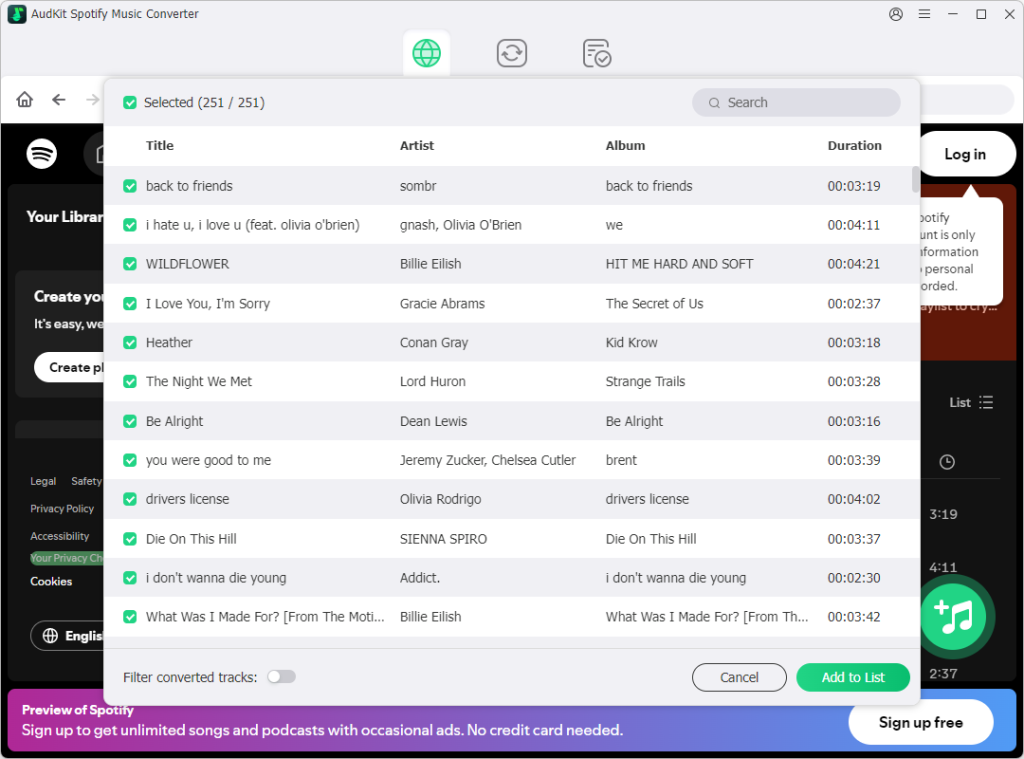
Just drag and drop the playlist or song from the Spotify app to AudKit Spotify Converter. Alternatively, you can copy and paste the URL of the playlist or song to the search box of this converter. Then click the Plus icon to add it.
Step 2 Reset the output format as WAV
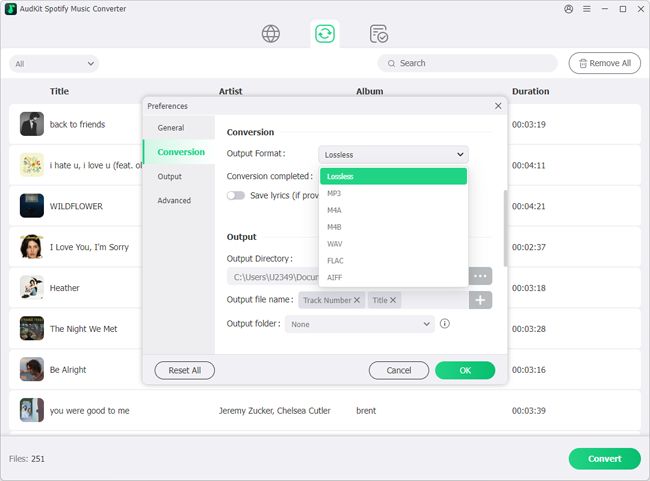
On the main interface of AudKit, please open the Menu icon to choose the ‘Preferences‘ and then the ‘Convert‘ part. Then you can enter into the settings page. Please reset the output format to WAV. If you want to keep the original audio quality, please reset the bitrate to 320 kbps, and the sample rate to 48000 Hz, and then edit other parameters as you like.
Step 3 Begin to download WAV from Spotify
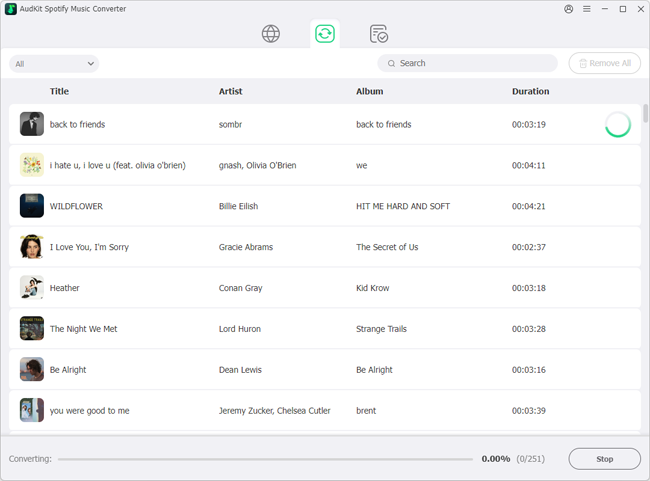
Tap the ‘Convert‘ tab from the lower-right corner of the main window. In general, the app will start to convert all uploaded files to WAV at a 5X faster speed. When the converting process is done, please follow the pop-up tips to unfold the local folder.
Part 3. Download Spotify to WAV Online
If you prefer using online tools instead of installing third-party tools on your computer, please never miss the following 2 Spotify WAV downloader online tools.
Chrome Audio Capture: Spotify to WAV Converter Online
Chrome Audio Capture is an extension of the Google Chrome browser. It allows you to capture any audio playing at the current tab from your computer’s microphone or other audio sources including Spotify Web Player. The recorded files will be saved as either MP3 or WAV files to your computer.
-
Pros
- Record any music playing from Spotify Web Player and other audio sources
- Convert recorded audio to WAV and MP3
- No need to install any application
- Totally free to use
- Customize output file format
-
Cons
- Each capture time is limited up to 20 minutes
- Not keeping ID3 tags like title, artist, etc.
- The audio quality is lossy
How to Download WAV from Spotify Using Chrome Audio Capture
Step 1. Open the Google Chrome browser. Later, visit the Chrome Web Store.
Step 2. Search for ‘Chrome Audio Capture‘. Then open the first option and click ‘Add to Chrome‘.
Step 3. When a promotion pops up, please select ‘Add extensions‘.
Step 4. You can find the Chrome Audio Capture from the upper-right Extensions section. Please pin it.
Step 5. Navigate to open.spotify.com and start playing a song afterward.
Step 6. Tap the icon of Chrome Audio Capture from the upper-right Extensions bar.
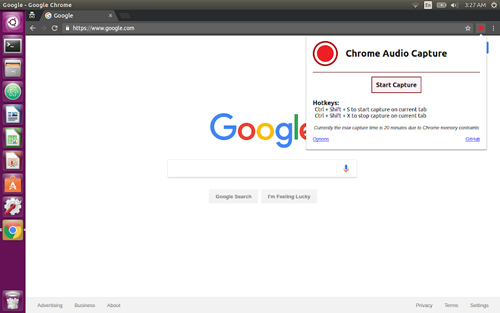
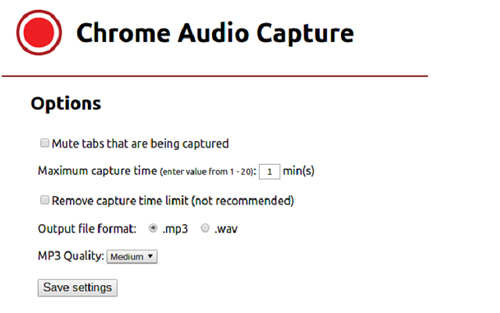
Step 7. Please press the bottom-left ‘Options‘ tab. Then you can select .wav from ‘Output file format‘ and click ‘Save Settings‘.
Step 8. Once saved, hit the ‘Start Capture‘ button to record music from Spotify. When the recording is finished, press ‘Save Capture‘.
You can listen to those Spotify recordings on any player afterward.
Apowersoft Free Online Audio Recorder
Apowersoft Free Online Audio Recorder is a reliable option. It is a free audio recording software that allows users to record any sound from various audio inputs, including Spotify. Particularly, it provides lots of output audio formats including WAV, MP3, AAC, FLAC, WMA, etc. for offline playing on any music player and portable devices smoothly.
In addition, the Apowersoft Spotify to WAV online converter is developed for website owners, personal bloggers, online education platforms, and others to host the application on their web pages. This allows their users to record Spotify to WAV online free. The API also allows customization for specific needs.
-
Pros
- One-click to start recording audio online without downloading any software.
- Can record system audio and microphone in high quality.
- Can record audio from web browsers, media players, and other applications.
- Multiple recording formats (WAV, MP4, AAC) .
-
Cons
- Cannot directly edit the recorded audio.
- Audio quality may not be as good as some other audio recording software.
How to Use Apowersoft Spotify WAV Downloader Online
Step 1. Go to the official website of Apowersoft Free Online Audio Recorder.
Step 2. Hit the Start Recording button to download a small launcher.
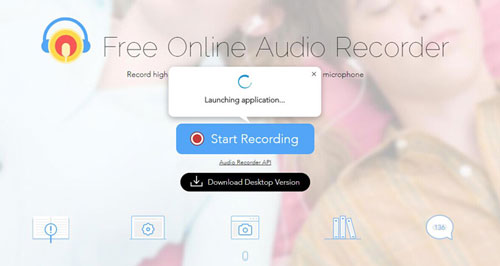
Step 3. Select System Sound as your recording audio source.
Step 4. Play the Spotify music you want to record. Later, click on the Record button on Apowersoft Online Audio Recorder to initiate the Spotify music recording.
Step 5. The recorded audio file will be saved in MP3 format by default. However, you can also click “Convert” to choose the WAV format option.
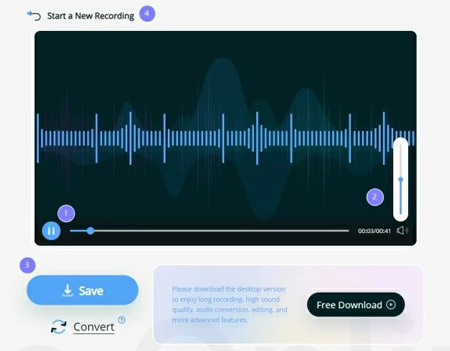
Step 6. When the recording is finished, click the “Stop” button to end the recording and save the recorded WAV file to your computer online.
Part 4. Download Spotify to WAV Free
Also, there is a free Spotify WAV downloader that meets your needs.
Audacity
Audacity is a popular free audio recording software. It is also one of the best Spotify recorders that can record audio in WAV format. Moreover, it can record audio via microphone or mixer, or digitize recordings from other media. So, you can use it to record Spotify music from your computer.
Because it is an open-source platform, you can find and use it completely free of charge. It can be used as an alternative to the free Spotify to WAV converter. It is easy to use and available for Windows, macOS, GNU/Linux, and other operating systems. Not only WAV, but it also supports other output audio formats such as MP3, AAC, etc. As a powerful audio recorder, you can even edit your sound files.
-
Pros
- Free and open-source audio recording and editing software.
- Record both playing audio and live sound.
-
Cons
- Doesn’t have a real-time preview.
- Limited multitrack capabilities.
- Sometimes there are synchronization problems between tracks.
How to Use Audacity Spotify to WAV Converter Free
Step 1. Download and install Audacity on your computer.
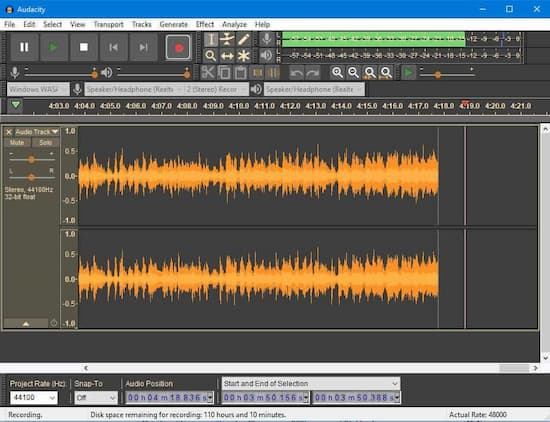
Step 2. Hit the Audio Setup toolbar at the top of Audacity. Select Windows WASAPI as the host afterward.
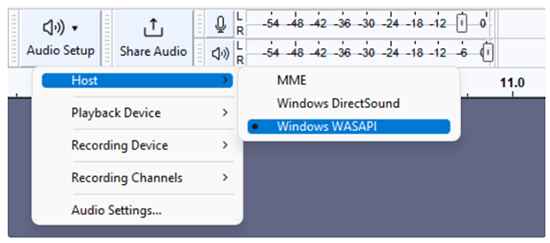
Step 3. Tap the Audio Setup toolbar again to select the recording device as your Speaker.
Step 4. Select the Reference option from Record. Then turn off the Software Playback to avoid damaging your computer.
Step 5. Hit the Options button to select the audio output format as WAV.
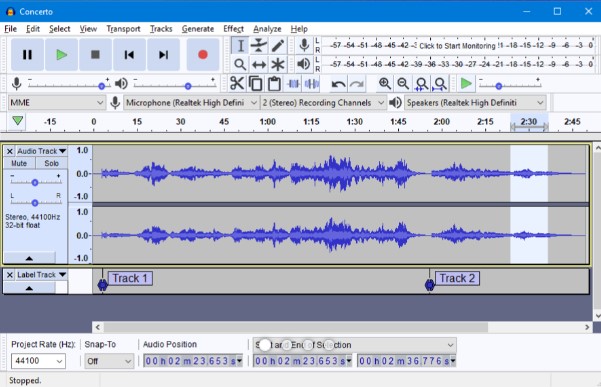
Step 6. Click the Record button while playing a Spotify song at the same time. Audacity will then automatically rip and download WAV files from Spotify for free.
Part 5. More FAQs of Spotify WAV Download
Q1: Is it legal to convert Spotify to WAV?
A: Yes, for personal offline listening. Distributing copyrighted material is prohibited. AudKit and similar tools are intended for users to enjoy their legally streamed content on devices that don’t support Spotify natively.
Q2: Does Spotify natively play WAV files?
A: Absolutely. Spotify supports local WAV playback alongside MP3, M4A, FLAC, and OGG. You can even upload local WAV files to Spotify and sync them across devices.
Q3: Which is better for music quality — WAV or MP3?
A: WAV is superior for archiving and professional use because it’s uncompressed and lossless. MP3 is smaller but discards audio data during compression. For CD burning or DJing, always choose WAV.
Q4: Can I convert Spotify to WAV without a Premium account?
A: Yes. AudKit works with both Free and Premium Spotify accounts. Note that if your source quality is lower (e.g., 24 kbps on Free mobile), the resulting WAV will still only contain that original data — the converter doesn’t magically improve quality.
Q5: How do I add WAV files to Spotify for mobile?
A: On desktop, go to Settings > Local Files and toggle on the source folder containing your WAVs. Add them to a playlist, then download the playlist on your phone while on the same Wi‑Fi network. Full guide here.
Q6: Are online Spotify to WAV converters safe?
A: Many free online tools contain ads or bundled software. The two we recommend — Chrome Audio Capture and Apowersoft — are reputable, but they only record audio, which results in some quality loss. For a secure, malware‑free, and lossless experience, a dedicated desktop app like AudKit is the safest choice.
Part 6. In Conclusion
There are 4 tools available to get Spotify WAV download in this article. However, it’s essential to choose a reliable and efficient tool that can maintain the audio quality and preserve metadata information. In this comparison table, we will compare these 4 three popular options to determine which one is the best Spotify to WAV converter online free.
| AudKit Spotify Music Converter | Chrome Audio Capture | Apowersoft Audio Recorder | Audacity | |
| Compatible System | Windows/Mac | Online | Online | Windows/Mac/GNU/Linux |
| Output Formats | WAV, MP3, AAC, FLAC, M4A, M4B | MP3, WAV | MP3, AAC, OGG, FLAC, WMA, WAV | WAV, AIFF, MP3, Ogg Vorbis, FLAC |
| Audio Quality | Lossless | Lossy | Lossy | Lossy |
| Conversion Speed | 5X | Real-time | Real-time | Real-time |
| ID3 Tags | ✔️ | ❌ | ❌ | ❌ |
| Metadata Information | ✔️ | ❌ | ❌ | ❌ |
| Customization Settings | ✔️ | ✔️ | ❌ | ❌ |
| Recommends | ⭐⭐⭐⭐⭐ | ⭐⭐⭐ | ⭐⭐⭐⭐ | ⭐⭐⭐ |
Verdict
It is clear that AudKit Spotify Music Converter excels in most categories. It offers fast conversion speed, high output quality, an intuitive user interface, extensive customization options, and also stable performance.
Additionally, it provides extra features like ID3 tag preservation. While Apowersoft audio recorder and Audacity have their merits, they fall short in certain areas. Therefore, for users seeking the best one, AudKit Spotify Music Converter is the recommended choice.
Windows:

Elle Johnson
 Staff Editor
Elle Johnson has been working in the technology and music software field for over 5 years. She is dedicated to providing easy-to-use guides and effective tips to play music anywhere.