





Quick Answer
- To convert Spotify to MP3 without quality loss, a dedicated desktop converter like AudKit Spotify Music Converter is the most reliable method, offering 5X speed and 320kbps output.
- For a quick, one-off download on the go, online tools like
SpotifyDownare convenient but often come with intrusive ads and single-track download limits. - We strongly advise against using unofficial mobile apps like SpotiFlyer or Telegram bots due to high security risks and potential malware. Always use a tool that respects your privacy and clearly states it’s for personal use only.
Spotify is a popular music streaming service with millions of songs. It isn’t hard to find music for that perfect moment on it. You can either do this through your Spotify free account or the premium version. But when it comes to playing Spotify music on any device and player without restriction, one of the icings on the cake might be to convert Spotify to MP3.
Fortunately, there are ways to convert Spotify to MP3, allowing you to download and listen to your favorite songs on any device. In this article, we will discuss the benefits of converting Spotify music to MP3 and provide a comprehensive guide on how to download Spotify songs to MP3 on different platforms.
- Part 1. Key Benefits of Converting Spotify to MP3
- Part 2. How to Convert Spotify to MP3 on PC/Mac 🔥🔥🔥
- Part 3. How to Record and Download MP3 from Spotify
- Part 4. How to Download from Spotify to MP3 Free
- Part 5. How to Convert Spotify to MP3 Online Free
- Part 6. How to Download Spotify Songs to MP3 on Android/iPhone
- Part 7. FAQs About How to Convert Spotify to MP3
- Part 8. Conclujsion
Comparison at a Glance
| Tool | Best For | Speed | Output Quality | Safety | Our Rating |
|---|---|---|---|---|---|
| AudKit Spotify Music Converter | High-quality, batch conversions | Up to 5X | Lossless (up to 320kbps) | High (Verified, No Ads) | ⭐4.9/5 |
| Audacity | Free editing & recording | 1X (Real-time) | Low (Re-recorded) | Medium (Open-source) | ⭐3/5 |
| Soundloaders | Simple free single downloads | Varies | Low (128-160kbps) | Low (External App Req.) | ⭐2/5 |
| SpotifyDown | Quick online downloads | Varies | Low (128kbps) | Low (Riddled with Ads) | ⭐2.5/5 |
| SpotiFlyer | Android downloading | Varies | Low | Very Low (Malware Risk) | ⭐1.5/5 |
| Telegram Bots | iOS downloading | Varies | Low (Mismatched Metadata) | Very Low (Data Risk) | ⭐1/5 |
Part 1. Why Would You Want to Convert Spotify to MP3?
Before diving into the tools, it’s worth understanding the key benefits that make Spotify MP3 downloads so appealing. It’s not just about having a file; it’s about taking back control of your listening experience.
Lossless Quality Preservation: The best tools can download Spotify tracks while preserving near-perfect, high-bitrate audio quality, giving you an experience that’s often richer than standard streaming.
True Offline Playback: Unlike Spotify’s encrypted offline cache, a real MP3 file can be played on any device that supports the format, no internet or Spotify app required.
Universal Compatibility: From your Android phone to your iPod classic, from a smart TV to a car’s USB slot–an MP3 file just works everywhere.
Personal Ownership: You get a permanent copy of the music. You can burn it to a CD for a road trip, add it to a video editing project, or simply archive it.
Part 2. How to Convert Spotify to MP3 Free on PC and Mac
| Audkit Spotify Music Converter | |
| Compatibility | Windows and macOS |
| Best for | ✔️ Convert Spotify to MP3, WAV, FLAC, and multiple output formats ✔️ Come with conversion speeds of up to 5X ✔️ Maintain 100% sound quality with ID3 tags ✔️ Available for Spotify free and premium users |
| Cons for | ❌ You need to update to its premium version to unlock its conversion length limitation. |
| Price | Lifetime free trial (full version starting from $14.95) |
| Ratings | ⭐️⭐️⭐️⭐️⭐ |
AudKit Spotify Music Converter remains to be among the best software to download Spotify playlist to MP3. The software is specifically designed for all Spotify users and can convert Spotify tracks to commonly desired audio output formats, like MP3, AAC, FLAC, WAV, M4A, and M4B.
Main Features of AudKit Spotify Music Converter
- Easily download any Spotify audio content in 320kbps
- Convert Spotify music to MP3/AAC/FLAC/WAV/M4A/M4B
- Keep full ID3 tags like artist, year, cover, title, etc.
- Batch download at a fast 5X conversion speed
- Help listen to Spotify music offline anywhere
Under perfect network conditions, it can download Spotify songs to MP3 at 5X download speed. Then you can access the unprotected Spotify MP3 files in your PC’s local folder. What’s more, music lovers can also choose to save Spotify songs at 320kbps bitrate and 48000Hz sample rate to enhance the quality of Spotify music.
How to Convert Spotify to MP3 with Free Account Losslessly
Step 1 Launch and import Spotify music to AudKit SpotiLab
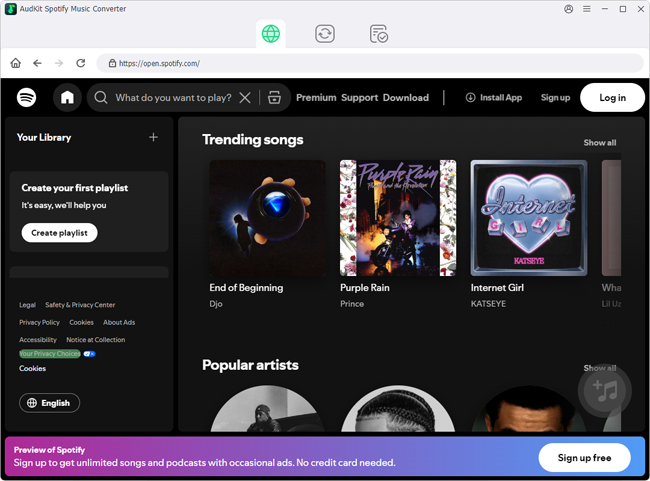
Click the Download button above to download and install AudKit Spotify Music Converter on your computer. Launching it will make the Spotify app appear automatically. After that select the song, album, or playlist you want to convert to MP3. Copy the track link and paste it into the search bar, after which press the Add button to import the target song.
Step 2 Change Spotify output settings to MP3 for free
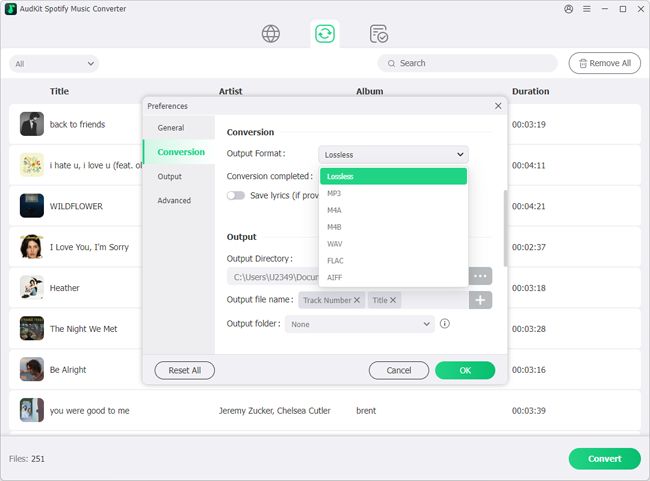
Now, you can switch to the Convert bar by going to Menu > Preferences in the upper right corner. At this point, you can start to set the output format of Spotify music to the desired MP3 or other common formats you need. Of course, you can also customize various output parameters of Spotify MP3 songs, including bitrate, sample rate, etc.,
Step 3 Download and convert Spotify songs to MP3 free
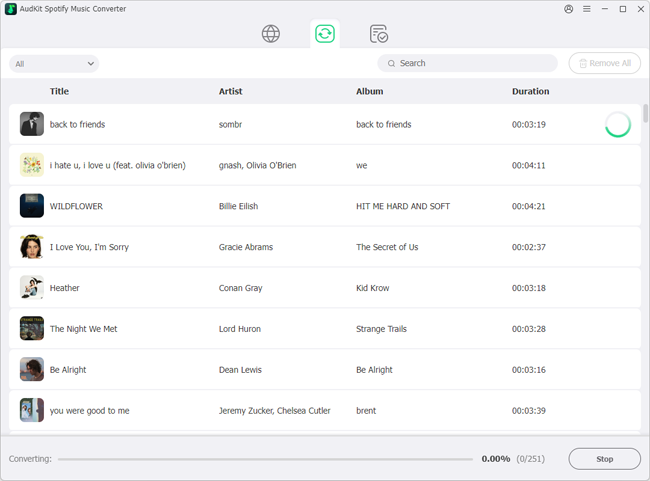
Click the Download button at the bottom right corner to start the download and conversion process. After the conversion process is finished, all downloaded Spotify MP3 files will go to your local destination folder. After that, you can download Spotify songs without Premium, transfer and play Spotify MP3 songs on any device anytime and anywhere.
💥 [Test Result] You should download the Spotify desktop app to use this third-party software on your computer. It works on Spotify free and premium accounts to convert individual Spotify songs and whole playlists to MP3. The conversion speed is fast and the output quality is lossless.
Part 3. How to Record and Download MP3 from Spotify
| Audacity | |
| Compatibility | Windows, macOS, Linux |
| Best for | ✔️ Free and open source ✔️ Cross-platform compatibility ✔️ Simple and user-friendly interface ✔️ Provide a wide range of audio editing capabilities |
| Cons for | ❌ It’s an incomplete program, meaning you’ll have to separately install encoders/plug-ins ❌ The program is unstable since there are known and unknown existing bugs |
| Price | Free |
| Ratings | ⭐️⭐️⭐️ |
Audacity is a free and open-source audio editing software. It allows users to record, edit, and manipulate audio files with a wide range of tools and effects. With it, You can capture audio from Spotify and other audio sources via your PC’s internal speaker. Audacity supports multiple audio formats and offers features such as multi-track editing, cut/copy/paste functionality, and the ability to apply various effects to audio files.
It will also output Spotify in MP3 or WAV format to enhance Spotify’s compatibility with other devices. It is available for Windows, macOS, and Linux, making it accessible to users on different operating systems. Audacity is known for its user-friendly interface and extensive plugin support, allowing users to customize and enhance its functionality according to their needs.
How to Rip and Download Spotify to MP3 via Audacity
Step 1. Open Audacity and hit the Edit button from the toolbar. Press the preference tab.
Step 2. Head to Devices and click the Host button in the audio host box. Select Windows WASAPI since it’s the preferred sound recording method on the computer.
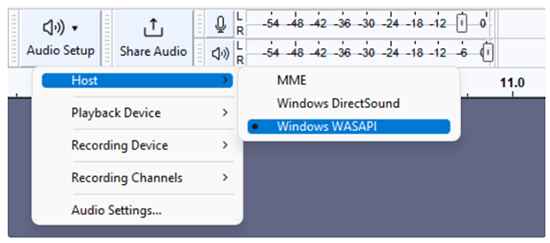
Step 3. Next, head to Recording and uncheck the Software Playthrough. This will avoid the re-recording of your tracks that creating an increasingly high echo that may damage your PC.
Step 4. Hit the red Record button in Audacity and start playing your tunes on Spotify.
Step 5. Once done with the recording, click Stop to make Spotify download to MP3 or other desired format.
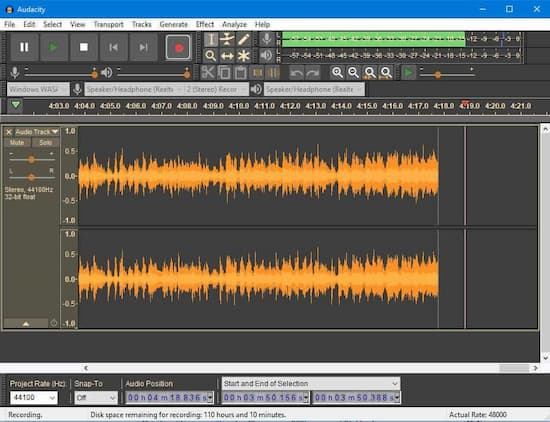
✨ [Test Result] It’s difficult to adjust the audio settings in Audacity to make it record music from Spotify. And it wastes time to do the real-time recording. However, it provides some powerful editing features for users to edit Spotify MP3 files, such as cutting and merging.
Part 4. How to Download from Spotify to MP3 Free
| Soundloaders | |
| Compatibility | Windows, macOS |
| Best for | ✔️ Automatic metadata retention ✔️ No Spotify account required ✔️ No limit to the number of songs you can download |
| Cons for | ❌ Only allow you to download single Spotify songs ❌ Output format is only MP3 ❌ Required to install the application |
| Price | Free |
| Ratings | ⭐️⭐️ |
Soundloaders has shifted from an online tool to a desktop app you must install. It’s straightforward: paste a Spotify link, and it downloads a single MP3. However, I found the output bitrate to be a middling ~160kbps, which is noticeably less vibrant than a 320kbps file. It also can’t process full albums—you’re stuck feeding it one link at a time. While it worked without crashing, the requirement to install an extra app from a non-official source always gives me pause, raising mild security concerns.
How to Download Music from Spotify to MP3 with Soundloaders
Step 1. Open your web browser and go to the Soundloaders website.
Step 2. Find Soundloaders Spotify Downloader and install its application.
Step 3. Go to the Spotify website and search for the song you want to download.
Step 4. Copy the track link and paste it into Soundloaders’ search bar and click the Search button.
Step 5. Click on the Download button next to the song and wait for the download process to finish.
Step 6. Once the download is complete, the Spotify song will be saved in MP3 format on your device.
✨ [Test Result] Although it is free to download Spotify music, it can only download singles and not full albums. Additionally, the tool used to be available online, but now requires users to download an app. This may be inconvenient for some users who prefer to use online tools instead of downloading software.
Part 5. How to Convert Spotify to MP3 Online Free
| SpotifyDown | |
| Compatibility | Online |
| Best for | ✔️ A simple user interface ✔️ One-click conversion ✔️ No need to download or install special software ✔️ Can be used on mobile web browsers |
| Cons for | ❌ It may not apply to podcasts, audiobooks, etc. ❌ Contain ads or malware that can harm your computer. ❌ It may not be as reliable as paid Spotify to MP3 converters. |
| Price | Free |
| Ratings | ⭐️⭐️⭐️ |
SpotifyDown is one of the new-released tools these days to download songs, albums, and playlists without using a Spotify account. It doesn’t require you to install any software on your computer but enter its official website via any web browser on all devices.
It has an advanced setting for users to customize output parameters and bring a good listening experience. And it claims to block Spotify ads without any problem while converting Spotify to mp3 free online. The following is its simple user tutorial.
How to Download Spotify Music to MP3 Online Free Using SpotifyDown
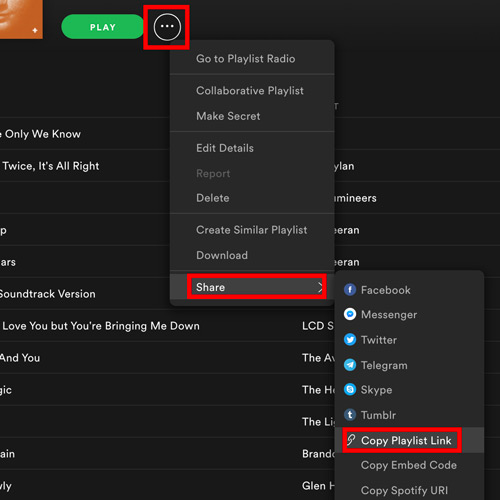
Step 1. Open the Spotify desktop app or its Web Player to find songs that you’d like to download. And then click the three-dots icon to copy the Spotify URL.
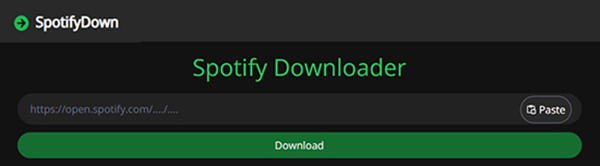
Step 2. Enter the SpotifyDown website and paste the Spotify link to the text address bar. Or click the Paste button to load them automatically.
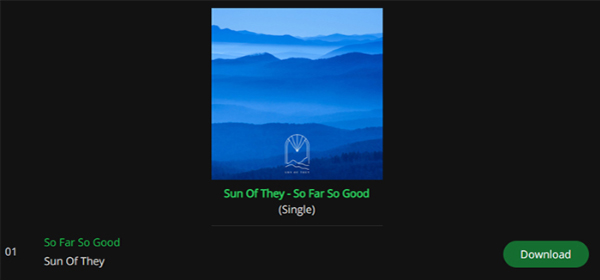
Step 3. Hit on the Download button to select wanted songs and it will start to download the target Spotify music to MP3 for free.
✨ [Test Result] When you visit this website, it will require you to check internet security. After that, you will see the official homepage with a detailed introduction and user tutorial of its free online Spotify to MP3 converter. There are many ads on the website. Please be careful to avoid clicking it. There is no option to download the whole Spotify playlist. You need to press the download button again and again to download individual songs.
Part 6. How to Download Spotify Songs to MP3 on Android/iPhone
# 1. SpotiFlyer
| SpotiFlyer | |
| Compatibility | Windows, macOS, Linux, Android |
| Best for | ✔️ Download Spotify music for free ✔️ Cross-platform compatibility ✔️ Support for multiple music platforms |
| Cons for | ❌ The quality of the downloaded songs may not be as good as the original songs ❌ There is a risk of getting caught and having your Spotify account banned ❌ It does not support batch conversion, so download speed can be slow |
| Price | Free |
| Ratings | ⭐️⭐️⭐️ |
SpotiFlyer is a third-party app that allows users to download music from online sources like Spotify, YouTube, Gaana, and SoundCloud. It’s available for Android, Windows, macOS, and Linux. With it, you can download Spotify albums, tracks, playlists to MP3, so you can play them on any device. SpotiFlyer is available on F-droid and is free with no ads.
How to Convert Spotify to MP3 Android via SpotiFlyer
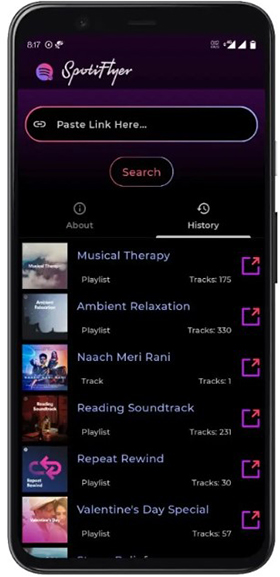
Step 1. Download and install SpotiFlyer on your Android device.
Step 2. Open the Spotify app and select the song you want to convert to MP3.
Step 3. Click the three dots and then click Share > Copy Song Link.
Step 4. Paste the link into the SpotiFlyer input field and tap the Search icon.
Step 5. Press the Download All button to download Spotify songs free.
✨ [Test Result] It’s not an official Spotify app and isn’t endorsed by Spotify. Some say that SpotiFlyer may contain malware or viruses that can harm your device. There have also been reports of SpotiFlyer downloading malware or other malicious software onto users’ devices.
# 2. Telegram
| Telegram | |
| Compatibility | Android, iOS |
| Best for | ✔️ It can manage a batch download of as many Spotify songs at once ✔️ It can also work with Deezer |
| Cons for | ❌ The conversion process is not stable ❌ Download tracks with matching names, not the originals from Spotify ❌ Only download MP3 files |
| Price | Free |
| Ratings | ⭐️⭐️ |
What about downloading Spotify music to MP3 iPhone? Telegram bots would be helpful. Telegram Spotify Downloader Bots are interactive bots that allow users to download Spotify playlists, albums, and tracks directly onto their devices. These bots can also be used to perform other tasks like converting files, checking emails, and playing games.
How to Convert Spotify to MP3 iPhone via Telegram
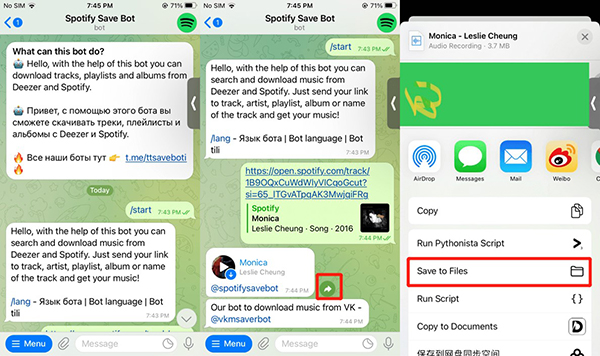
Step 1. Open the Spotify app on your iPhone and find the song you want to download.
Step 2. Copy the URL of the song and open Telegram, then search for the Spotify to MP3 bot.
Step 3. Click the Start tab and paste the URL of the song into the bot.
Step 4. Click Send to begin downloading songs and tap the Download icon to save Spotify MP3 music files to your iPhone.
✨ [Short Summary] You can use Telegram bots to download Spotify songs and convert them to MP3 files. However, not all bots are secure and safe. Bots may collect user data, including personal information and chat history. Security researchers have found Telegram bots that can command and control malicious Android apps, and even exfiltrate data from Telegram chats.
Part 7. FAQs About How to Convert Spotify to MP3
Is it legal to convert Spotify to MP3?
Technically, downloading content from Spotify without the copyright holder’s permission breaks their terms of service. However, using tools like AudKit for personal, offline listening of music you’ve already accessed is generally considered safe from a user’s perspective, provided you are not redistributing, uploading, or selling the files. It’s about fair personal use.
Can I trust free online Spotify to MP3 converters?
Our testing reveals a clear pattern: most free online converters are bundled with aggressive, intrusive ads and often limit output quality to 128kbps. They are a temporary, low-fidelity solution at best, and potentially a security threat at worst. A clean, dedicated desktop software is always a safer bet.
What’s the real difference between 128kbps and 320kbps MP3?
An MP3 at 320kbps is perceptibly identical to the original lossless source for most human ears. A 128kbps file is heavily compressed, resulting in a loss of detail, a “hollower” sound, and less vibrant high-frequencies. For a music lover, this difference is night and day, especially on decent headphones or speakers.
Part 8. Which Is the Best Way to Convert Spotify to MP3
The following table shows the complete comparison of the above methods we mentioned.
| Audkit Spotify Music Converter | Audacity | Soundloaders | SpotifyDown | SpotiFlyer | Telegram | |
| Compatibility | Windows, macOS | Windows, macOS, Linux | Windows, macOS | Online | Windows, macOS, Linux, Android | Android, iOS |
| Output Format | MP3, FLAC, WAV, AAC, M4A, M4B | MP3, WAV, AIFF, AU, FLAC, Ogg Vorbis | MP3 | MP3 | MP3 | MP3 |
| Conversion Speed | 5X | 1X | 1X | 1X | 1X | 1X |
| Download Quality | Lossless Quality | Low Quality | Low Quality | Low Quality | Low Quality | Low Quality |
| Keep ID3 Tags | ✔️ | ✔️ | ✔️ | ✔️ | ✔️ | ✔️ |
| Secure | ✔️ | ❌ | ❌ | ❌ | ❌ | ❌ |
| Ratings | ⭐️⭐️⭐️⭐️⭐️ | ⭐️⭐️⭐️ | ⭐️⭐️ | ⭐️⭐️⭐️ | ⭐️⭐️⭐️ | ⭐️⭐️ |
There are several ways to convert Spotify songs to MP3. While all of these tools have their pros and cons, Audkit Spotify Music Converter stands out as the best option due to its high output quality, fast speed, and ease of use. We hope that this article will help you make the best choice out there.
Windows:

Andrew Rowley
 Staff Editor
Andrew Rowley has over 10 years of writing experience and is good at writing in audio technology and audio converter software. He can provide high-quality articles to help streaming music lovers explore music better.